Field Service Ver. 1.0 Aug. 2005 11. Soft Switch List
57
FK-503Adjustment / Setting
NOTE
•
The features with (*) are settable by users. *: Screen setting <*>: Soft switch setting
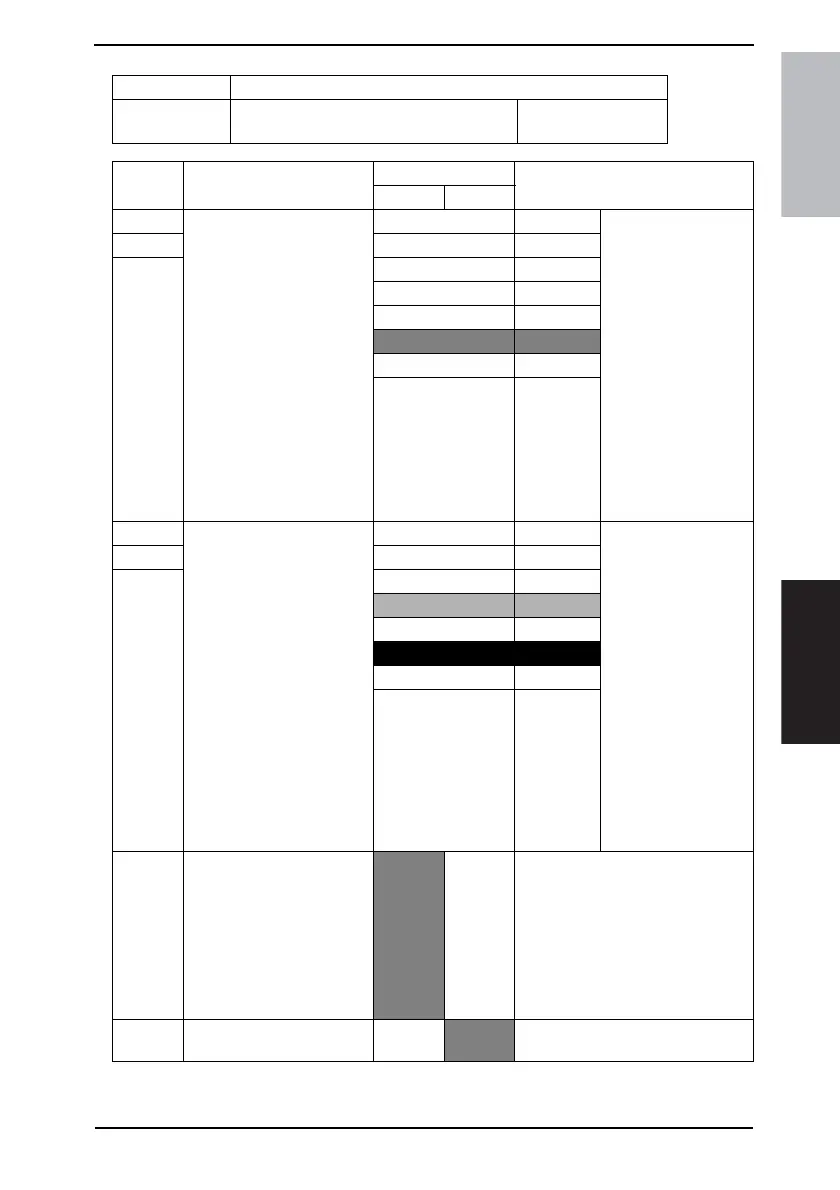
MODE Factory setting bit
007
Bit: 7654 3210
1011 0101
HEX:B9 (For U.S.)
HEX:B5 (For Europe)
Bit Feature
Logic
Description
01
7 Select upper limit of cut-off
length after printing:
When a received document
is longer than the print paper
and if the excess length is
shorter than that specified
here, it is cut off.
If it is longer than that value
specified with these bits, it is
split into multiple pages. This
feature is enabled when the
following 2 conditions are
satisfied:
• When printing a received
document
• When bit 1 of this mode is
1 <*>
Bit 7-5: 000 0 mm
6001 8 mm
5 010 12 mm
011 14 mm
100 18 mm
101 20 mm
110 24 mm
111 Not
available
4 Select upper limit of reduc-
tion ratio of received docu-
ment:
When a received document
is longer that the print paper,
it will be reduced to fit the
paper with the upper limit
specified with these bits. This
feature is enabled when the
following 2 conditions are
satisfied:
• When printing a received
document
• When bit 1 of this mode is
0
Example: The reduction is
100 to 90% when “90%” is
specified. <*>
Bit 4-2: 000 100 % Reduction will not be
done if a received doc-
ument is still longer
than the paper for a
specified reduction.
3001 95 %
2010 90 %
011 85 %
100 80 %
101 65 %
110 60 %
111 Not
available
1 Select cut off/reduction of
received document:
This bit specifies cutting off
or reducing a received docu-
ment that is longer than the
print paper.
(This feature is enabled when
printing a received docu-
ment.) <*>
Reduc-
tion
Cut off This bit determines that the received
document will be cut off with “Select
upper limit of cut off length after print-
ing (MODE 007 Bit 7 to 5)” or
reduced with “Select upper limit of
reduction ratio of received document
(MODE 007 Bit 4 to 2).”
0 Printing specification of
received document.
First
page.
All
pages.











 To Next Page