13-68 INSTRUMENTS (AND AVIONICS) / DAC MEMORY UNIT
ICON A5 / MAINTENANCE MANUAL CHANGE C2
Special Tools Required
2mm long-reach hex head wrench
Parts Required
None
Aircraft System and Number
10—Instruments (and Avionics)
Consumables
None
1. Turn on master switch.
2. Turn key switch to A for six minutes with the DAC unit installed.
3. Turn key switch to OFF position and turn OFF master switch.
4. Remove the DAC memory unit. (See “DAC Memory Unit Removal” on page 13-65.)
5. Connect DAC memory unit to the memory unit adapter and connect to USB port on a computer.
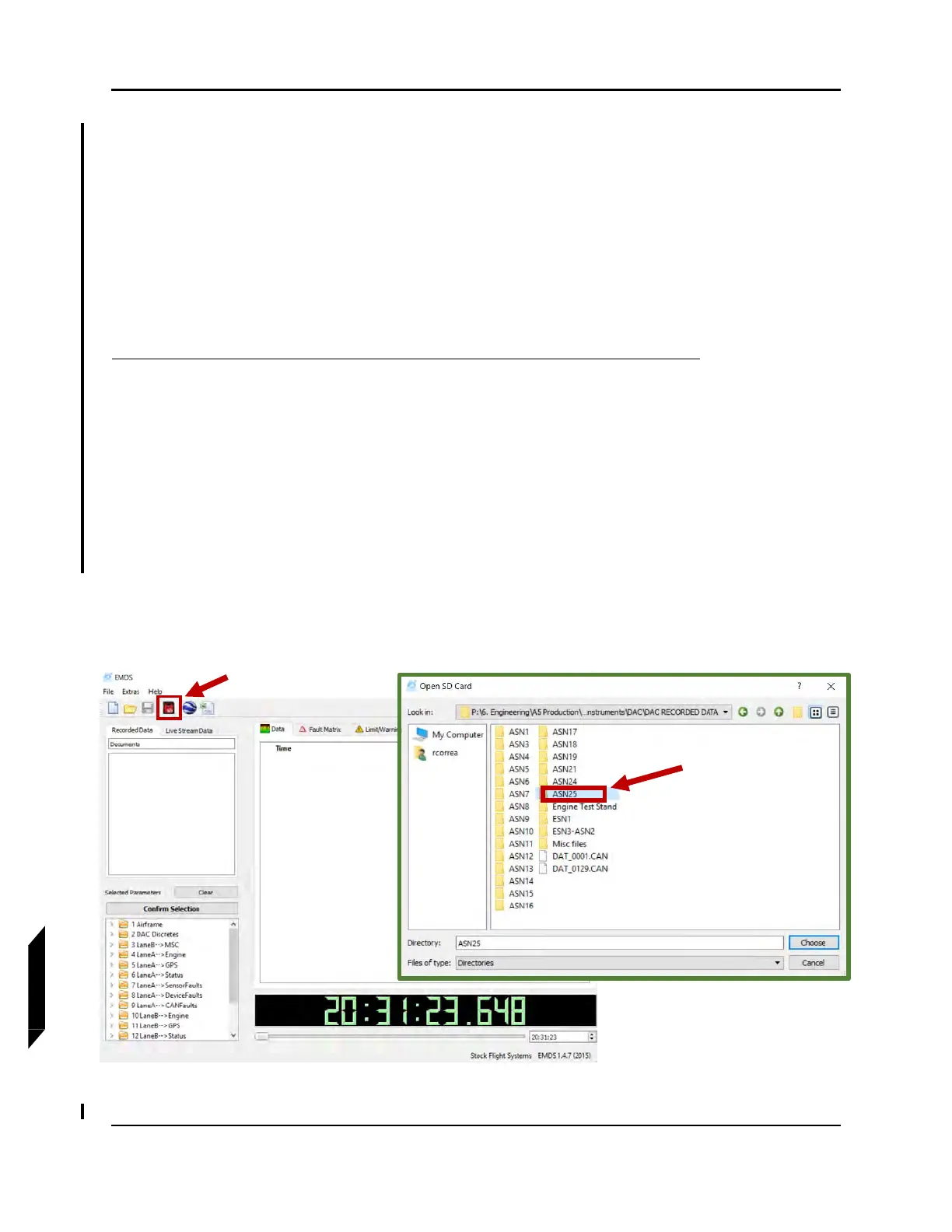
6. Open EMDS on the computer, click on the SD card button on top LH side to load folder. Select
folder containing recorded DAC data and load the data (See Figure 13-19.) by clicking on
“Choose”. The DAC data file is in the following format: DAT_xxxx.CAN
NOTE: “xxxx” is a decimal file number range from 0001 to 9999. For each
restart of the DAC unit or after one hour of engine operation a new
data file is created, and the previous file will be closed.
FIGURE 13-19
LOAD DAC DATA FILE



 To Next Page