iTero recommends the following best practices for scanning restorative cases:
l Ensure that the prepped tooth and the surrounding area is free of debris, saliva, and blood contamination.
l The prepped tooth should be dry and the margin line should be clear of tissue.
l You should be familiar with proper scanning techniques and avoid over scanning.
4.5.3 Scan options
In Scan mode, you can select the following options:
l Additional scan feedback, described in section 4.5.3.1
l Toggle color/monochrome, described in section 4.5.3.2
l Toggle between the 3D and the viewfinder display, described in section 4.5.4
l Toggle between displaying a color image or a NIRI image in the viewfinder, as described in section 4.5.5
l Edit the scan:
o
Delete a segment, described in section 9.5.1
o
Delete a selection, described in section 9.5.2
o
Fill in missing anatomy, described in section 9.5.3
o
Disable A.I cleanup, described in section 9.5.4
4.5.3.1 Additional scan feedback
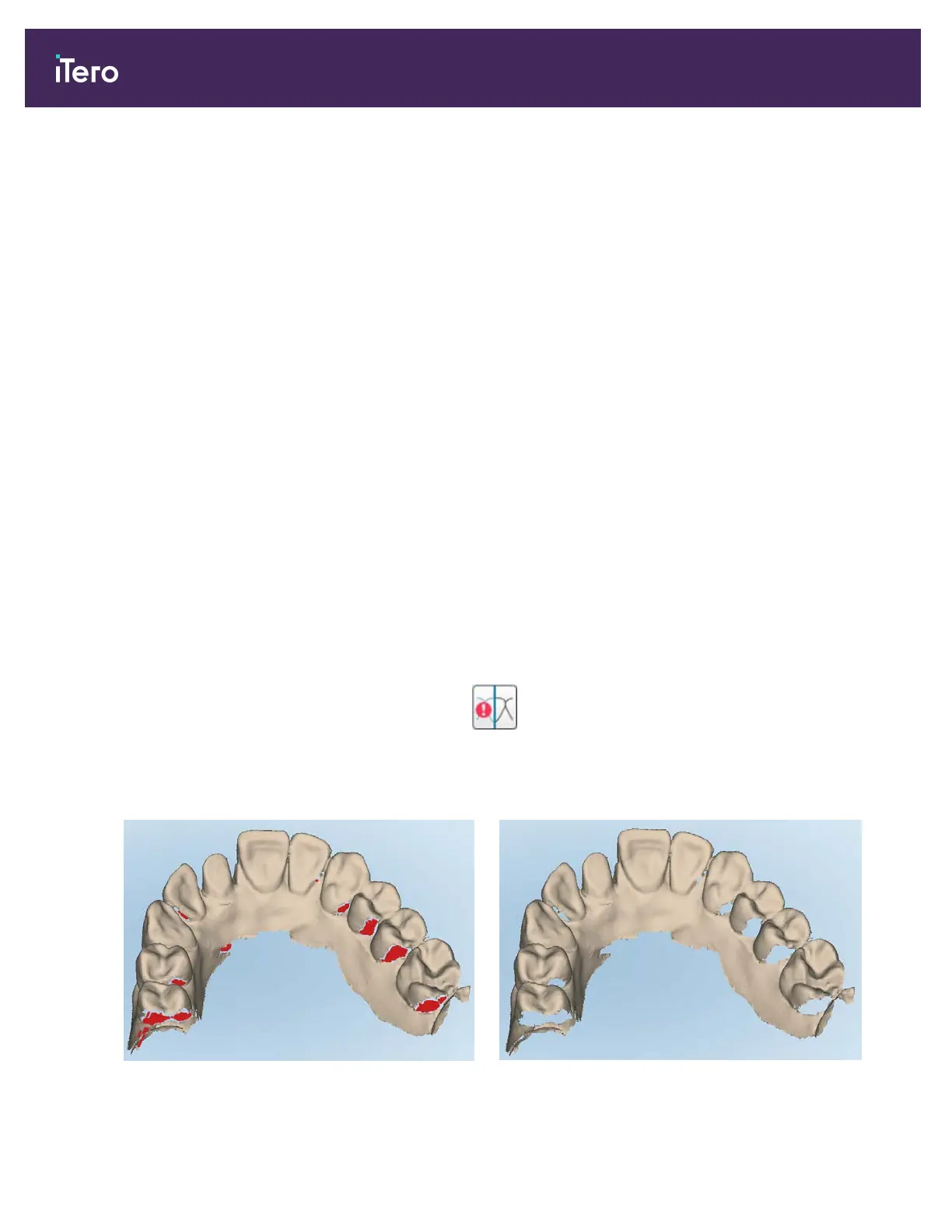
You can activate the additional scan feedback mode to alert you to the areas that need additional scanning, to
ensure that critical areas that could compromise the whole model are not missed.
Areas with missing anatomy are highlighted in red when scanning in monochromatic mode, and purple when
scanning in color mode.
Figure 99: Areas with missing anatomy shown with and without additional scan feedback – monochrome
iTero Element® 5D Plus User manual
90 © 2020 Align Technology, Inc. All rights reserved.



 To Next Page