When you reach the original starting point and right click on it, the shape will fill with color and you will
have a closed path, in spite of starting and stopping along the way.
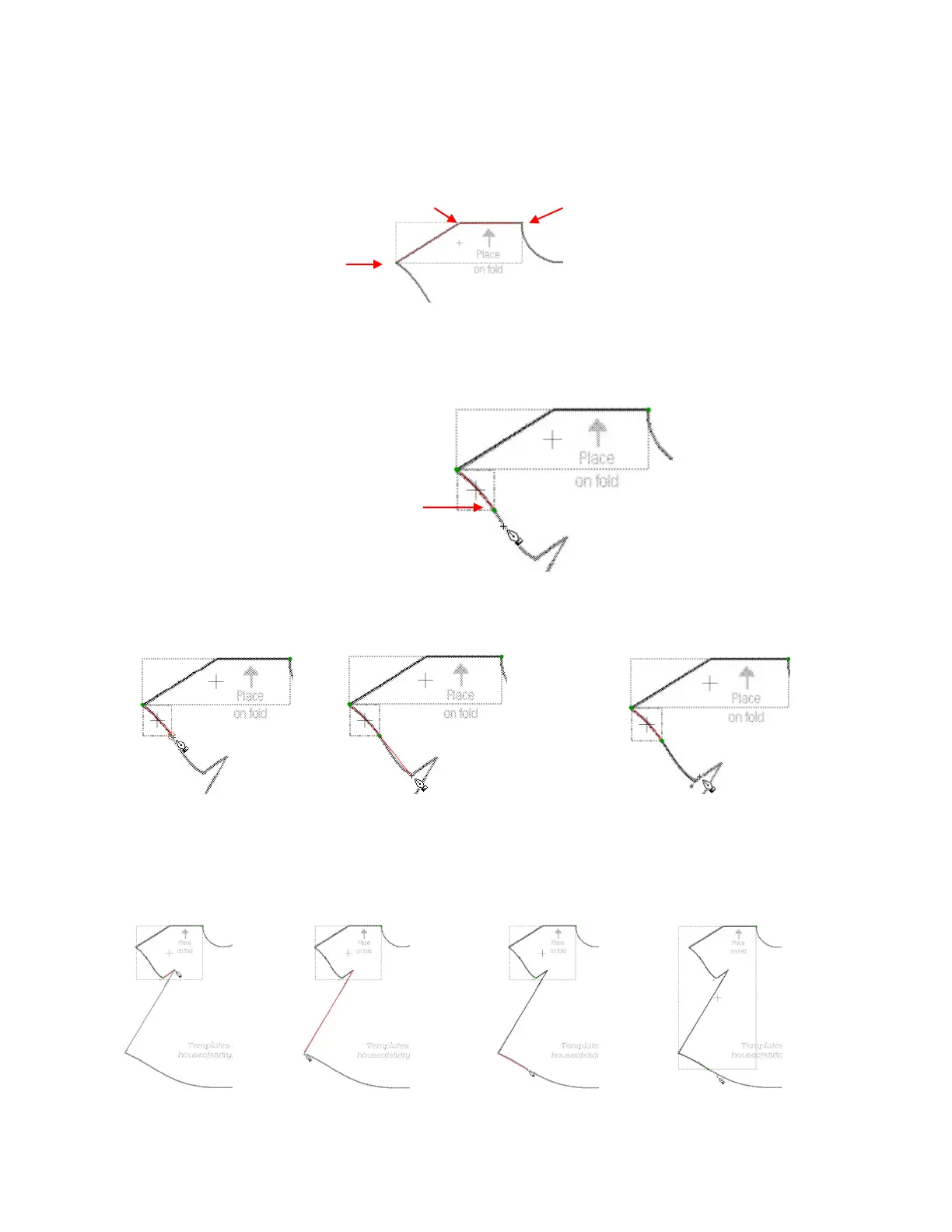
Now to show this process in more detail:
Trace the straight portion as show:
Now, to do the first curve, go to the point at which the curve ends, hold down the left mouse button and
drag the mouse so that the curve matches up with the dress. Then, while still holding down the left
mouse button, right click to end the segment:
Next, left click where the last curve ended, move to where curve will end, hold down left mouse button
and drag to form curve. Immediately right click to end that segment:
Now there are two more straight line segments, so just left click at each one. Then, again, move to the
end of the next curve, hold down left mouse button and drag to fit the curve and then right click to end:
1. Left click once to
begin the trace here.
4. Hold down the left mouse button here and
begin to drag the mouse to fit the curve.
5. When curve is perfect, do NOT
release left mouse button until you right
click to end the segment.
6. Left click on top of
where the last segment
ended.
7. Hold down right mouse
button at end of next
segment.
8. Drag mouse to fit curve and
then right click before releasing
left mouse button.
7. Left click on top of
last segment end and
then left click at top of
inner sleeve.
8. Left click at bottom of
dress.
9. Hold down left mouse
button and drag to fit
curve of dress.
10. Right click while still
holding left mouse button
to end the segment.



 To Next Page