Additional Tips on Rhinestone Designing
Sometimes the circles you want to respace equally may fall closer to a 45
0
angle versus vertically or
horizontally. Select your entire design and rotate until the line of circles are closer to vertical or horizontal.
Respace using the [ or ] shortcut keys and then rotate back into place.
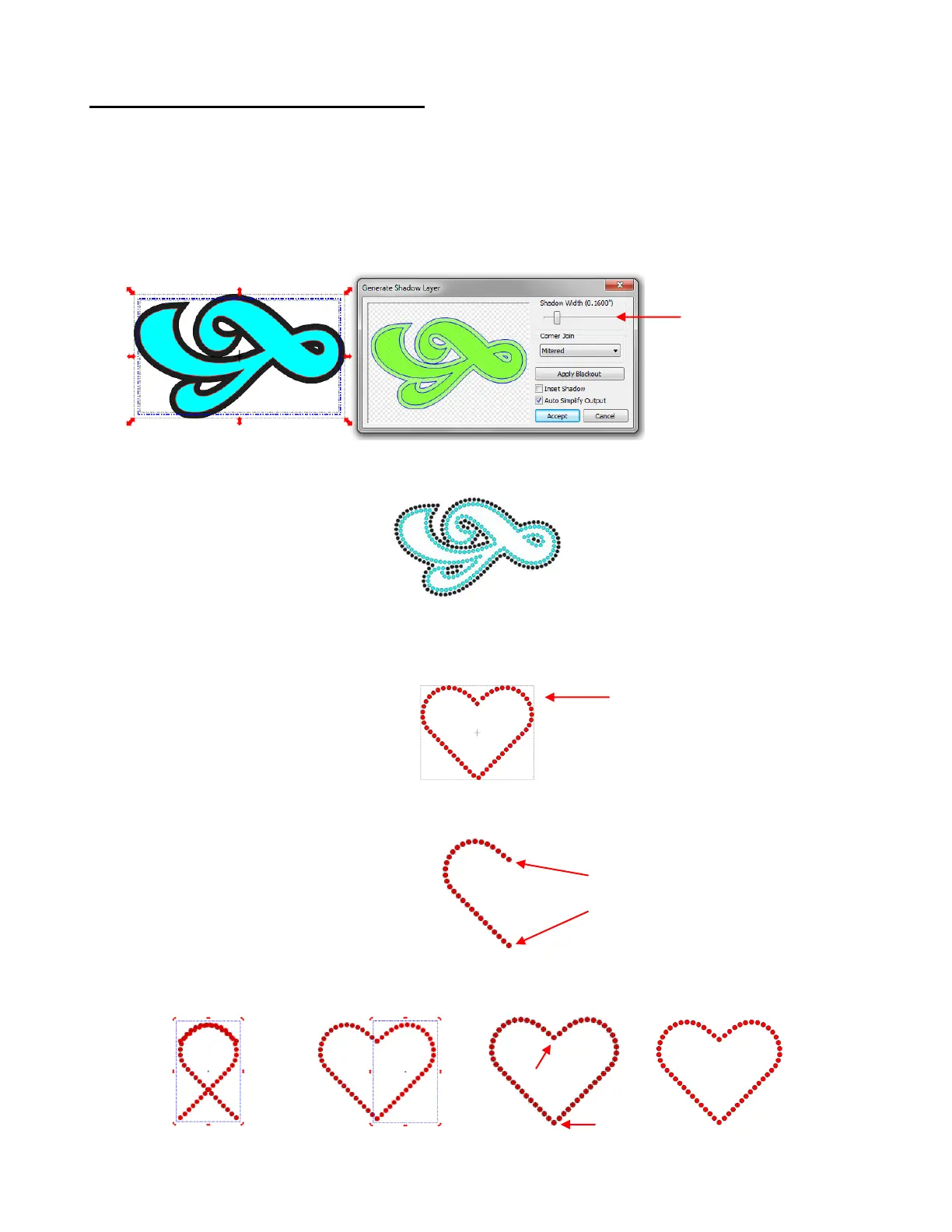
If you want to outline your design, then create the outline first using the Shadow Layer function (Ctrl-H).
Choose a Shadow Width at least the size of the circles plus the spacing. In the 10SS example ,the circles
were 0.13” in diameter and the spacing was 0.03”. If the same settings are used in this next example, then
the Shadow Width needs to be 0.16”:
The resulting design with the shadow set to the circle size plus the spacing, looks like this:
With symmetrical rhinestone designs, consider using the following process to perfect your design:
This heart outline is clearly not symmetrical:
Delete the right half and position the upper and lower circles to the desired location:
Select circles and then perform the following steps shown:
Set the Shadow
Width to at least the
size of the circles
plus the spacing
Right half of heart is
not symmetrical with
left half
Right half is deleted
and then circles
tweaked to positions
desired
Click on the Copy icon,
followed by the Paste In
Paste icon, and then the
Mirror icon.
With right side still
selected, press right
arrow key until right
side is in place.
Delete the top and bottom
circles since there are
identical copies on top of
one another
Apply the Join
function and the
design is
complete



 To Next Page