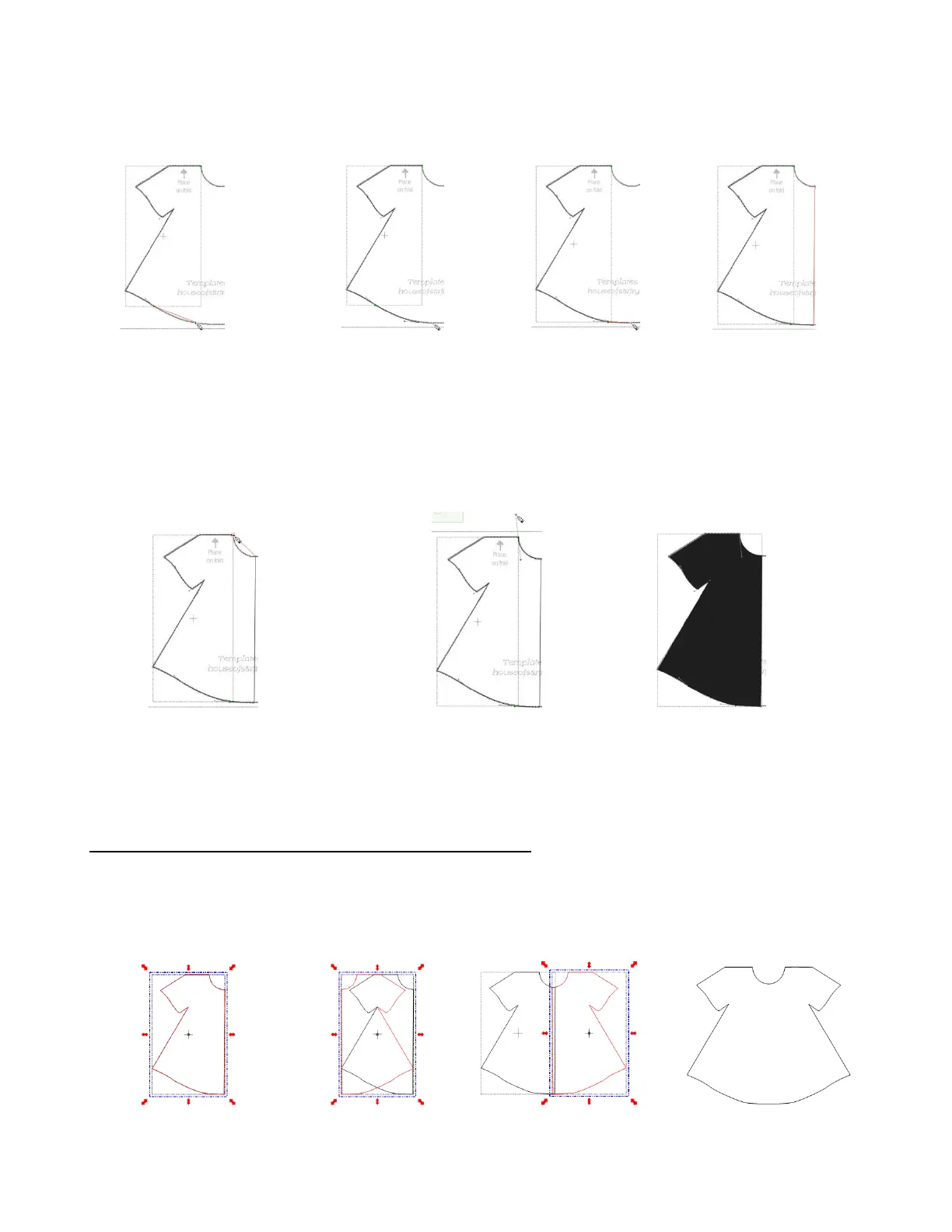
Start and end another curve segment to finish bottom curve of dress. Then do another short straight
segment along bottom, followed by a long segment up center of dress::
Finally, hold down left mouse button at top where initial trace began. Drag mouse to create the neckline
curve. While left mouse is still held down and extended out to form the curve, right click to end the
segment and then release mouse button. The final right click will close the shape and the dress will fill
with color:
Flip/Mirror and Weld to Complete Symmetrical Shapes
The final step to complete the dress involves making a mirror image copy and then welding it. Select the
dress and do a Copy/Paste in Place. Then, immediately click on the Mirror tool. (If the line of
symmetry were horizontal, then you would click on the Flip tool). Then use the arrow keys to move the
symmetrical copy to overlap as desired and perform the Basic Weld:
11. Left click on top of last
segment end and then
hold down left mouse
button where curve ends.
12. Hold down left mouse
button and drag to fit
curve of dress. Right click
to end.
13. Left click where last
segment ended and click
again to finish straight
part of dress bottom.
14. Left click at top of
dress.
15. Move to top and hold
down left mouse button
over original starting
point.
16. Drag mouse up to fit
curve of dress neckline.
17. While still holding left
mouse button down, right click
to end the trace. Dress fills
with color.
Copy dress trace
and Paste in Place
Move copy to overlap
dress trace



 To Next Page