This feature can also be used in the design of cupcake wrappers!
8.07 Lattice
The Lattice feature can be used to create a lattice design within a shape or part of the entire shape itself. It
can be accessed in any of the following ways:
Click on the Lattice icon on the Magic Toolbar
Press Ctrl+E
Right click on screen and select Shape Magic>Lattice
Go to Edit>Shape Magic>Lattice.
Latticed Circle
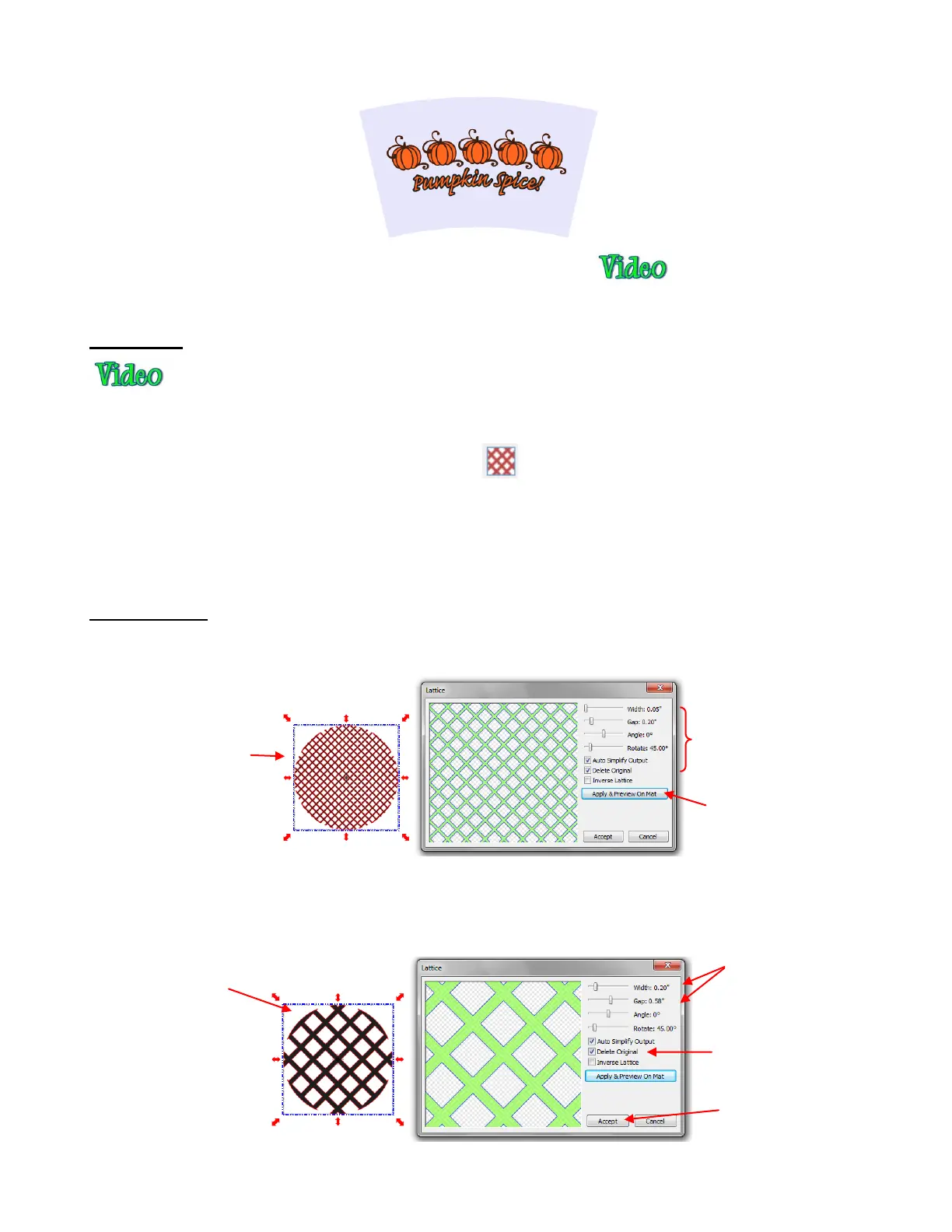
Begin with a circle, select and then click on the Lattice icon on the Magic Toolbar. This window will open:
The selected circle indicates that the current settings for Lattice will result in a much smaller, detailed look
than desired. But with the adjustment of the Width and Gap settings (both made larger), the result is much
more practical for cutting:
A preview of how the
lattice will appear in
the selected shape
Settings which will alter
the appearance of the
lattice
Click on Apply & Preview
On Mat to see how the
current settings actually
look on your selected
shape.
Preview indicates
the lattice is now
much larger.
Width and Gap both
increased
Option to Delete
Original shape if no
longer needed
Click on Accept if
design is complete.



 To Next Page