Press Ctrl+Q
Right click on the screen and select Shape Magic>Conical Warp
Go to Edit> Shape Magic>Conical Warp
Tumbler Wrap
A design has been created for the wrap. The pumpkin is from the free Create-A-Card set in the Lettering
Delights window. A random font was chosen to create the lettering:
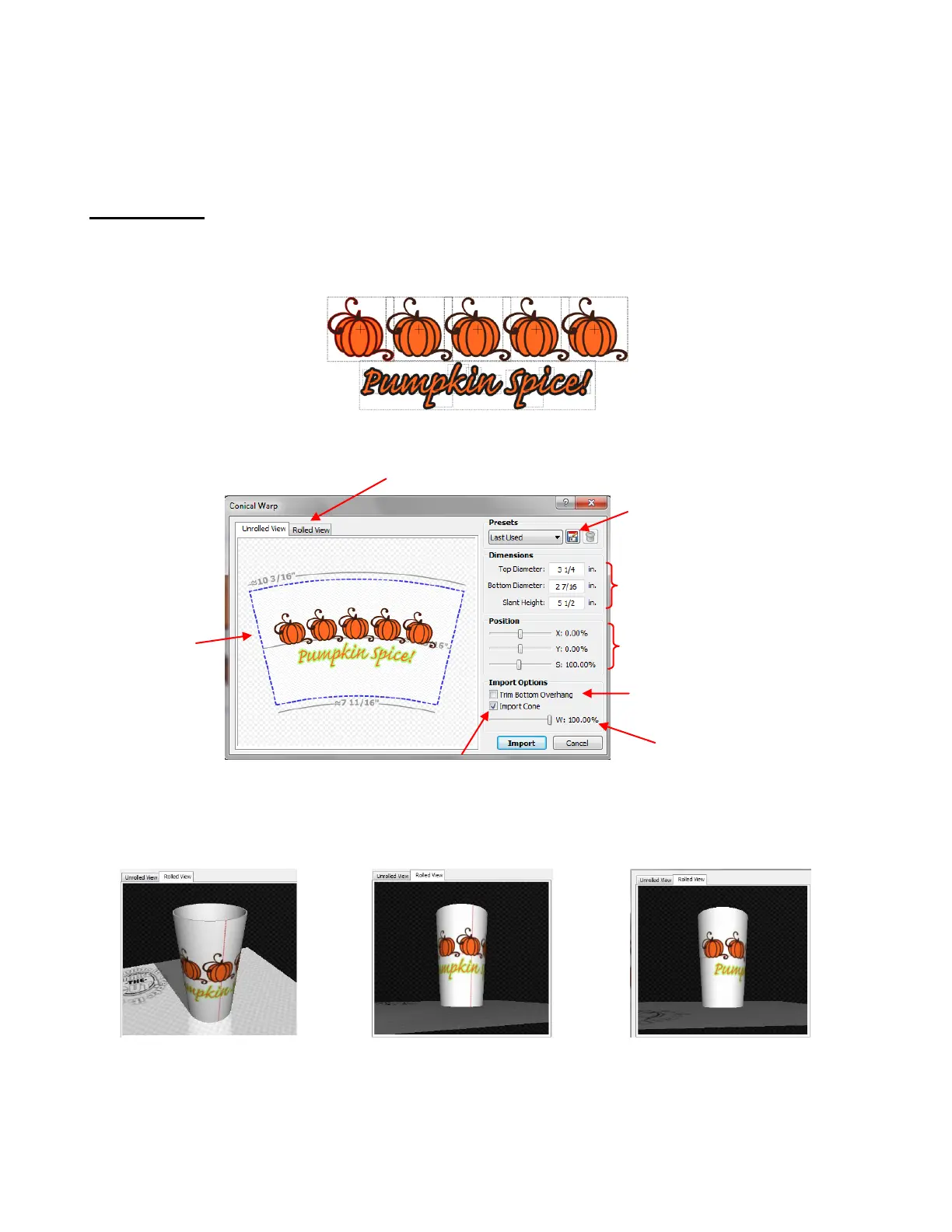
Select the entire design and then click on the Conical Warp icon. The follow window opens:
Before clicking on Import, click on the Rolled View tab. You will be able to drag your mouse across the
screen to rotate the tumbler and view from virtually any direction:
You can continue to make changes to the settings in the Rolled View, as well, and click on Import when
done. If you selected Import Cone, then you will see both the outside shape of the wrap for the tumbler, as
well as the original image, reshaped to fit the wrap:
The design
appears on
the wrap
outline
Settings may be saved for
future use.
Enter Top and Bottom Diameters,
as well as the Height of the
Tumbler, along the actual surface.
Scroll to move the Position of the
Design or modify the Size.
If the design extends beyond the
bottom, you have the option to
trim the overhang.
Scroll to decrease the
Width of the wrap
Option to import the outside shape of the wrap/cone



 To Next Page