5.07 Fitting Text to the Outside of a Shape
Wrapping Text Around A Circle
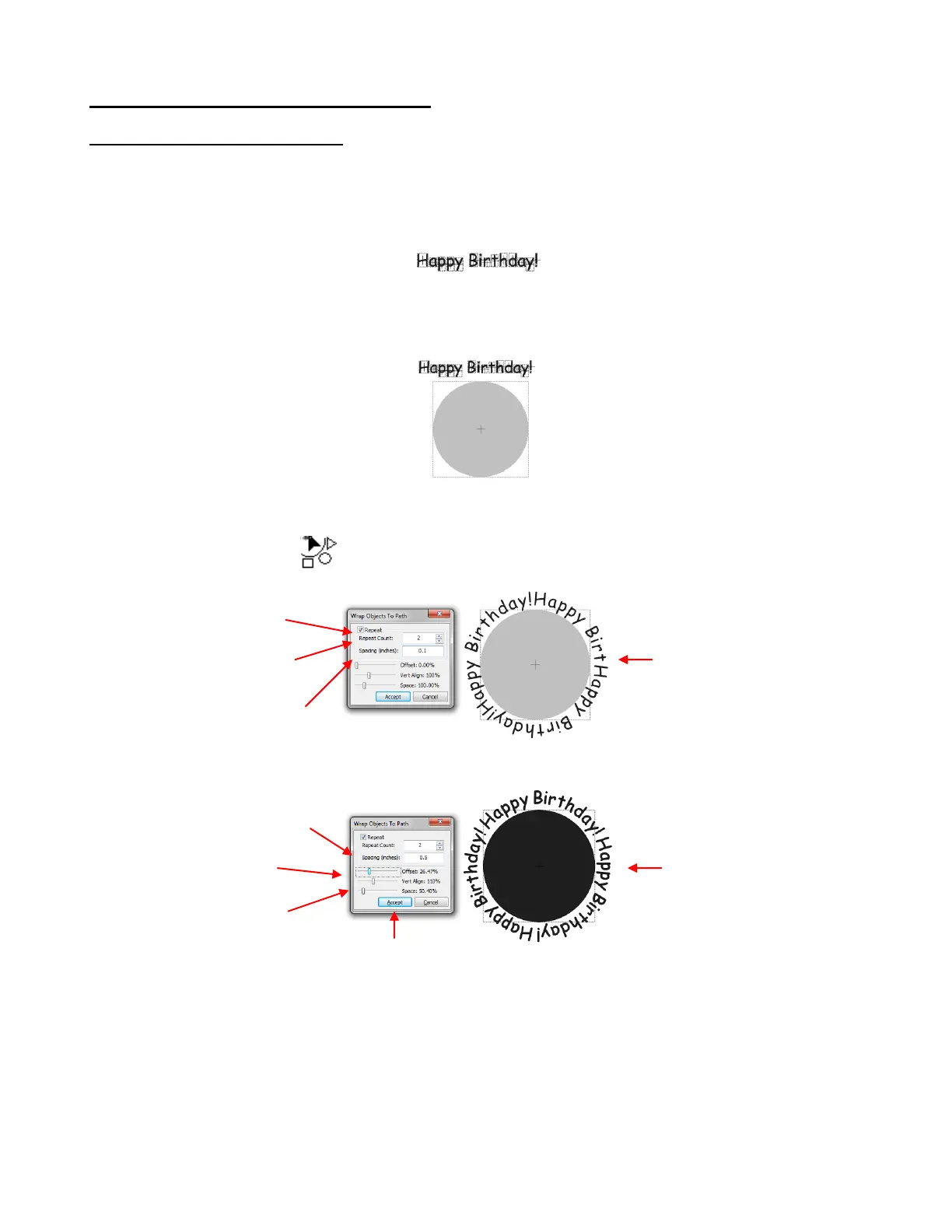
The Wrap Objects To Path function can be used to fit text to the outside of a shape. In this example the
words “Happy Birthday” will be wrapped around a circle three times.
The first step is to type the text, making sure the Split by Glyphcs option is selected. If you forget, then use
the Split function to break your text into individual letters:
The next step is to create the circle. You can import a circle from Basic Shapes and resize it to what seems
close to fit the lettering if the letter were repeated three times. It’s not necessary to be exact as you will have
some settings to tweak this! Worst case, you will be able to cancel the process and resize the circle larger
or smaller, as needed:
There is currently only one way to activate the Wrap Objects to Path function. Select what you want to
wrap (in this case, the text) and hold down the Ctrl key while you drag the text onto the shape. When you
see the cursor change to release the mouse button and the following window will open:
The lettering doesn’t fit. But not to worry! Begin to tweak the settings:
To end up with a perfectly arranged design, work with the settings in this order:
Repeat Count: If you want a particular number of repeats, enter it.
Spacing: This is the distance between each of the repeats. In our example, it is the space set between
the end of “Birthday” and the start of the next “Happy.” Note that this may not be retained as the Space
setting is adjusted to get all of the repeats visible.
Space: This is the distance between the individual shapes making up the design. In our example, it is
the space between all of the letters making up “Happy Birthday.”
Click on Accept
when done.
Note that the three
Happy Birthday’s do
not quite fit.
Enter 2 for the desired #
of Repeats, so that the
total will be 3.
Vert. Align moves the text
inwards towards the center
of the shape or away.
Space moves the
individual characters
closer or further apart.
Offset is used to move the
starting location of the text.
Now all three are
arranged evenly
around the circle.



 To Next Page