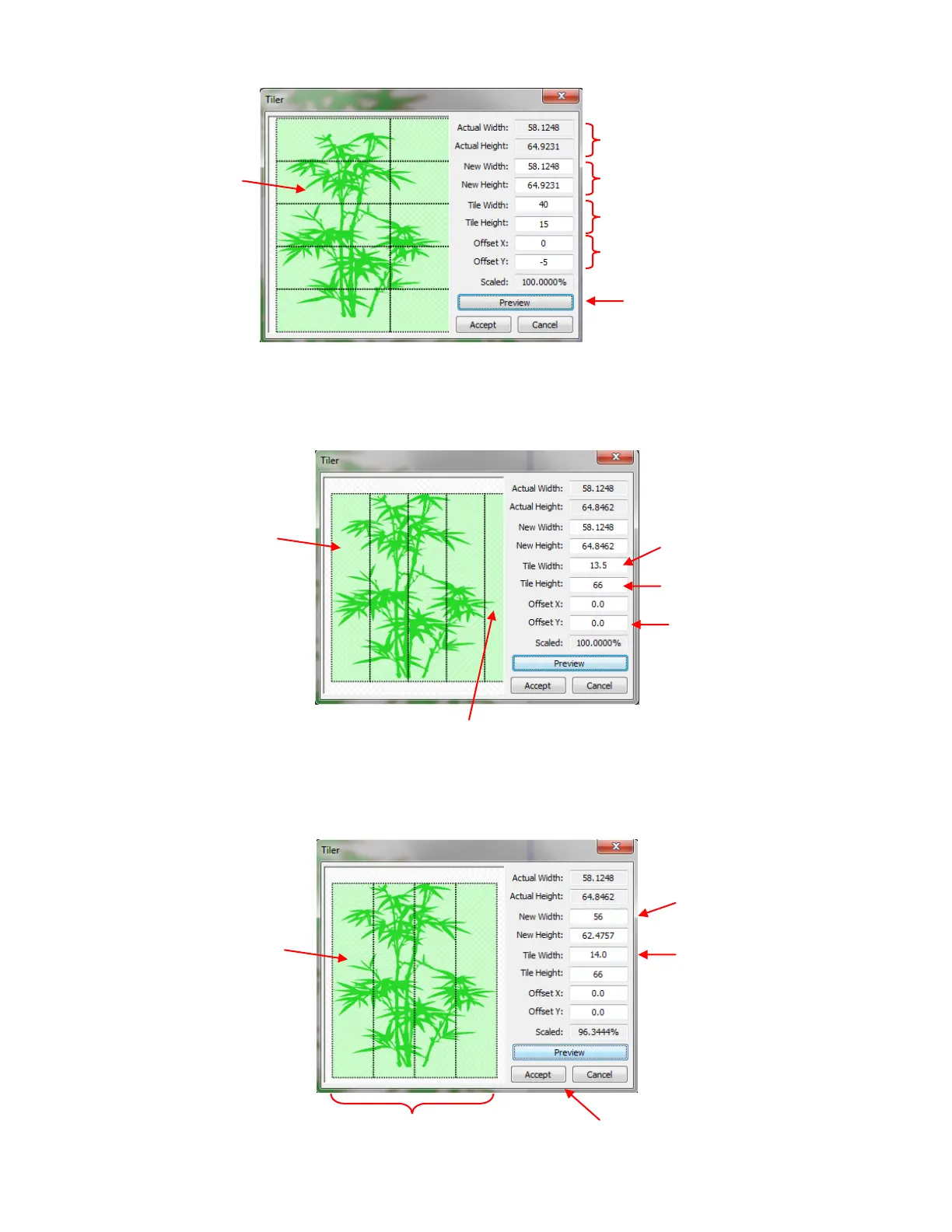
Only the Tile Width must be set to something less than 15” since the Zing can handle 14” wide cutting. For
this example, the Tile Width will be set to 13.5”. The Zing can also cut long sections of vinyl at one time, so
the Tile Height will be set slightly larger than the height of the shape. Also there is no need to have an
Offset yet, so it is set to 0:
Everything looks fine except for the last tile in which there’s only a fraction of a leaf. This wouldn’t be an
economical use of the vinyl. Thus, the settings could be adjusted just a slight amount so that only four tiles
will be cut instead of five. There are several options: 1. The Actual Width of the image could be made
slightly smaller, 2. The Tile Width could be made slightly larger, or 3. A combination of both:
Preview of shape
broken into tiles
for cutting
W and H of shape on screen
Distance to offset horizontal of
vertical tiles
Tile Width changed to 13.5”
Tile Height changed to 66”
Click on Preview to update
with new settings.
5
th
tile only has a tiny part of a leaf!
Tile Width:
increase slightly
New Width:
decrease slightly



 To Next Page