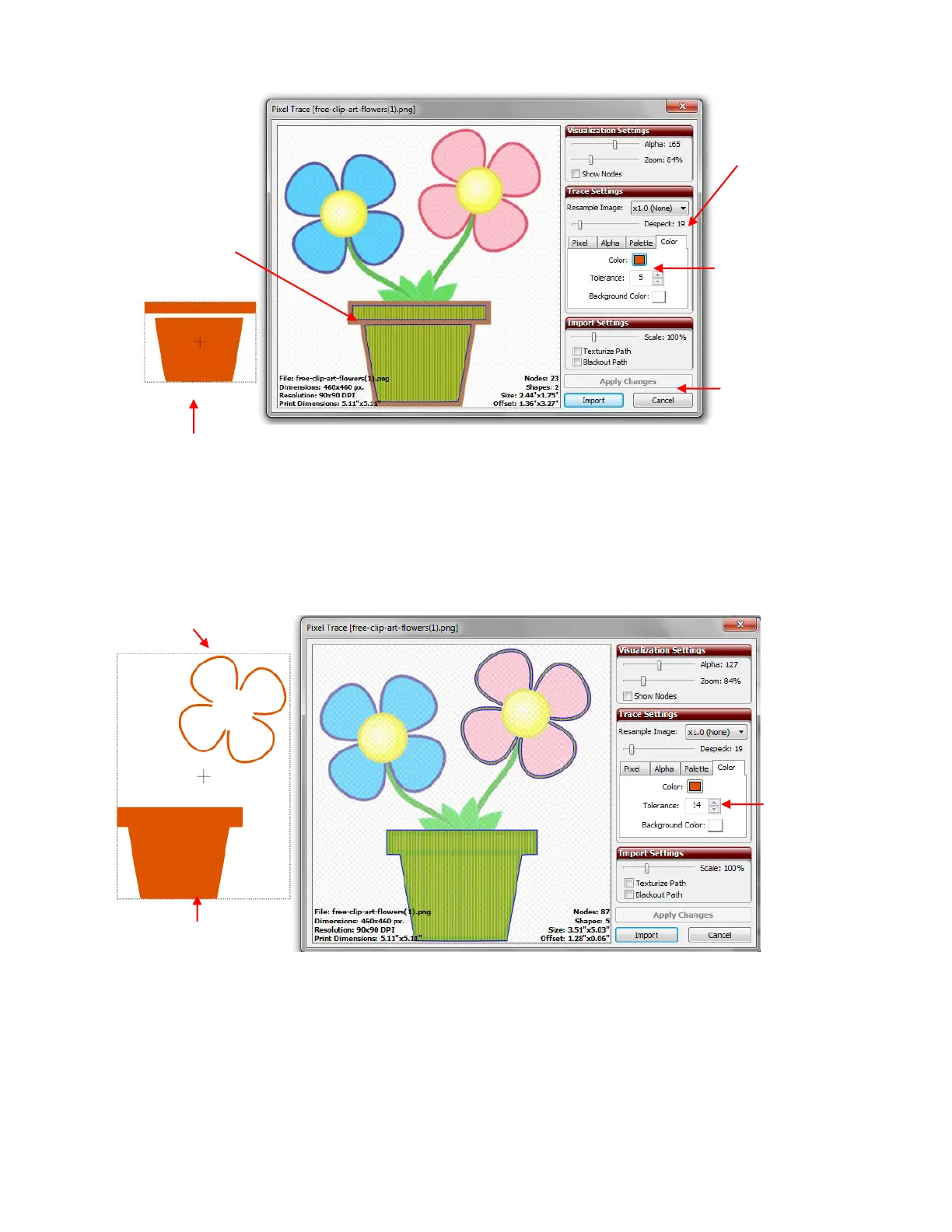
Let’s assume that you want the entire flower pot traced instead of just the interior. Increase the Tolerance
setting to expand the color range that is close to the original color. In this example, the Tolerance is
increased to 14 and the flower pot looks great! The entirety is now traced. Unfortunately, outside of the pink
flower also fell into this color range and is being included. But that’s okay! That part can be deleted later
after the tracing is completed:
Click on Import and the program will ask you if you want to continue tracing and add more layers. Answer
Yes. Click on the Color box again and then pick another color. This time choose the green leaves:
The entire flower pot is now
traced as one shape.
Outline of flower is also traced.
Tolerance
increased
to 14
Blue lines and green
fill indicate portion of
image traced.
The Color box
changes to the
color selected with
the eyedropper.
Click on Apply
Changes each
time a change is
made to update
the preview.
Despeck raised
to remove tiny
paths.



 To Next Page