OPERATION
4.4.6 Cutting
Height
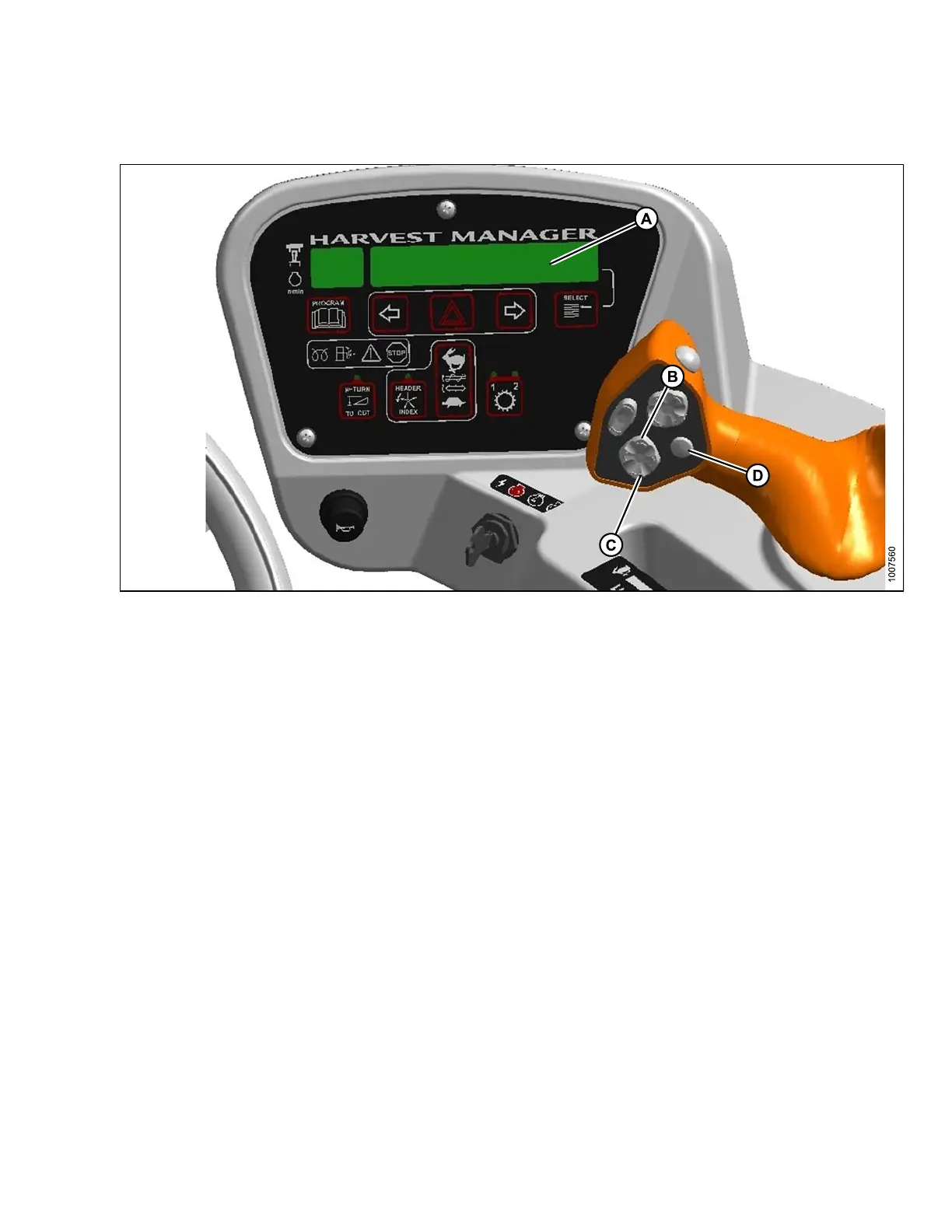
Figure 4.75: Operator Console
A-Displ
ay
B-Heade
rUp
C - H eader Down D - Display Selector
Cutting
height is adjusted by raising or lowering the header with the HEADER UP (B) or HEADER DOWN (C)
switche
s on the ground speed lever (GSL).
The cab d
isplay module (CDM) indicates header height with a reading on the DISPLAY (A) lower line between 00.0
and 10.
0, with 00.0 being on the ground.
Use DIS
PLAY SELECTOR switch (D) to display the current setting.
Retur
ntoCut
The M-Series monitoring system will assist you in m aintaining the desired cutting height with the RETURN TO CUT
feature. This feature can be turned OFF or ON with a switch on the cab display module (CDM).
The return to cut (RTC) feature provides preset cutting height and tilt angle settings for the header.
NOTE:
To enable the RTC header tilt feature, the optional h ydraulic center-link and expansion module must be installed.
Refer to 7.1.12 Hydraulic Center-Link, page 339 and 7.1.10 Expansion Module, page 338.
If desired, the CDM can be programmed so only the cutting height feature is active. The unit will default to cutting
height only if no hydraulic center-link or expansion module is installed.
Refer to the following procedures:
• Programming Return to Cut Feature, page 128
• Using Return to Cut Feature, page 129
169890
1
27
Revision A



 To Next Page