OPERATION
Using Return to Cut Feature
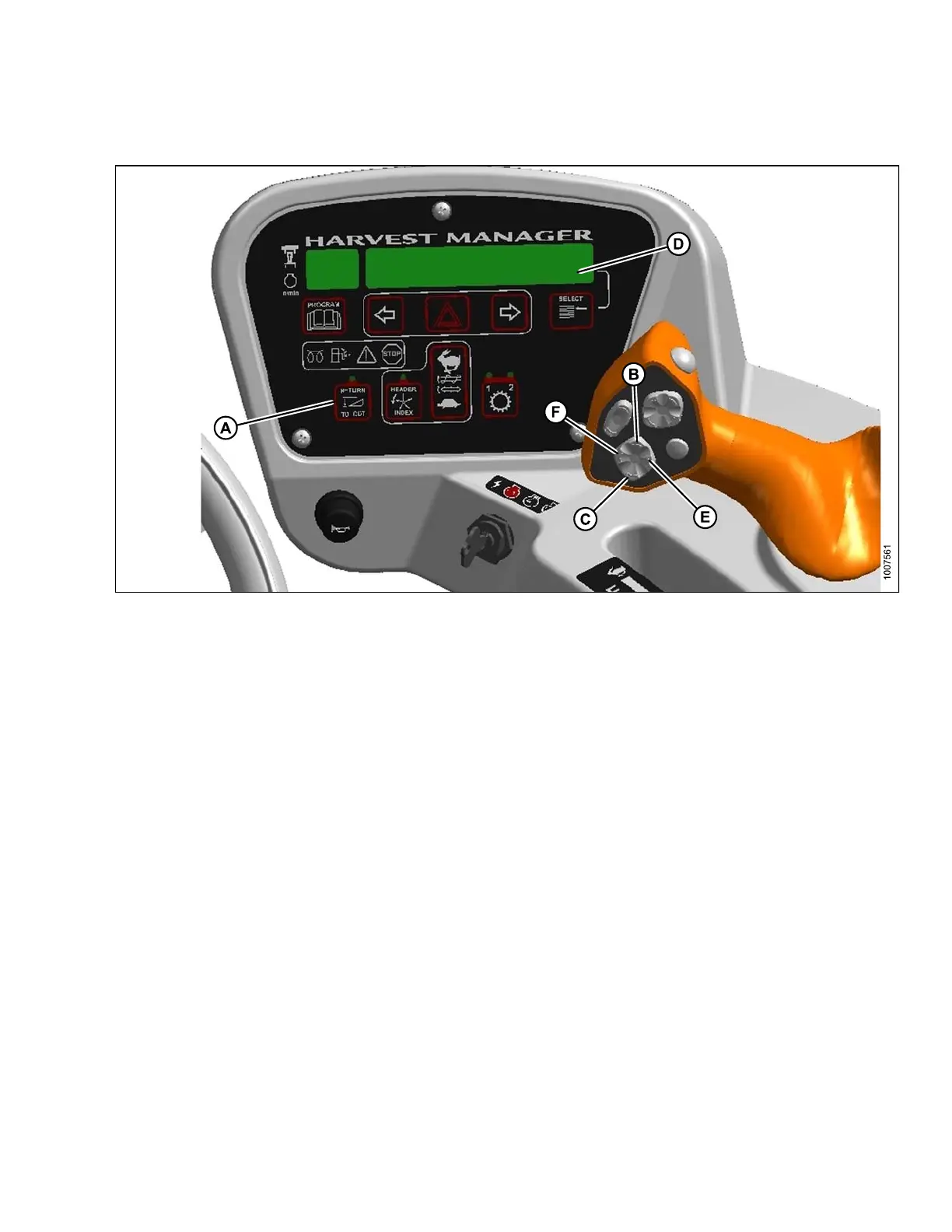
Figure 4.77: Operator Console
A - Return to Cut
B - Heade
rUp
C-HeaderDown
D - Display E - Header Tilt Up F - Header Tilt Down
Use the RETURN TO CUT feature as follows:
IMPORTAN T:
Ensure the head er is enga g ed a nd th e R ET URN TO CUT switch (A) is illum in ated .
NOTE:
The header can b e r aised or lowered by pressing and holding the HEADER UP (B) or HEADER DOWN (C)
switches on the ground speed lever (GSL).
1. If header is above the preset cutting height, momentarily press HEADER DOWN switch (C) and the header
will return to preset height.
2. If the header is below the preset height, press and hold the HEADER UP (B) switch to raise the header. Release
switch to stop header. Alarm will sound w hen header rises past the preset height.
3. If the header angle c hanges (for machines equipped with optional hydraulic center-link and expansion module),
double-click (two clicks within 0.5 seconds) the HEADER TILT UP (E) or HEADER TILT DOW N switch (F) and
the header will return to the preset angle.
NOTE
:
If th
e header cannot return to the preset height or angle within 30 seconds, the RETURN TO CUT feature will
deac
tivate to prevent the hydraulic oil from overheating. Push the RETURN TO CUT switch (A) to reactivate.
169890 129 Revision A



 To Next Page