OPERATION
Programming Return to Cut Feature
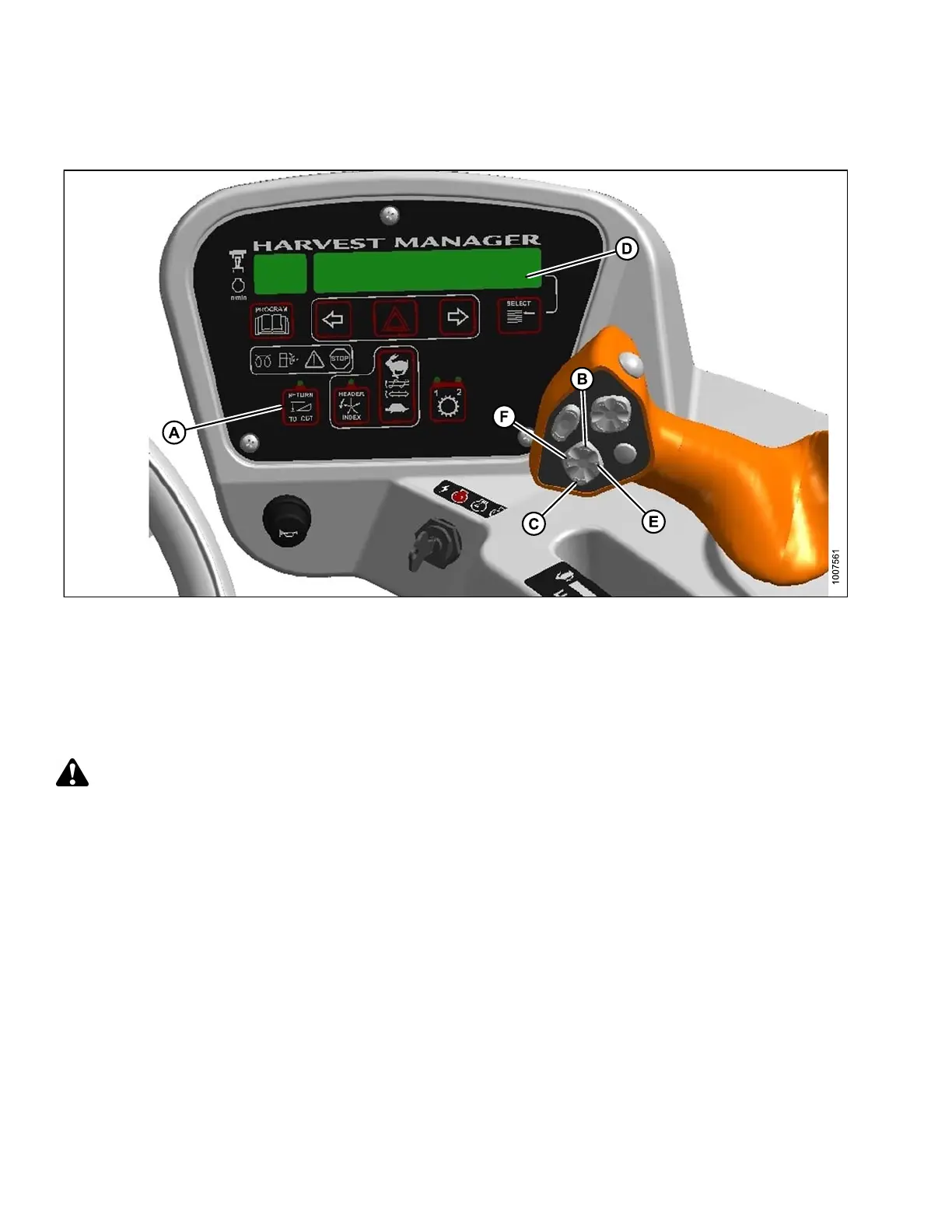
Figure 4.76: Operator Console
A - Return to Cut
B - Heade
rUp
C - Header Down
D - Display E - Header Tilt Up F - Header Tilt Down
Program the RETURN TO CUT (RTC) feature as follows:
IMPORTA
NT:
To enab
le the RTC header tilt feature, the hydraulic center-link and expansion module options must be installed.
CAUTION
Check to be sure all bystanders have cleared the area.
1. Start and windrower and engage the header.
2. Set RET URN TO CUT switch (A) to OFF (indic ator light is O F F ).
3. Adjust the header to the desired cutting height with the HEADER UP (B) or HEADER DOWN (C) switches on
the ground speed lever (GSL). The cab display module (CDM) displays between 00.0 and 10.0 at (D).
4. Adjust the header angle with the HEADER TILT UP (E)orHEADERTILTDOWN(F)switchesontheGSL.The
CDM displays between 00.0 and 10.0. This step is not required when height only has been preselected.
5. Press the RET URN TO CUT switch (A) on th e CDM. T h e indicator light will illuminate and th e settings are now
programmed into the windrower control module (WCM).
169890 128 Revision A



 To Next Page