MAINTENANCE AND SERVICING
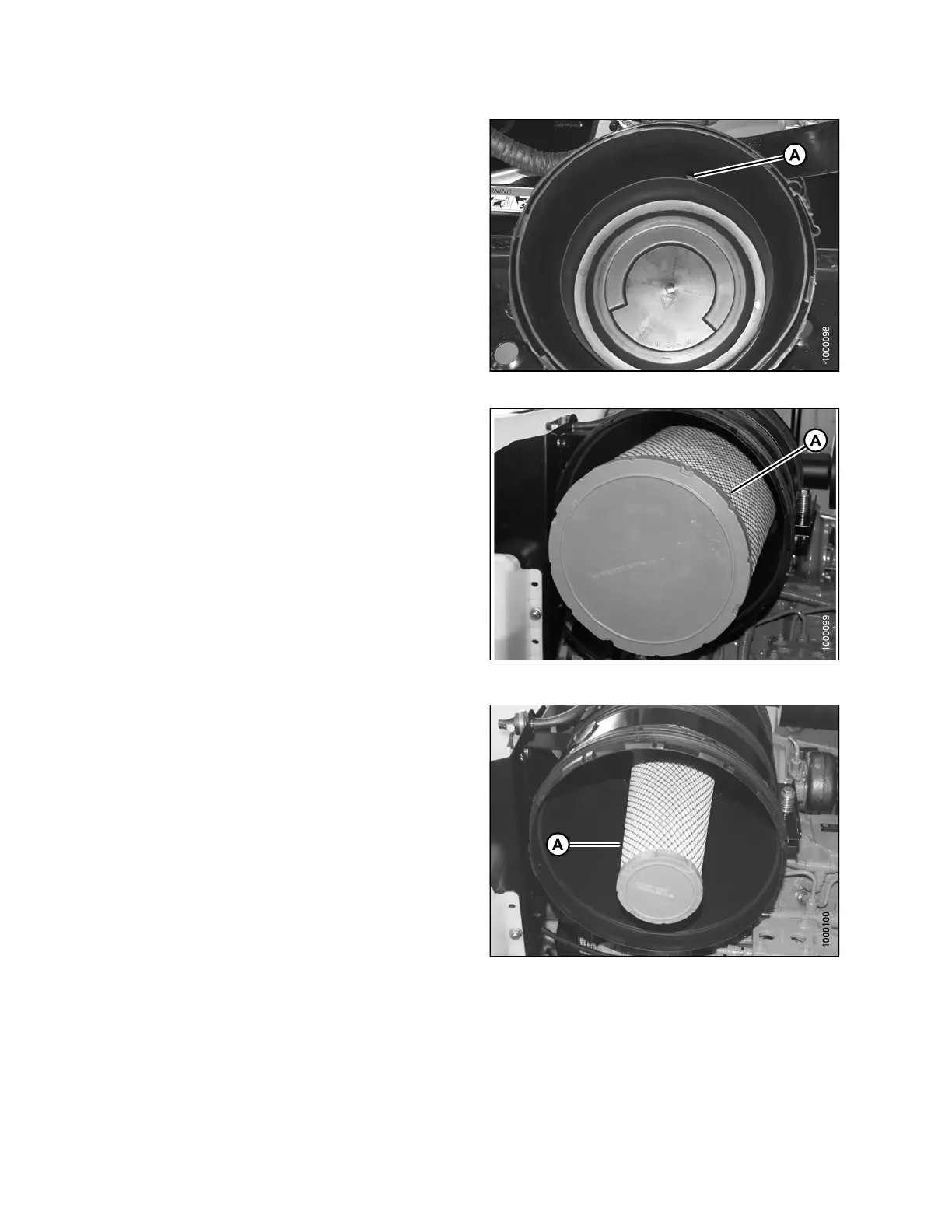
5. Check the aspira tor duct o pening (A) for obstructions
or dama ge . Clean if necessary.
Figure 5.69: Engine Air Cleaner
6. Pull out the primary filter element (A).
IMPORTANT:
Be extremely careful with the dirty element, until you get
it completely out of the housing. Accidentally bumping
it while still inside means dropped dirt and dust may
contaminate th e clea n sid e of your filter ho using, before
the new filter element has a chance to do its job.
Figure 5.70: Engine Air Cleaner
Replace the secondary air filter (A) every year or after every
third primary filter change (even if it appears clean).
If you’re changing the secondary air filter because it is dirty,
inspect the primary filter and th e filt er ca nister to determin e
the reason for contamination.
•Examinethefilter canister for cracks and replace if
necessary.
• Ensure filter sealing surfaces are s oft, flexib le, and
sealing properly. Hard seals may allow debris through
to the secondary filter.
• Ensure canister retaining latches are secure.
IMPO
RTANT:
•DoNOT remove the secondary filter element unless it
needs replacing.
•DoNOT attempt to clean the secondary element (A).
Replace only.
Figu
re 5.71: Engine Air Cleaner
169890 232 Revision A



 To Next Page