Example Description
An RGB overprint patch is a patch where equal amounts of two inks
are used: Y and M, Y and C, C and M. The inks are printed in one
patch to produce R, G, or B.
A K-only patch is a patch where only K ink is printed.
The darkest patch is the patch which corresponds with the estima-
ted black point. The black point is the Lab value with the lowest L*
value.
A solid patch is a patch printed with 100% C, M, Y, or K.
Tolerance levels
The difference between two colors or two groups of colors can be expressed by a color difference
metric. (
Learn about color differences
on page 250)
Every test definition has a pre-defined series of color metrics (
Overview of color validation
metrics
on page 437) The test definition also includes for every metric a tolerance level to decide
if printed color values are close enough to their reference color values. A tolerance level or
threshold level is set before the evaluation takes place. A tolerance level is also expressed by a △
(Delta) value. Based on the test outcome, a quality level can be achieved.
Test results
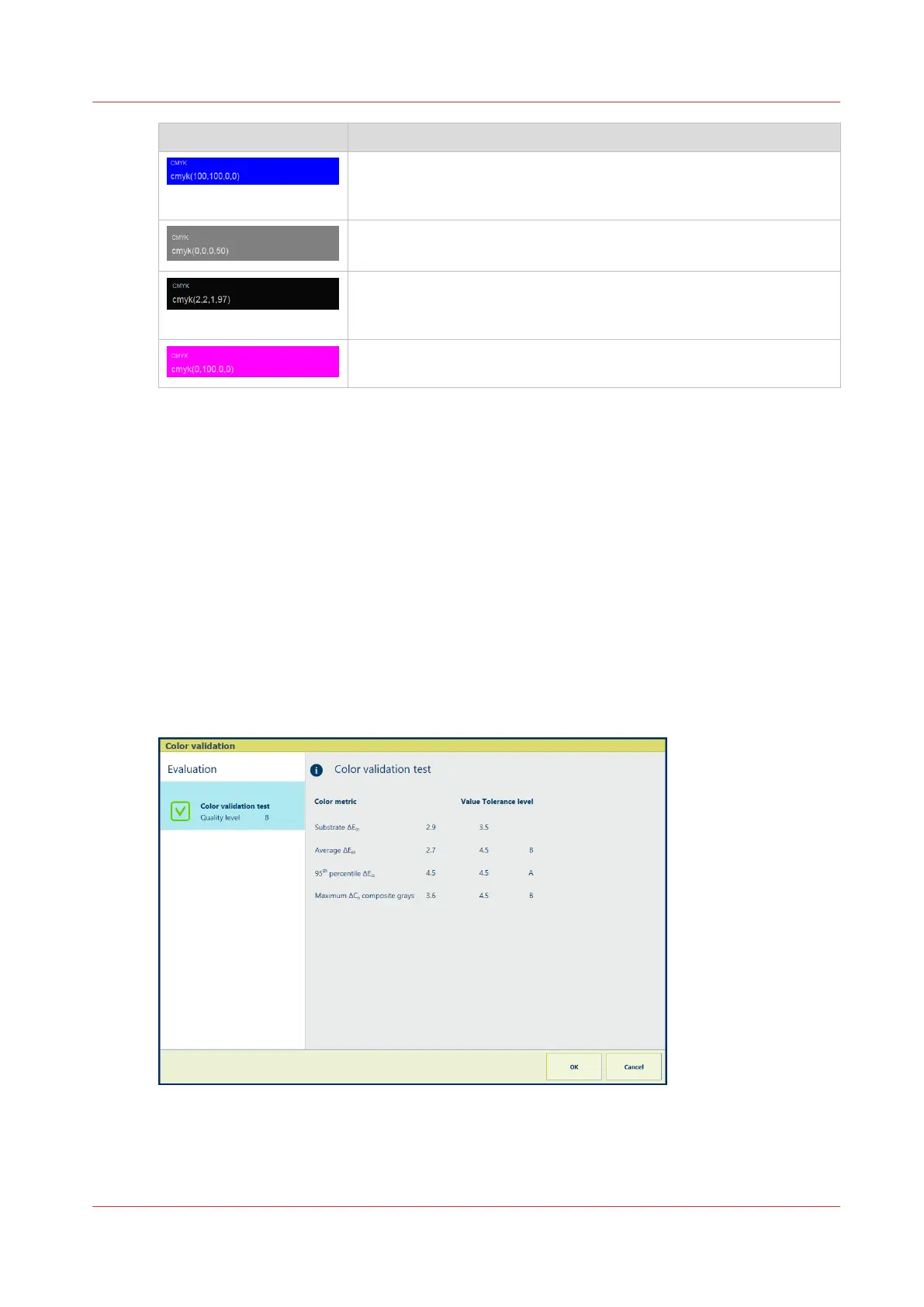
The control panel shows the main results in the feedback window and the printer lists all test
details in a CGATS report. (
Read color validation results
on page 259)
The following example is not based on a realistic printer and print environment.
[311] Example: Feedback window of a color validation test
Learn about color validation tests
Chapter 9 - Print what you expect
249


 To Next Page
 Loading...










