OfficeServ 7100 PROGRAMMING
TECHNICAL MANUAL PART 2 APRIL 2007
MMC: 759
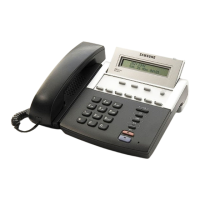
Use the VOLUME key to scroll through entries
and press the RIGHT SOFT key to select an
entry.
3. Enter the CID number and press the RIGHT
SOFT key to advance to the next entry
CLI RINGING(005)
CLI:1234567
OR
Enter the CID number and press LEFT SOFT
key to return to step 2.
4. Enter the reject option via the dial keypad
(1 for YES, 0 for NO)
CLI RINGING(005)
REJ:NO PRI:NO
OR
Press the VOLUME key to make a selection
and press the RIGHT SOFT key to advance to
the next step.
5. Enter the priority level via dial keypad.
(1—9 or NO)
CLI RINGING(005)
REJ:NO PRI:NO
OR
Press the VOLUME keyto make selection and
press the RIGHT SOFT key to advance to the
next step.
6. Enter the station or group number for each
Ring Plan destination via the dial keypad
CLI RINGING(005)
R1:501 R2:NONE
(e.g. 501) OR press the VOLUME key to make
a selection and press the RIGHT SOFT key to
advance to the next step.
7. Dial 1-8 (or NO) to select the ring tone (e.g. 2)
OR
CLI RINGING(005)
TONE:2 CAD:NO
Press the VOLUME key to select the ring tone
and press the RIGHT SOFT key to movethe
cursor.
8. Dial 1-5 (or NO) to select the ring cadence
OR
CLI RINGING(005)
TONE:2 CAD:NO
Press the VOLUME key to select the ring
cadence and press the RIGHT SOFT key to
move the cursor.







 To Next Page