OfficeServ 7100 PROGRAMMING
TECHNICAL MANUAL PART 7 APRIL 2007
7.3.49
Field Name Description
redirect a screened caller to another number
Reject call Prompt and single digit option to allow the subscriber to reject a
screened call
Realtime Greeting Prompt and single digit option to allow the subscriber to record
a brief message to be played to a screened caller
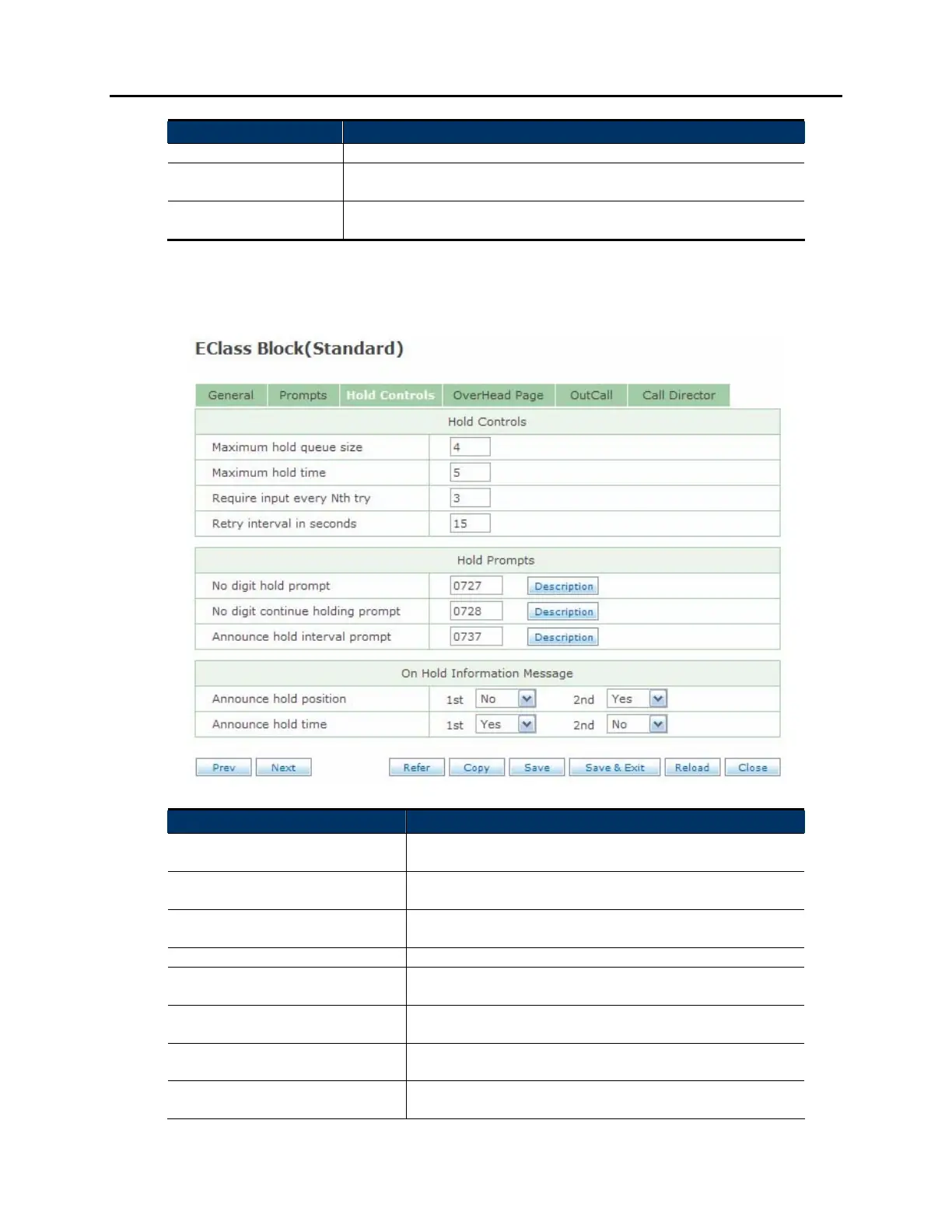
HOLD CONTROLS SCREEN:
Field Name Description
Maximum hold queue size Maximum number of callers who can hold for the
subscriber
Maximum hold time Maximum amount of time caller can hold before being
redirected to leave a message
Require input every nth try Set how many attempts to make before requiring the
user to press a key
Retry interval in seconds Set the amount of seconds between attempts
No digit hold prompt Prompt to let the caller know they can hold without
pressing a key
No digit continue holding
prompt
Prompt to let a caller know they can continue to hold
without pressing a key
Announce hold interval prompt Prompt to let the caller know they will be placed on
hold
Announce hold position Set whether or not the caller will hear their place in
queue on the first attempt and / or subsequent








 To Next Page