OfficeServ 7100 PROGRAMMING
TECHNICAL MANUAL PART 7 APRIL 2007
7.3.50
Field Name Description
attempts
Announce hold time Set whether or not the caller will hear their estimated
time in queue on the first attempt and / or subsequent
attempts
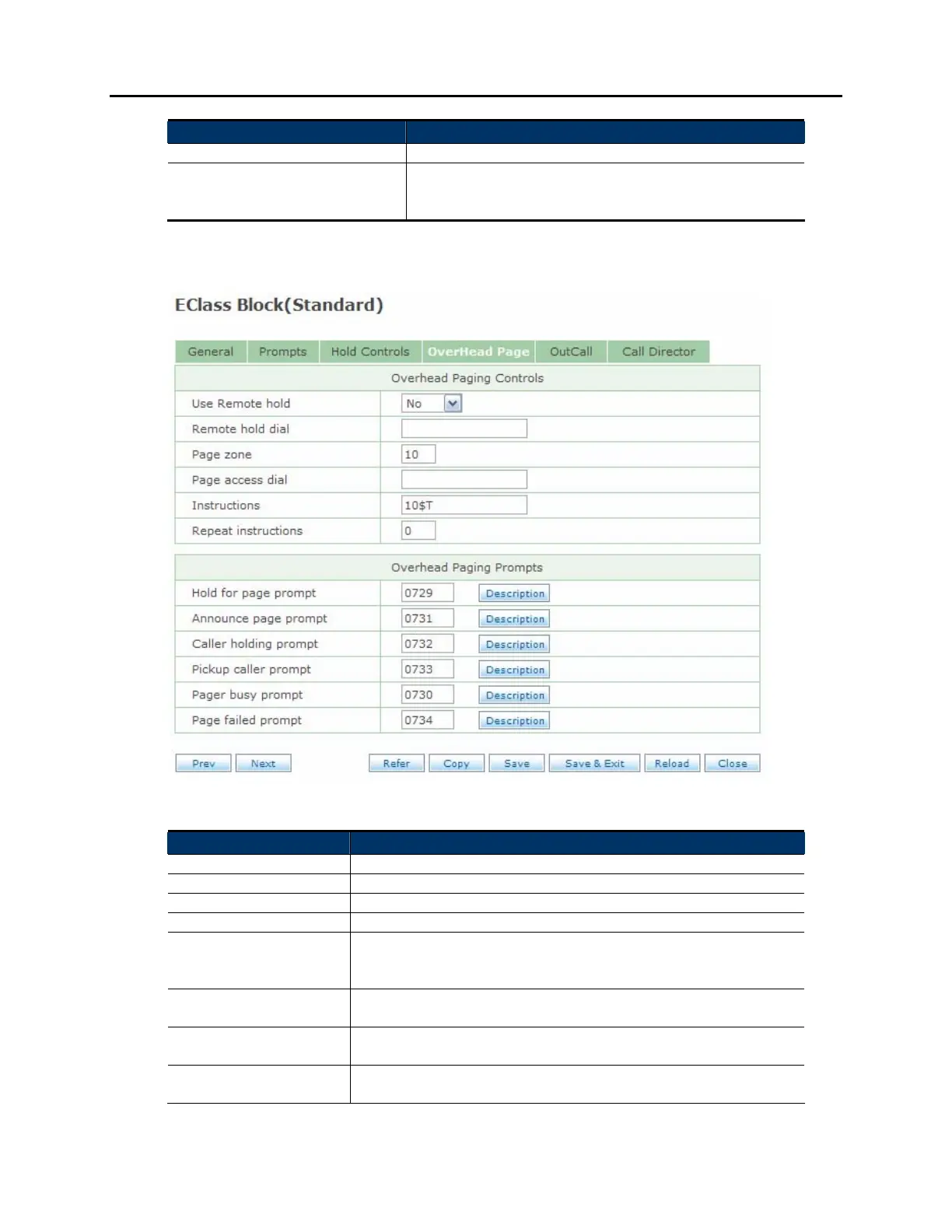
OVERHEAD PAGE SCREEN:
Field Name Description
Use Remote hold Set if callers can be held remotely at the subscriber's station
Remote hold dial The dial string to use to place the caller on remote hold
Page zone The page zone to use when doing an overhead page
Page access dial The dial string to use to initiate the page
Instructions The digits to announce on the overhead page to let the
subscriber pick up the call. By default this is feature code "10"
and the trunk number.
Repeat instructions The amount of times to repeat the instructions over the paging
system
Hold for page prompt Prompt to let a caller know they will be placed on hold while
the subscriber is paged
Announce page
prompt
Prompt to announce the caller over the paging system







 To Next Page