11.10
SEL-351A Relay Instruction Manual Date Code 20080213
Front-Panel Interface (Only on Models With LCD)
Functions Unique to the Front-Panel Interface
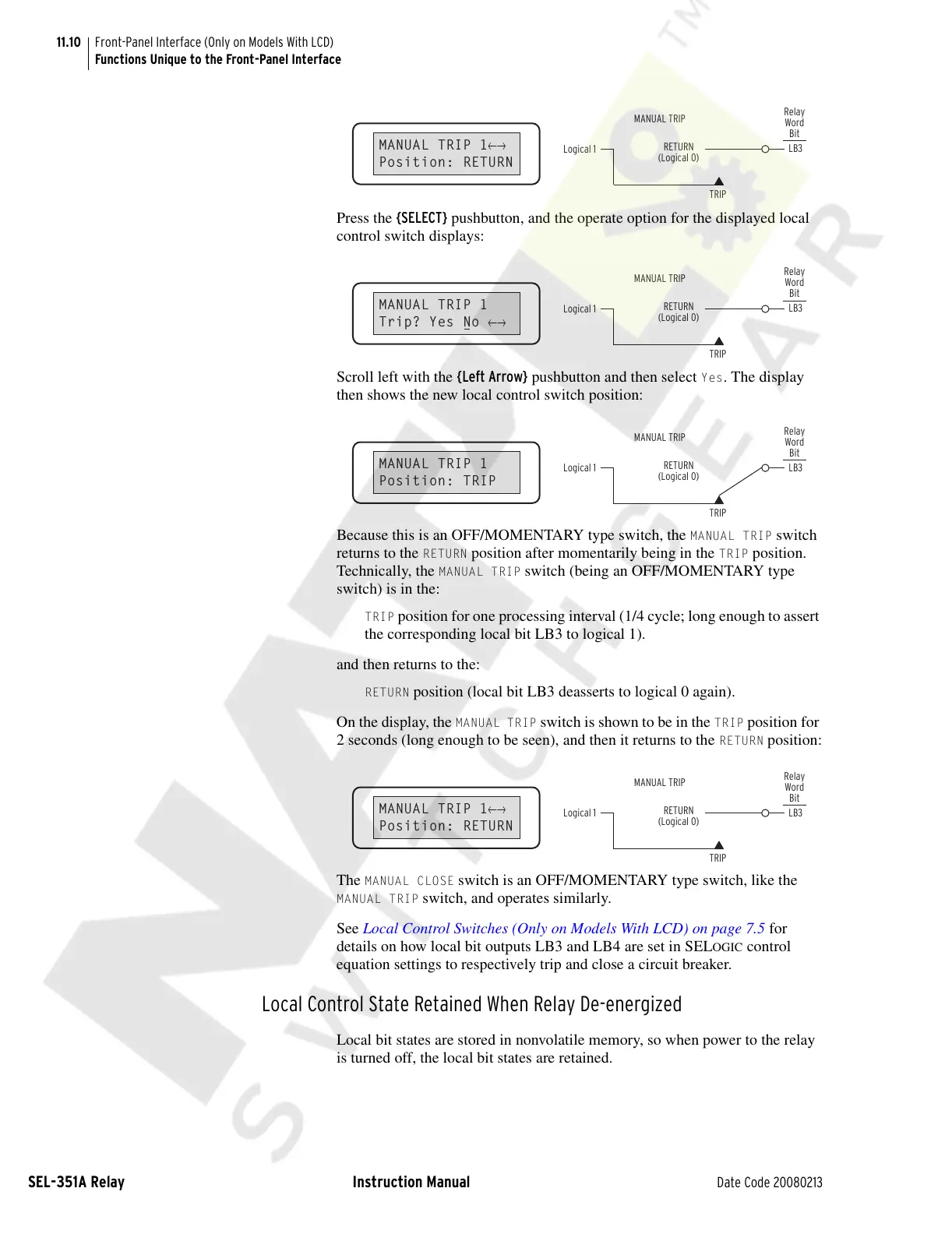
Press the {SELECT} pushbutton, and the operate option for the displayed local
control switch displays:
Scroll left with the {Left Arrow} pushbutton and then select
Yes. The display
then shows the new local control switch position:
Because this is an OFF/MOMENTARY type switch, the
MANUAL TRIP switch
returns to the
RETURN position after momentarily being in the TRIP position.
Technically, the
MANUAL TRIP switch (being an OFF/MOMENTARY type
switch) is in the:
TRIP position for one processing interval (1/4 cycle; long enough to assert
the corresponding local bit LB3 to logical 1).
and then returns to the:
RETURN position (local bit LB3 deasserts to logical 0 again).
On the display, the
MANUAL TRIP switch is shown to be in the TRIP position for
2 seconds (long enough to be seen), and then it returns to the
RETURN position:
The
MANUAL CLOSE switch is an OFF/MOMENTARY type switch, like the
MANUAL TRIP switch, and operates similarly.
See Local Control Switches (Only on Models With LCD) on page 7.5 for
details on how local bit outputs LB3 and LB4 are set in SEL
OGIC control
equation settings to respectively trip and close a circuit breaker.
Local Control State Retained When Relay De-energized
Local bit states are stored in nonvolatile memory, so when power to the relay
is turned off, the local bit states are retained.
MANUAL TRIP 1
←→
Position: RETURN
Logical 1
LB3
RETURN
(Logical 0)
TRIP
Relay
Word
Bit
MANUAL TRIP
MANUAL TRIP 1
Trip? Yes No
←→
Logical 1
LB3
RETURN
(Logical 0)
TRIP
Relay
Word
Bit
MANUAL TRIP
MANUAL TRIP 1
Position: TRIP
Logical 1
LB3
RETURN
(Logical 0)
TRIP
Relay
Word
Bit
MANUAL TRIP
MANUAL TRIP 1
←→
Position: RETURN
Logical 1
LB3
RETURN
(Logical 0)
TRIP
Relay
Word
Bit
MANUAL TRIP
Courtesy of NationalSwitchgear.com



 To Next Page