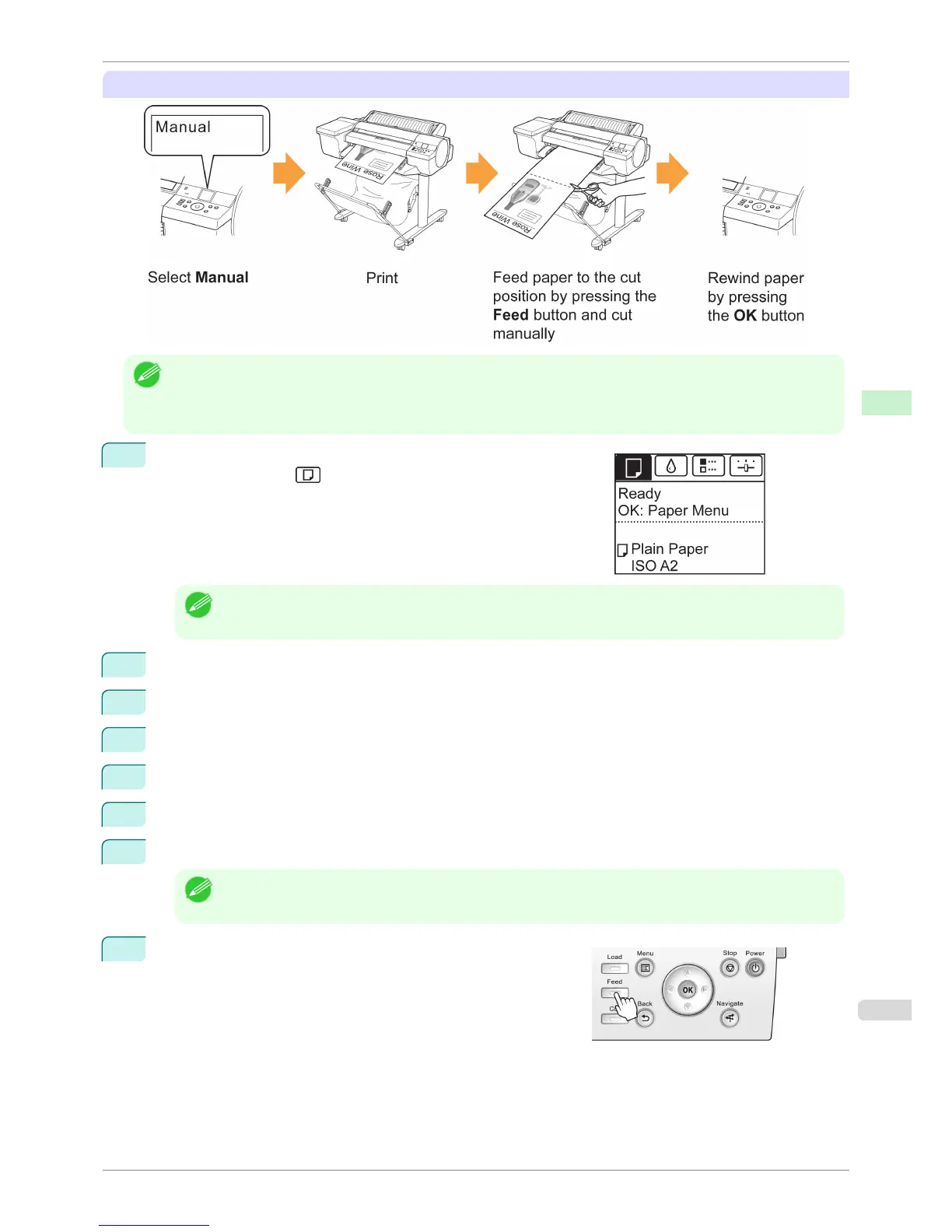
Manual (for paper of which the leading edge rubs the printhead)
Note
• Once the following step has been performed, the procedure can be started from step 10 the next time.
• Printing the second and subsequent times
• Printing after replacing with the same type of paper
1
On the Tab Selection screen of the Control Panel, press ◀ or ▶ to
select the Paper tab ( ).
Note
• If the Tab Selection screen is not displayed, press the Menu button.
2
Press the OK button. The Paper Menu is displayed.
3
Press ▲ or ▼ to select Paper Details, and then press the OK button.
4
Press ▲ or ▼ to select the type of paper, and then press the OK button.
5
Press ▲ or ▼ to select Cutting Mode, and then press the OK button.
6
Press ▲ or ▼ to select Manual, and then press the OK button.
7
When "Perform the detection of paper leading edge?" is displayed, select Do not perform.
Note
• If you set the detection of paper leading edge to Do not perform, a margin of about 23 cm is created at the
paper leading edge when printing starts.
8
Press the Feed button.
iPF6400S
Specifying the Cutting Method for Rolls
User's Guide
Handling and Use of Paper Handling rolls
487



 To Next Page