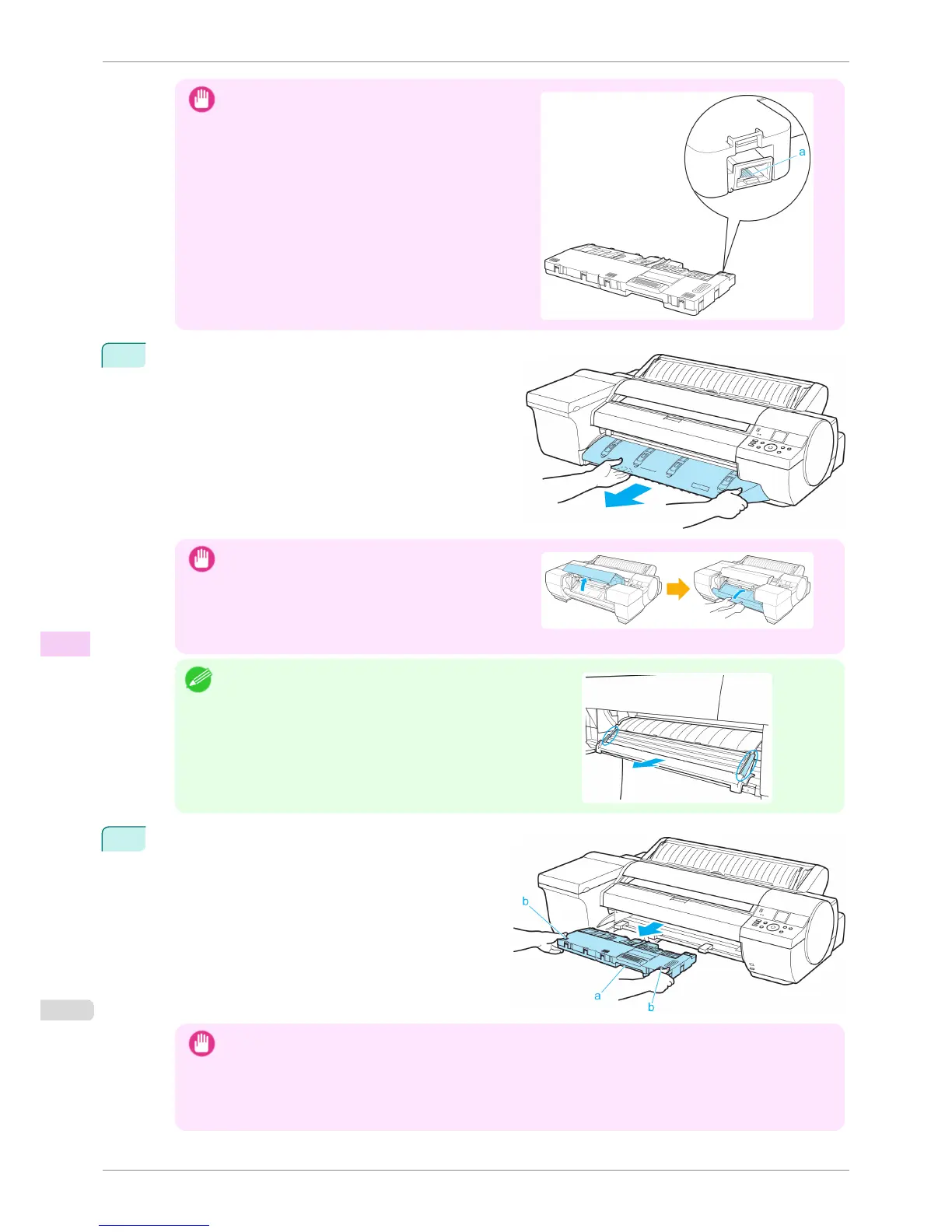
Important
•
Never touch the metal contacts (a). This may damage
the Maintenance Cartridge.
2
Remove the Ejection Guide.
Important
•
If the Spectrophotometer Eject Guide is lowered while
the optional Spectrophotometer Unit is mounted, open
the Spectrophotometer Unit Cover and lift up the cen-
tral part (near the blue label) of the Up-down Unit.
Lifting up the ends of the Up-down Unit may cause
damage.
Note
•
If the Spectrophotometer Unit is mounted, grasp the blue han-
dles on the left and right sides of the Spectrophotometer Eject
Guide and remove the Spectrophotometer Eject Guide from
the Spectrophotometer Unit.
3
Pull out the used Maintenance Cartridge by the grip
(a). Holding the cartridge by the handles (b) on both
sides, keep the cartridge level as you remove it.
Important
• Used maintenance cartridges are heavy. Always grasp the cartridge firmly and keep the cartridge level during
removal and storage. If you drop a used Maintenance Cartridge or store it at an angle, ink may leak and cause
stains.
• The remaining Maintenance Cartridge capacity is recorded on each printer. Do not install a used Maintenance
Cartridge in another printer.
Replacing the Maintenance Cartridge
iPF6400S
User's Guide
Maintenance and Consumables Maintenance Cartridge
834













 To Next Page