8
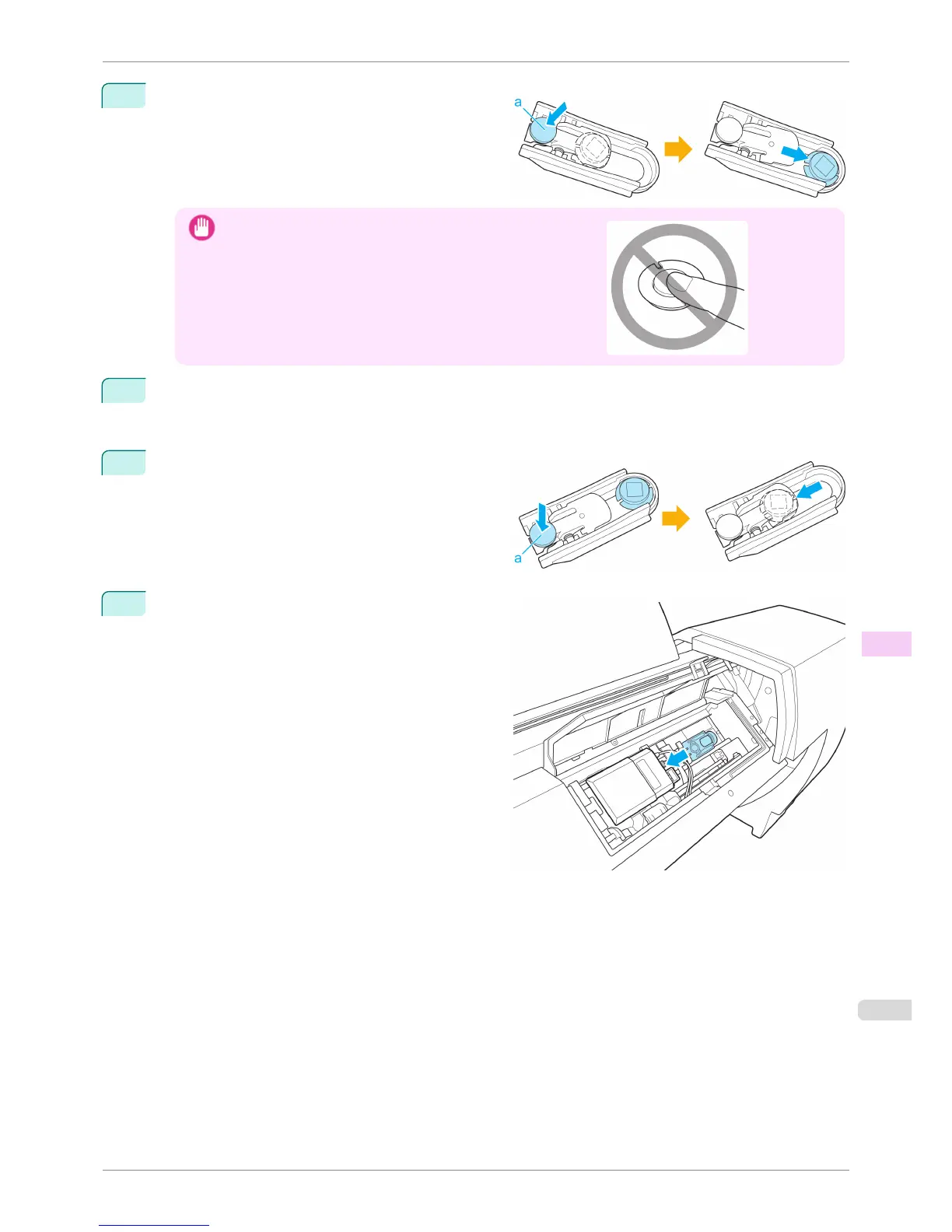
Push the (a) part of the White Calibration Tile Holder
and remove the White Calibration Tile.
Important
•
Never touch the white part of the White Calibration Tile.
If the white part is dirty, the printer may not be able to obtain the
correct color measurement results.
9
Wipe the surface of the White Calibration Tile clean with a dry, soft cloth.
If the white part is particularly dirty, use a damp cloth that you have wrung out completely to wipe the sur-
face of the White Calibration Tile clean and use a dry cloth to dry the surface.
10
Place the White Calibration Tile in the White Calibra-
tion Tile Holder and mount it in the position shown in
the diagram while pushing down on the (a) part.
When installing the White Calibration Tile, make sure
it is facing the appropriate direction.
11
Install the White Calibration Tile Holder on the Up-
down Unit as shown in the figure and move the hold-
er in the direction of the arrow to fix it in place.
iPF6400S
Cleaning the Spectrophotometer Unit (option) Parts
User's Guide
Maintenance and Consumables Cleaning the Printer
845













 To Next Page