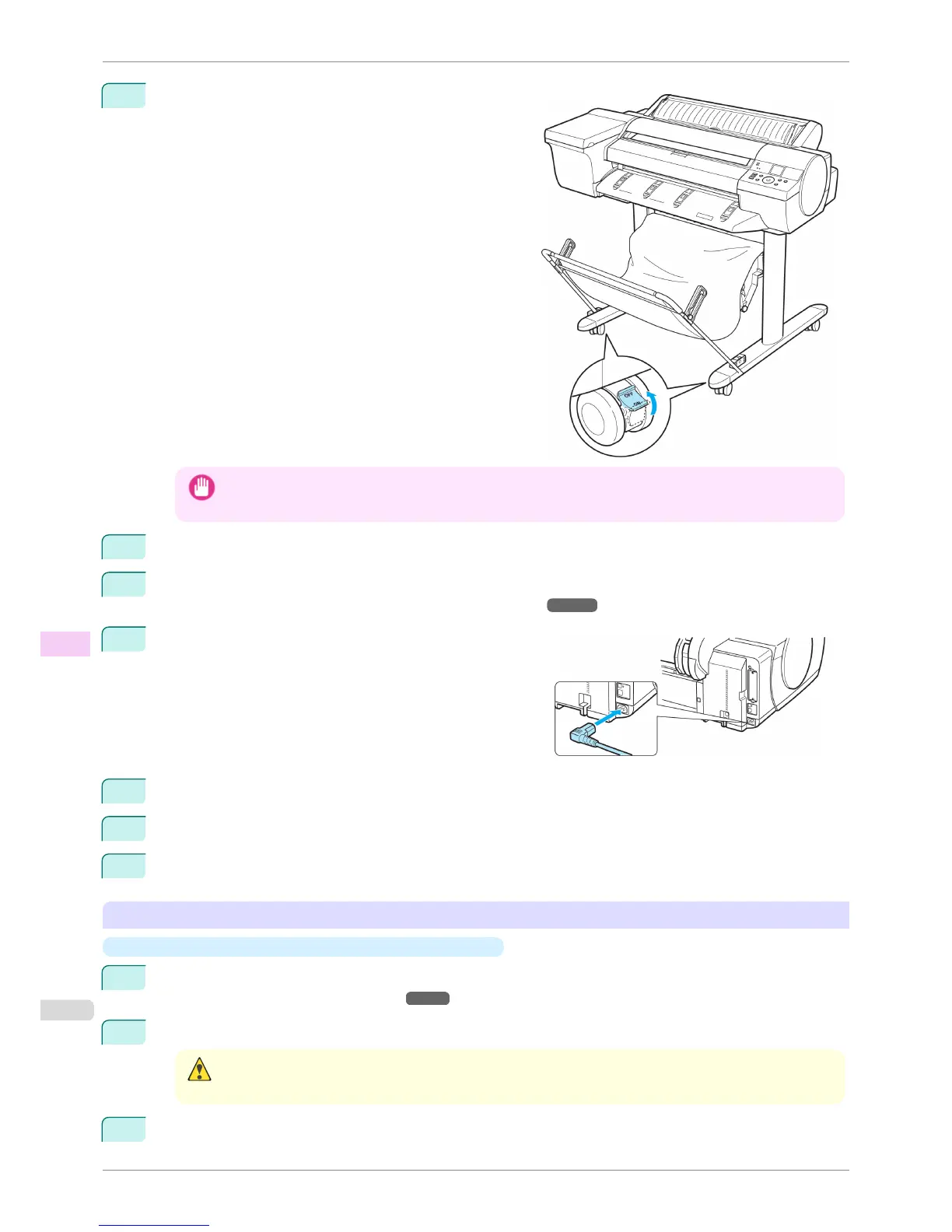
6
Move the Locking Caster switch on the Stand to OFF to
unlock and move the printer.
Important
• When moving the Stand, always unlock by moving the Locking Caster switch to OFF. Moving the Stand with
the Locking Caster locked may scratch the floor.
7
Move the Locking Caster switch on the Stand to ON to lock the Stand.
8
If you are using the Spectrophotometer Unit, attach the Spectrophotometer Unit to the printer.
(See "Removing and Attaching the Spectrophotometer Unit.") ➔ P.852
9
Connect the power cord to the Power Supply Connector on
the back of the printer.
10
Connect the interface cable to the printer.
11
Plug the power cord into the outlet.
12
Connect the interface cable to the computer or network.
Removing and Attaching the Spectrophotometer Unit
•
Removing the Spectrophotometer Unit From the Stand
1
Turn the printer off.
(See "Turning the Printer On and Off.") ➔ P.21
2
Unplug the power cord from the outlet.
Caution
• Always turn off the printer and unplug the power cord before cleaning or maintenance. Accidentally leaving the
printer on poses a risk of injury if you touch moving parts inside the printer.
3
Disconnect the power cord and interface cable from the printer.
Carrying the Printer
iPF6400S
User's Guide
Maintenance and Consumables Other Maintenance
852













 To Next Page