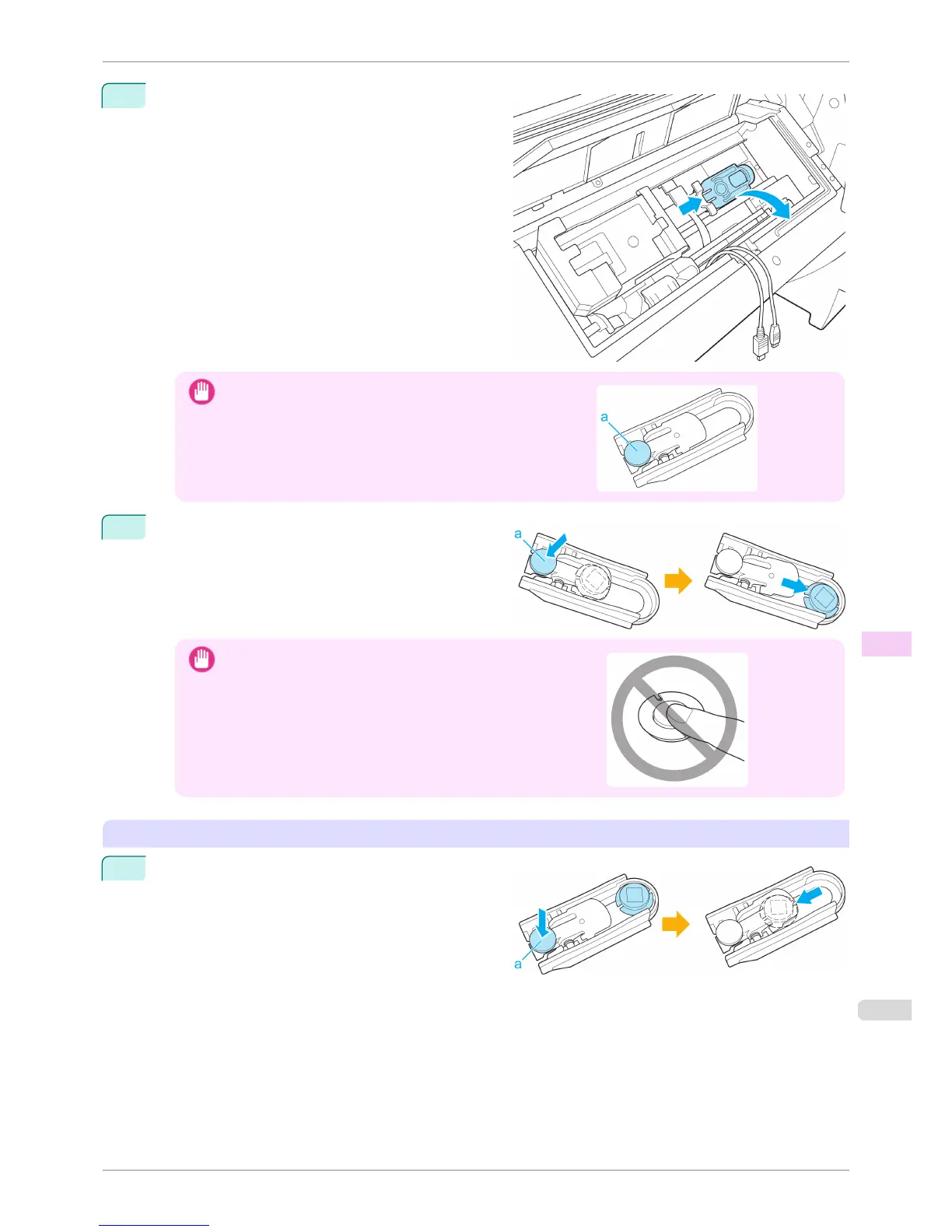
9
Move the White Calibration Tile Holder in the direc-
tion of the arrow and remove it from the Up-down
Unit.
Important
•
Do not touch the (a) part of the White Calibration Tile Holder ex-
cept when removing the White Calibration Tile.
Doing so may cause the White Calibration Tile to fall, which can
lead to damage.
10
Push the (a) part of the White Calibration Tile Holder
and remove the White Calibration Tile.
Important
•
Never touch the white part of the White Calibration Tile.
If the white part is dirty, the printer may not be able to obtain the
correct color measurement results.
Installing the Spectrophotometer Sensor and White Calibration Tile
1
Place the White Calibration Tile in the White Calibra-
tion Tile Holder and mount it in the position shown in
the diagram while pushing down on the (a) part.
When installing the White Calibration Tile, make sure
it is facing the appropriate direction.
iPF6400S
Replacing the Spectrophotometer Sensor of the Spectrophotometer Unit (option)
User's Guide
Maintenance and Consumables Other Maintenance
863













 To Next Page