267 • DM NAX® Product Manual — Doc. 9045M
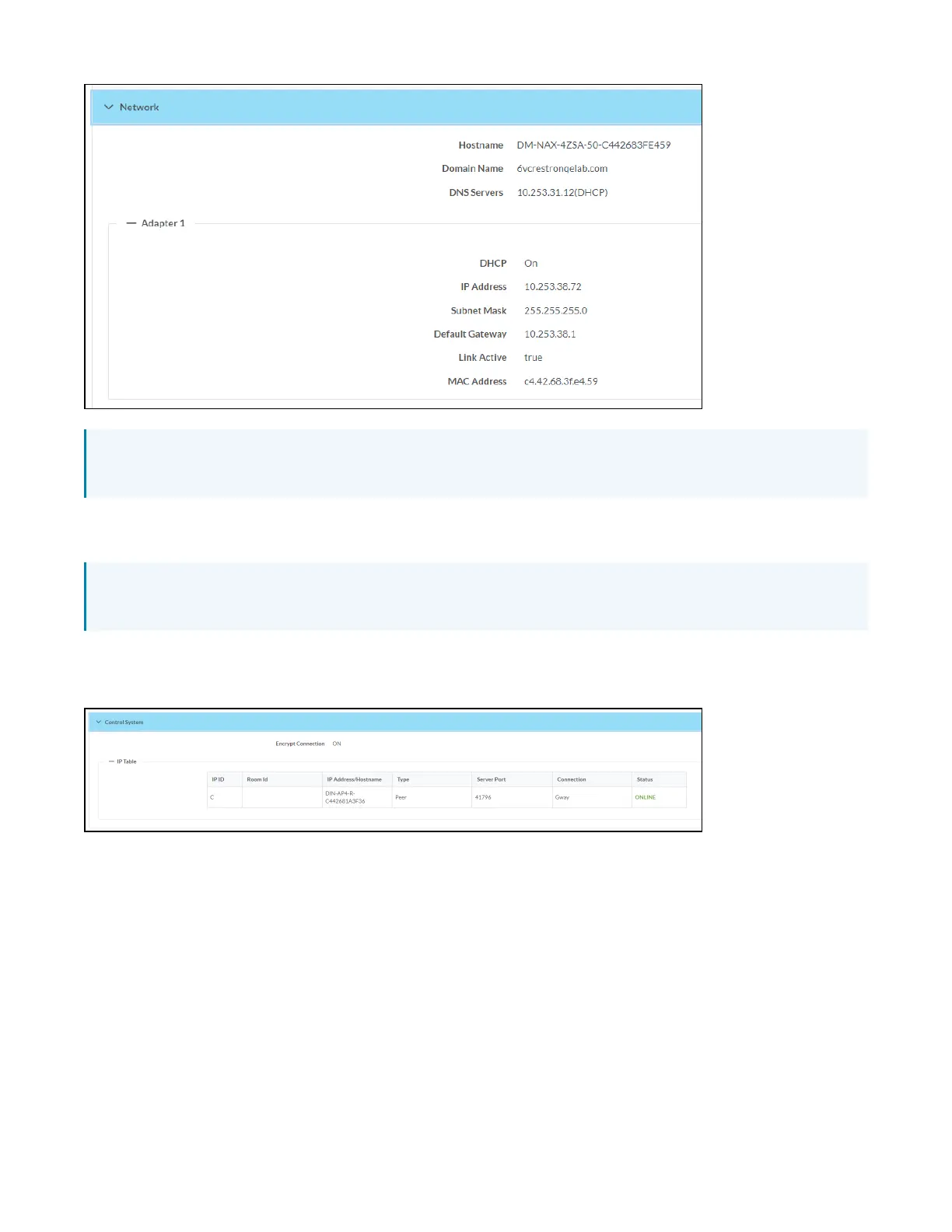
NOTE: By default, the host name of the DM-NAX-4ZSA-50 consists of the model name followed by
the MAC address of the device. For example, DM-NAX-4ZSA-50-00107FB58088.
Click + Adapter 1 to display an expanded section that shows additional information. If + Adapter 1 is
selected, click - Less details to collapse the section.
NOTE: The + Adapter 2 option appears when the dual Ethernet ports on the DM-NAX-4ZSA-50 are
set to isolate traffic using the Port Selection feature.
Control System
The Control System section displays connection information, consisting of the following:
l
Encrypt Connection: ON or OFF
l
IP ID: Reports the currently used IP ID of the DM-NAX-4ZSA-50
l
IP Address/Hostname: The IP address of the control system
l
Room ID: Displays the room ID
l
Status: OFFLINE or ONLINE
Settings
The Settings tab enables you to configure the DM-NAX-4ZSA-50 settings. The Settings page can be
accessed at any time by clicking the Settings tab of the DM-NAX-4ZSA-50 interface.



 To Next Page
 Loading...









