495 • DM NAX® Product Manual — Doc. 9045M
Input Channels
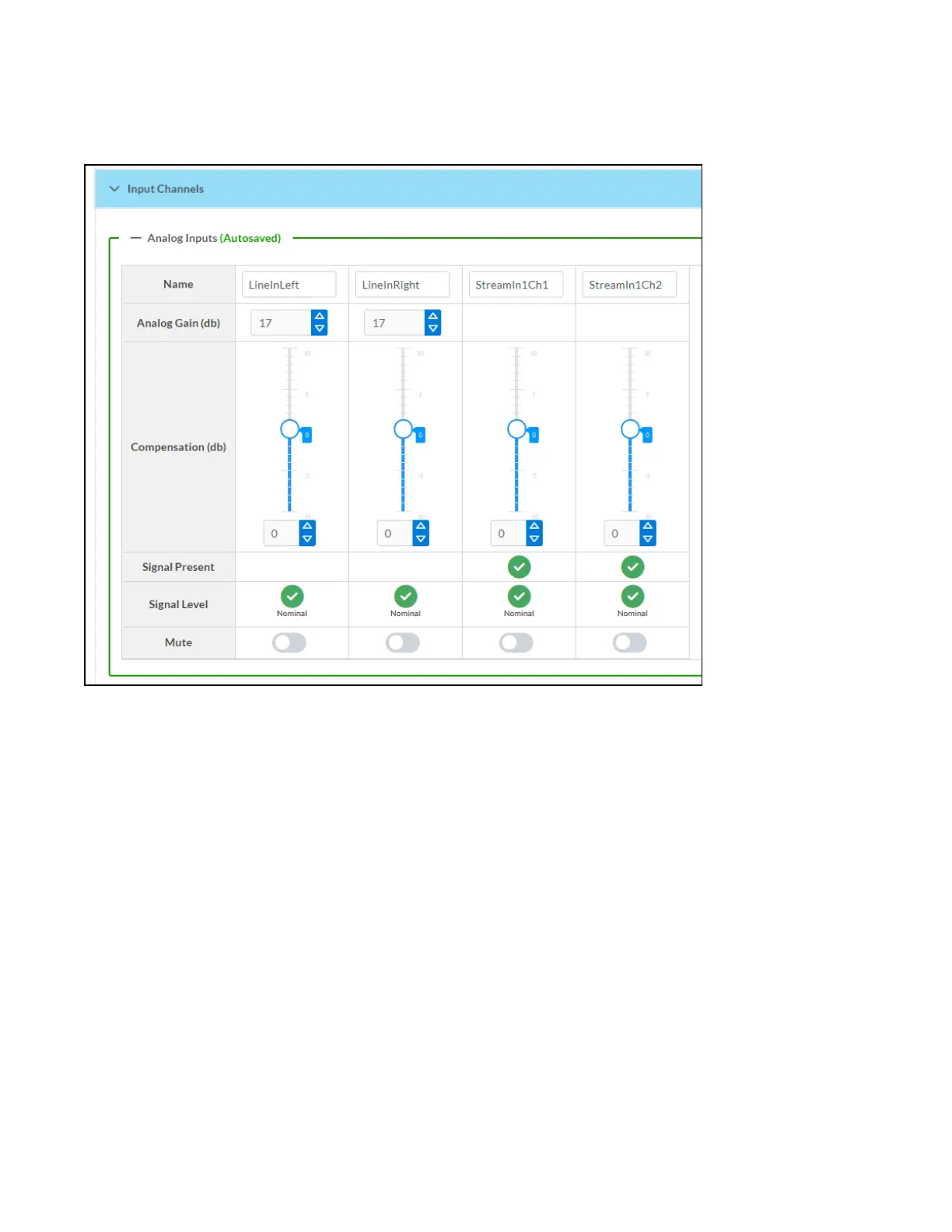
The Input Channels section is used to configure the Name, Compensation, and Mute attributes of the
front panel line inputs on the DM-NAX-AUD-IO.
Configure Inputs
1. If needed, enter a friendly name for each input in its Name field.
2. To set an analog gain value for a given input, click the db arrows to increase or decrease the
compensation. Values range from 0dB to 60dB, adjustable in increments of 1dB.
3. To set a level compensation adjustment for a given input, do one of the following:
l
Move the Compensation slider up to increase or down to decrease the level compensation.
Compensation increases or decreases the level of the incoming audio signal on any of the
physical inputs on the device's rear panel.
l
Click the db arrows to increase or decrease the compensation. Values range from -10dB to
10dB, adjustable in increments of 1dB.
l
Manually enter a value in the Compensation field.
4. To mute the signal from the corresponding input, set the Mute toggle to the right. To disable the
mute, set the Mute toggle to the left. By default, Mute is disabled.
Monitor the device's input signals using the text indicators in the Signal Present and Clipping Detected
columns:



 To Next Page
 Loading...









