EN
>> selection and setting of programs >> 21
Preset programs (P 2 – 7)
Load proles
• The preset programs with their load profiles offer you a multitude of pos-
sibilities to adjust your training depending on your goals.
• The workouts are varied which keeps motivation high even if your spirits are
sagging.
• You get the most out of your workouts, taking into consideration your
general fitness level.
The settings to be completed for the 6 preset programs with load profiles are
in principle the same for all programs:
•Program2–Tour
•Program3–Transition
•Program4–Hill
•Program5–Mountain
•Program6–Summit
•Program7–Interval
• You select the workout time or workout distance as well as the calories to
be used.
• The computer calculates the optimum target heart rate based on your age.
This target heart rate is constantly displayed. Monitor your current heart rate
and adjust the load accordingly.
• You can adjust the load by adjusting the cadence or resistance.
Selection
Turn the selection button until the programs 2, 3, 4, 5, 6 or 7 are displayed.
Confirm your selection by pressing the selection button.
Settings
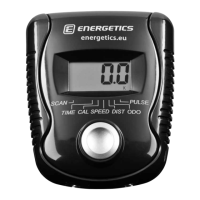
Workout time (TIME)/workout distance (DIST): After selecting one
of these programs, TIME will blink. You can then choose to either set the
workout time or distance (DIST). The computer will skip distance if a time was
entered. If no time is chosen the distance setting is activated.
• Turn the selection key until the desired workout time appears. Confirm your
selection by pressing the selection button.
Calories (CAL): After setting the workout time or distance, calories (CAL) will
blink on the display.
• Turn the selection button until the desired amount of calories to be burned
appears. Confirm your selection by pressing the selection button.
Age: After selecting the calories to be burned, AGE will blink on the display.
• Turn the selection button until your age appears. Confirm your selection by
pressing the selection button.
Begin your workout
When all settings are complete the program display will blink. Start the work
out by pressing the function key ST/SP.
Settings during the workout
You can adjust the resistance during the workout. The current resistance level
is displayed. Control your heart rate by altering the cadence or resistance.
The program’s underling time/resistance profile remains intact.
Control your heart rate by altering the cadence or resistance.



 To Next Page