14. Effects 271
Begin, End, Start
The begin and end values of an effect represent the limits that the function value will hit as it
passes through the effect table. The begin and end values can be edited directly in the effects
editor window or in the programmer / cue editor. Be aware that editing the begin and end
values an effect result in an adjustment to the base value for that fixture function as well.
The start value of an effect is the real world value at which the function will start the effect.
The start value of an effect is directly tied to the offset value of an effect.
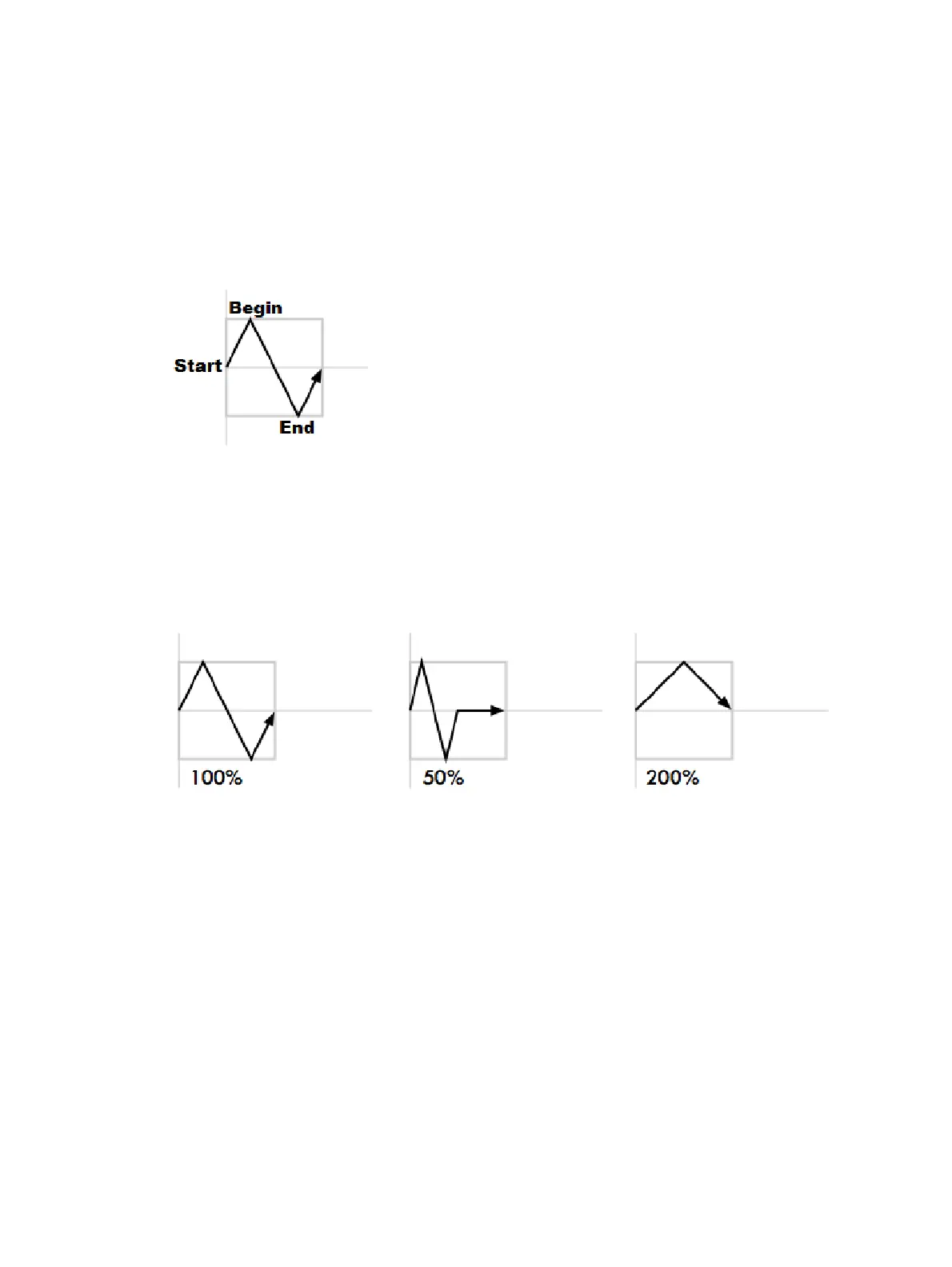
The following diagram shows the begin, end, and start points of a simple effect:
Length
The length is the proportion of the effect's period that it is active for. It is assigned as a
percentage.
The following diagram shows how the value of a parameter assigned to the sawtooth table
changes over time, with different length values:
N Shot
This is the number of times that the effect repeats before finishing. A dash (—) in the N Shot
cell denotes that the effect will run indefinitely.











 To Next Page