28. Visualizer Connectivity 463
28.4.3 WYSIWYG Console Edition Configuration
When using some versions of Console Edition (CE) WYSIWYG to connect directly to a Hog
system, only one universe of visualization is possible at a time. If your version of CE is
limited to one universe, you will need to specify which universe is active within the
WYSIWYG file:
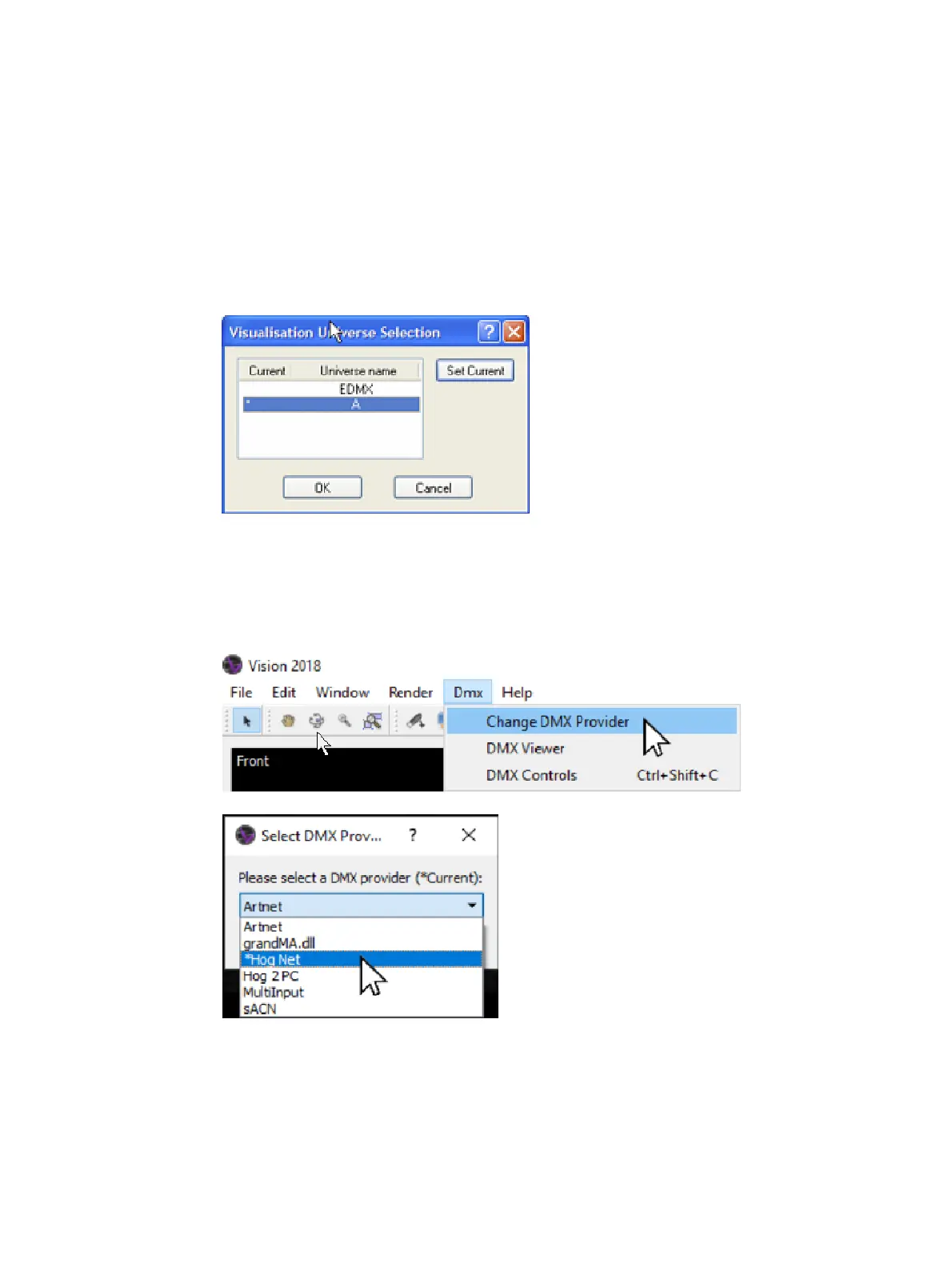
With the WYSIWYG file open, go to the Live Module and select Ed it → Univer ses.
1. The Visualization Universe Selection window will open. This window will display all the
currently configured universes within your drawing. Use this window to select the
universe you wish to visualize from the console.
2. Configuring WYSIWYG CE - the Visualization Universe
28.4.4 Vectorworks Vision Configuration
Set the DMX provider in Vectorworks Vision to the Hog connectivity driver using the following
steps:
1. Click the "Dmx" option at the top of the Vision Window and select the "Change DMX
Provider" menu option.
2. In the "Select DMX Provider" pop up menu select "Hog Net" and click okay.
28.4.5 Capture Configuration
Capture 2018 older:











 To Next Page