ART 2.0 91
User Guide v 2.0 — March 2023 Making Adjustments
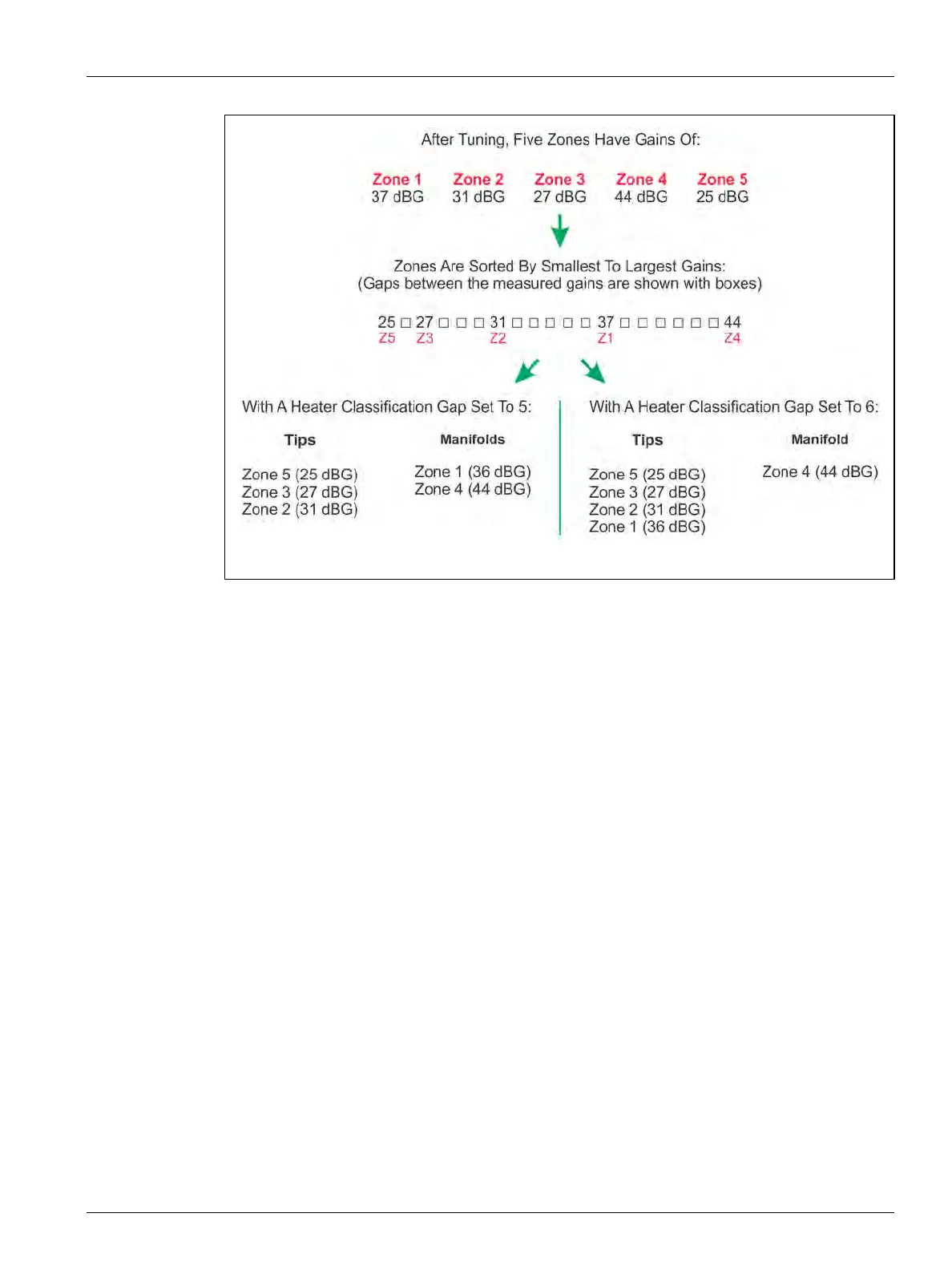
A dialog window is shown after the tuning is complete for a new mold setup or if one or more
zones have been re-tuned on a different mold. This is only if the heater types have changed.
NOTE: This dialog will not show if the system cannot find a gap between zones wider than
the Heater Classification Gap setting in System Setup. The system is unable to
determine a tip from a manifold during the tuning process.
In the dialog window, the zones are shown with their determined classifications. All zones are
selected by default. If you touch the Accept button, the system will store the tips and
manifold zones that it determined. The classifications are stored in the Mold Setup for later
reference. You can also deselect or reselect zones to customize which ones are automatically
classified. If you touch the Exit button, then no automatic classification will occur.
Figure 7-17 Automatic Zone Classification


 To Next Page