v 2.0 — March 2023 Altanium Delta5
142 Heats Setup - Control Page 3
10.3.3 Heats Setup - Control Page 3
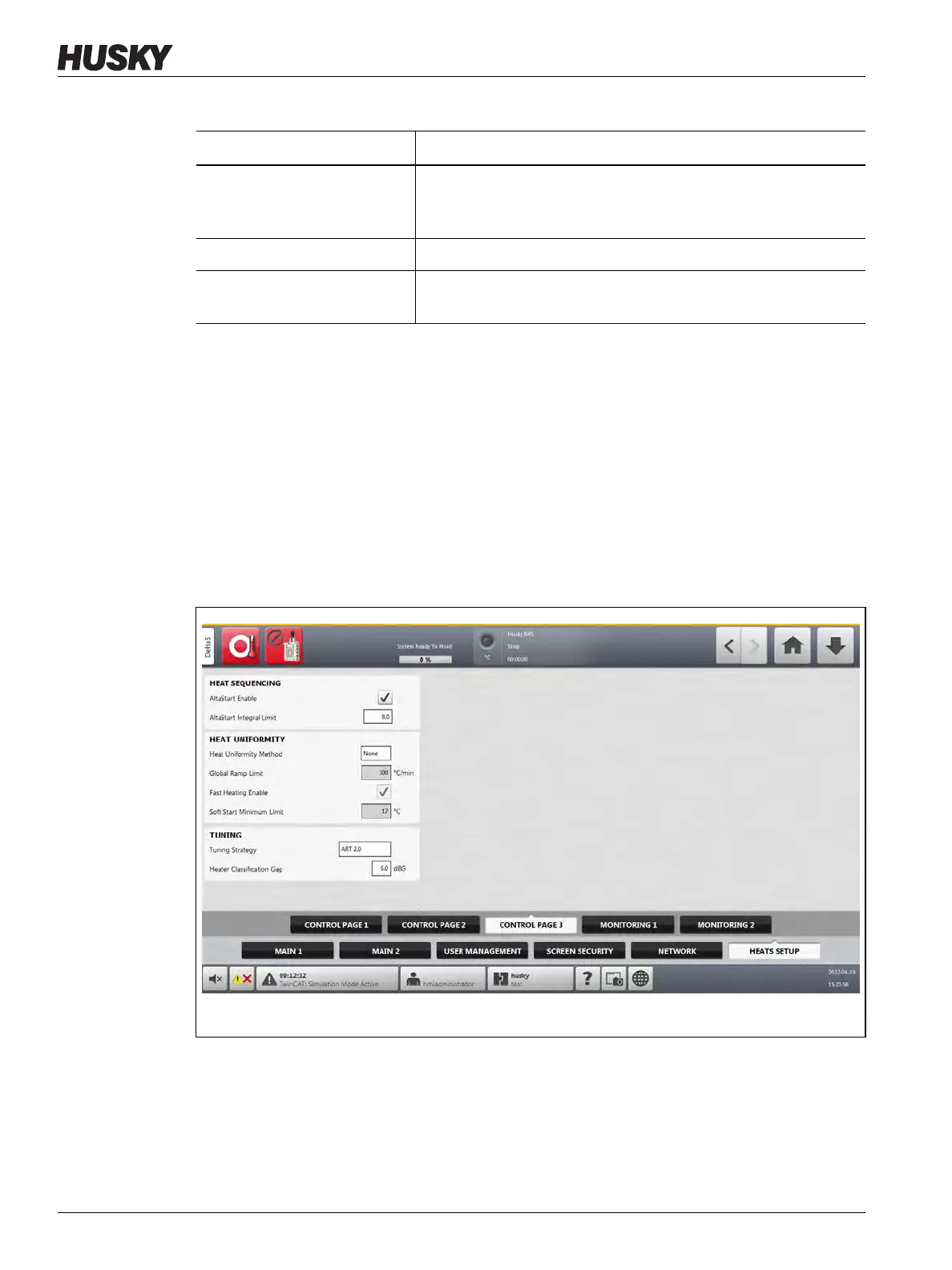
On the Control Page 3 tab of the Heats Setup screen, configurations are set for the categories
that follow:
• Heat Sequencing
• Heat Uniformity
• Tuning
The Control Page 3 tab is shown in Figure 10-18 with the configuration settings for each
category. The configuration settings are described in Table 10-10.
Auto Following Power Limit This value is the limit used by the Auto Following function to
calculate if the average power output of a candidate zone is in the
permitted deviation of the follower zone.
Grid Size Used to change the mainframe layout on the Card Layout screen.
Group Offset Used to configure the linked systems. The default group offset
setting is 96 zones.
Table 10-9 System Setup Screen - Heats Setup - Control Page 2 (Continued)
Item Description
Figure 10-18 Heats Setup - Control Page 3


 To Next Page