v 2.0 — March 2023 Altanium Delta5
108 Adjust the Soft Start Minimum Limit
9.6.3 Adjust the Soft Start Minimum Limit
The Soft Start limit is used to calculate the window between the lowest temperature zone
and the highest temperature zone in the system. This window is used during the Soft Start
process and controls the gap between the coldest and hottest zones. Usually, a lower Soft
Start Limit value decreases the gap, which gives better thermal uniformity of the hot runner
system from a cold startup.
To adjust the Soft Start Minimum Limit, do the steps that follow:
1. On the Home screen, touch the System Setup button.
2. On the System Setup screen, touch the Heats Setup tab and then the Control Page 1
tab.
3. On the Soft Start panel of the screen, touch the Soft Start Minimum Limit field.
4. Enter the Soft Start Minimum Limit temperature value.
9.7 Alarms Screen
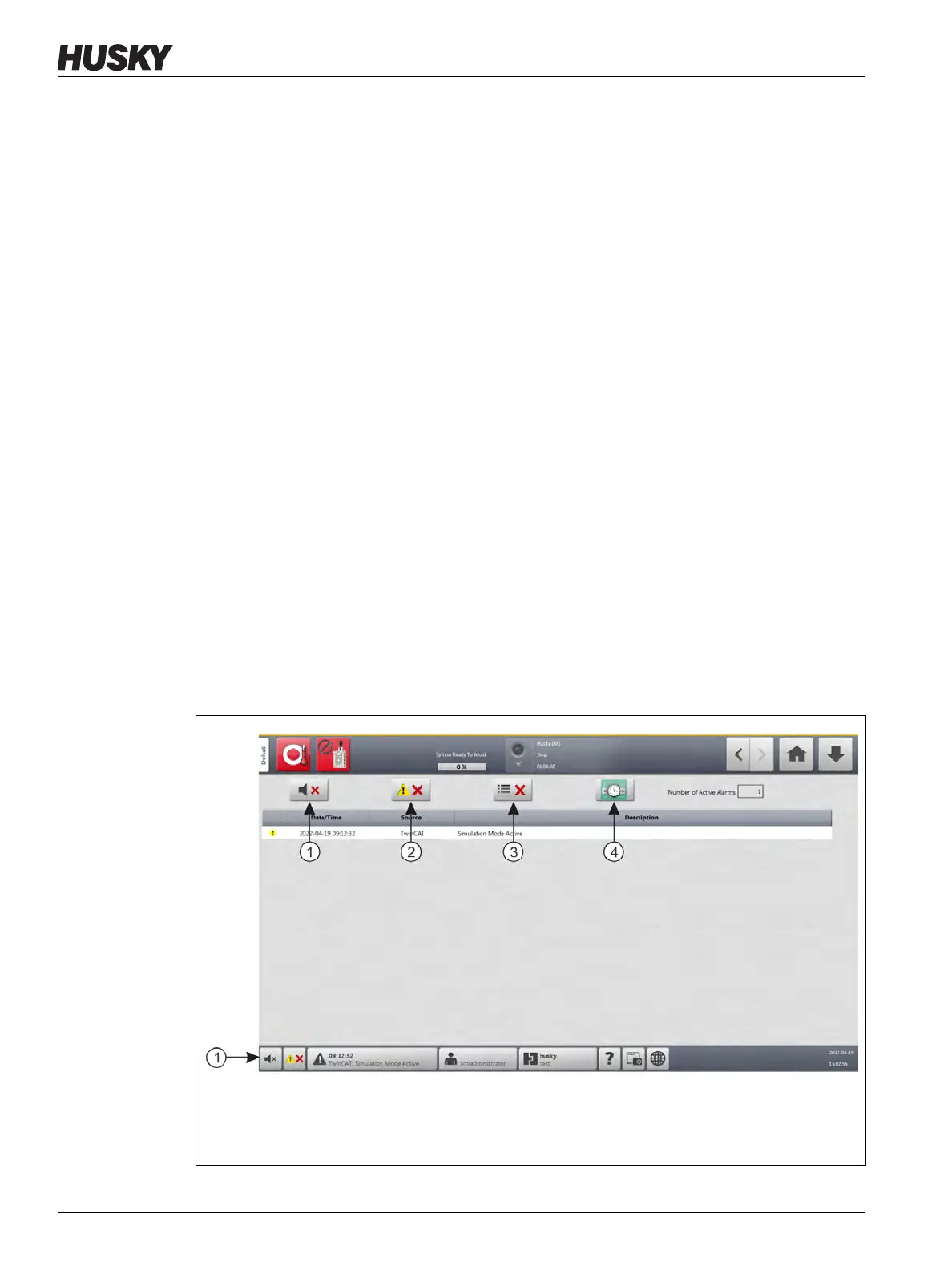
The Alarms screen shows the system errors that occur. Refer to Figure 9-1.
When an alarm is active, an icon in the Alarms button (at the bottom of the Altanium screen)
changes to yellow and flashes red. Touch the Alarms button to open the Alarms screen.
NOTE: For a description of the alarm conditions shown on the Event History screen and
Alarm screen, refer to Section 9.10. For a description of the abort conditions shown on
the Event History screen and Alarm screen, refer to Section 9.11.
Figure 9-1 Alarms Screen
1. Silence Horn Button 2. Reset Alarms Button 3. Clear Inactive Alarms Button 4. Event
History Button


 To Next Page