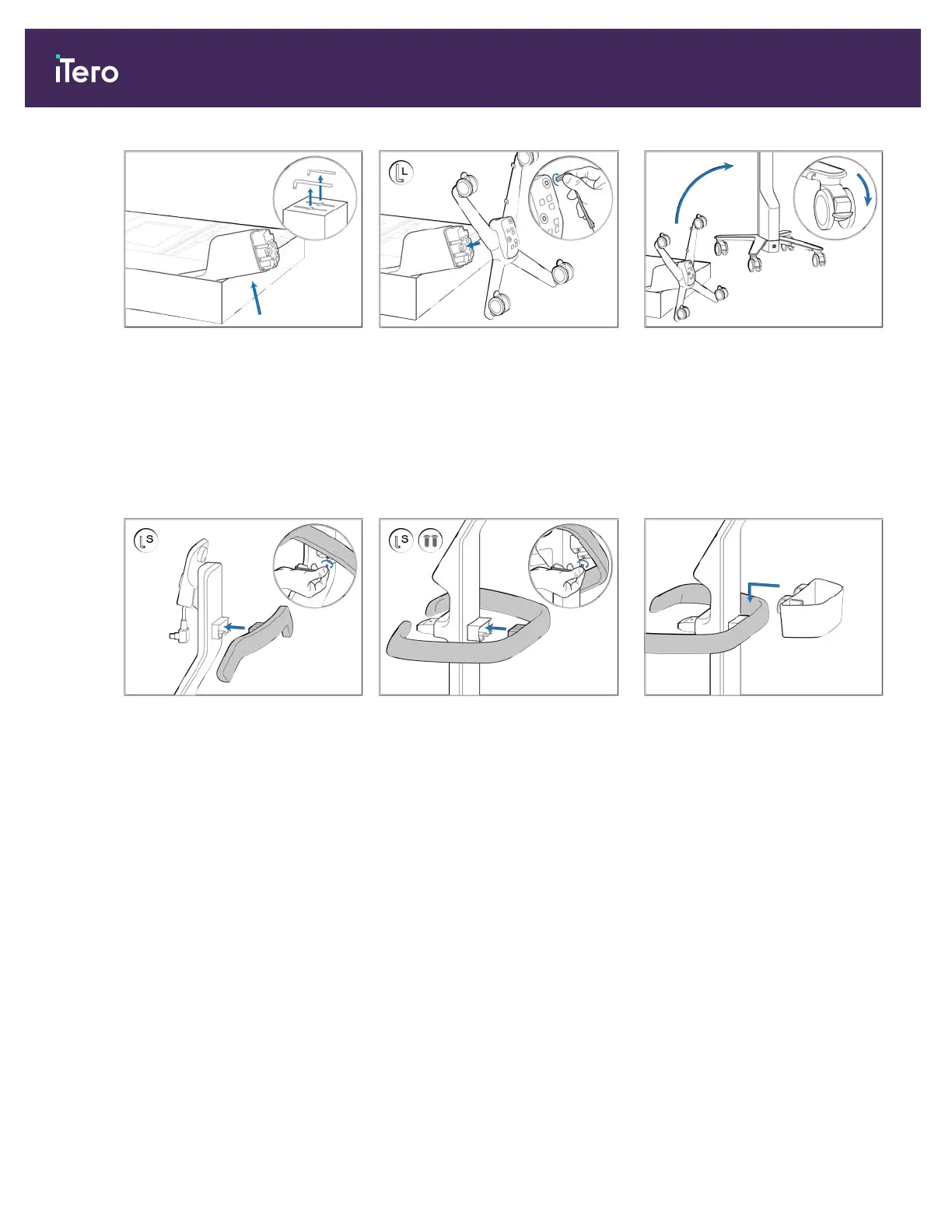
1. Remove the foam covering the
post (B).
Note: The two Allen keys (A) are
on top of the foam.
2. Lift the post (B), pull it out
slightly and rest it on the side of
the box.
3. Attach the wheel base (C) to the
end of the post (B) and tighten
using the large Allen key.
Note: Always use the shorter side
of the Allen keys to make sure the
screws are fully tightened.
4. Move the wheel stand to an
upright position and lock at least 2
wheels.
5. Remove the upper handle (D)
from the accessory box. Attach
it to the post (B) and tighten
using the small Allen key.
6. Remove the main handle (E) and
the 2 screws from the accessory
box. Attach the handle and tighten
using the screws and the small
Allen key.
7. Place the sleeve basket (F) on the
back of the main handle (E).
iTero Element® 5D Plus User manual
10 © 2020 Align Technology, Inc. All rights reserved.



 To Next Page