184 Instruction Manual QuickTOC
®
ultra
IECEx 12E5119
8 Care and Maintenance
8.5 Perform Care Actions LAR | PROCESS ANALYSERS AG
8.5.27 Check the Injection Port
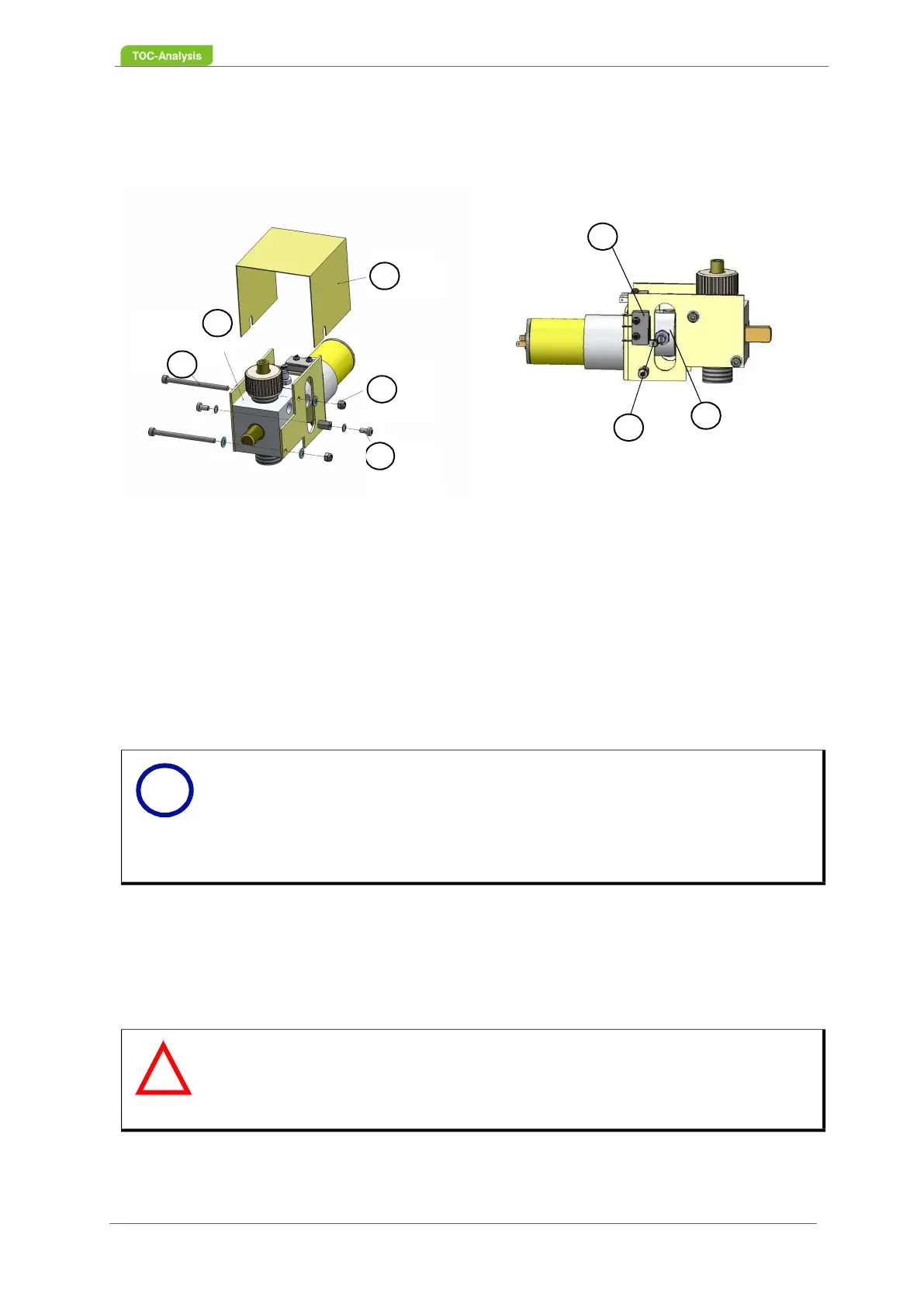
1. Undo the two Torx screws (5) with spring washers on the cover cap (3).
2. Pull the cover cap (3) upwards.
3. Access the display “Service actions”.
4. Close and open the injection port (2) to test the ease of movement of the closing and opening
functions for the injection port (2) (rotation test).
5. When turning the valve cock plug, check that the switch levers of the micro-switch (7) are not
pressed down onto the micro-switch housing by the switch knob of the valve cock plug.
6. Ensure that the minimum distance of 1 mm between the switch levers of the micro-switches and
the respective micro-switch housing (6) is not dropping below.
7. If the test criteria are not met, please contact your local partner or the Technical Support of LAR
(Chapter 15 on page 283).
8. Once all test criteria are met, screw on the cover cap of the injection port (2).
1 2x Screws M3x45
2 Injection Port
3 Cover Cap
4 2x Nuts M3, 4x Washers M3
5 2x Screws M3x6, 2x Washers M3
6 Micro-switch housing
7 Switch lever of micro-switch
8 Switch knob on valve cock plug
Fig. 128: Injection port
Notice
The closing and opening of the injection port causes a rotation of the valve
plug.
There is a switch knob on the valve plug (8, Fig. 128, page 184). If the valve
is closed, the valve plug rotates until the switch knob on the next selector lever
of a microswitch triggers the switching process and stops the valve.
Warning
Damage to the valve switches
During operation the valve switches.
Do not reach into the switching range of the valve.
3
4
5
2
1
6
7
8
i
!



 To Next Page