12E5119 Instruction Manual QuickTOC
®
ultra
IECEx 99
7 How to Work with the Analyser
7.6 Waveform
LAR | PROCESS ANALYSERS AG
7.6 Waveform
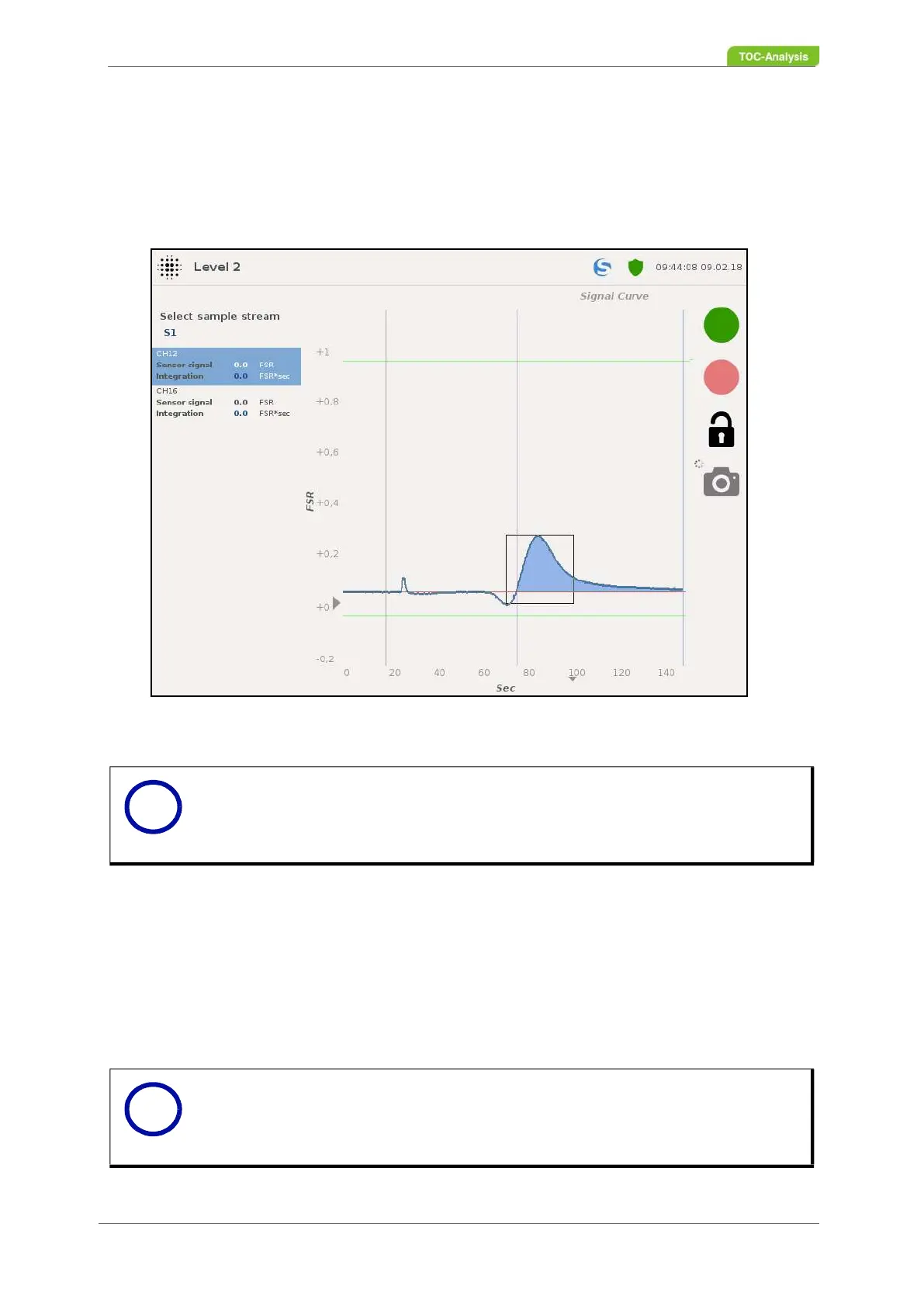
This view shows the waveforms. The "Sample stream selection" key can be used to select the signal of
the desired sample stream. Furthermore, after selecting the sample stream, the individual parameters
can be selected for illustration.
Selection of sample stream:
This function selects the sample current and parameter to be displayed.
Sensor signal:
This value corresponds to the current signal of the detector during a measurement [FSR].
Integration:
This value indicates the signal area [FSR * sec].
Fig. 68: Waveform (Example: Sample stream with one Channel / parameter)
Notice
This view supports the zoom funcionality (Chapter 7.14.1 on page 155).
Notice
The unit in this display is in FSR and stands for "Full Scale Range". The values
are between 0 and 1 FSR and corresponding standard values 0 to 20 or 4 to
20 mA.
i
i



 To Next Page