Description of the converter
- 9 -
optek-converter C4101 Version 07.2009_1.2US, 23.07.2009
www.optek.com
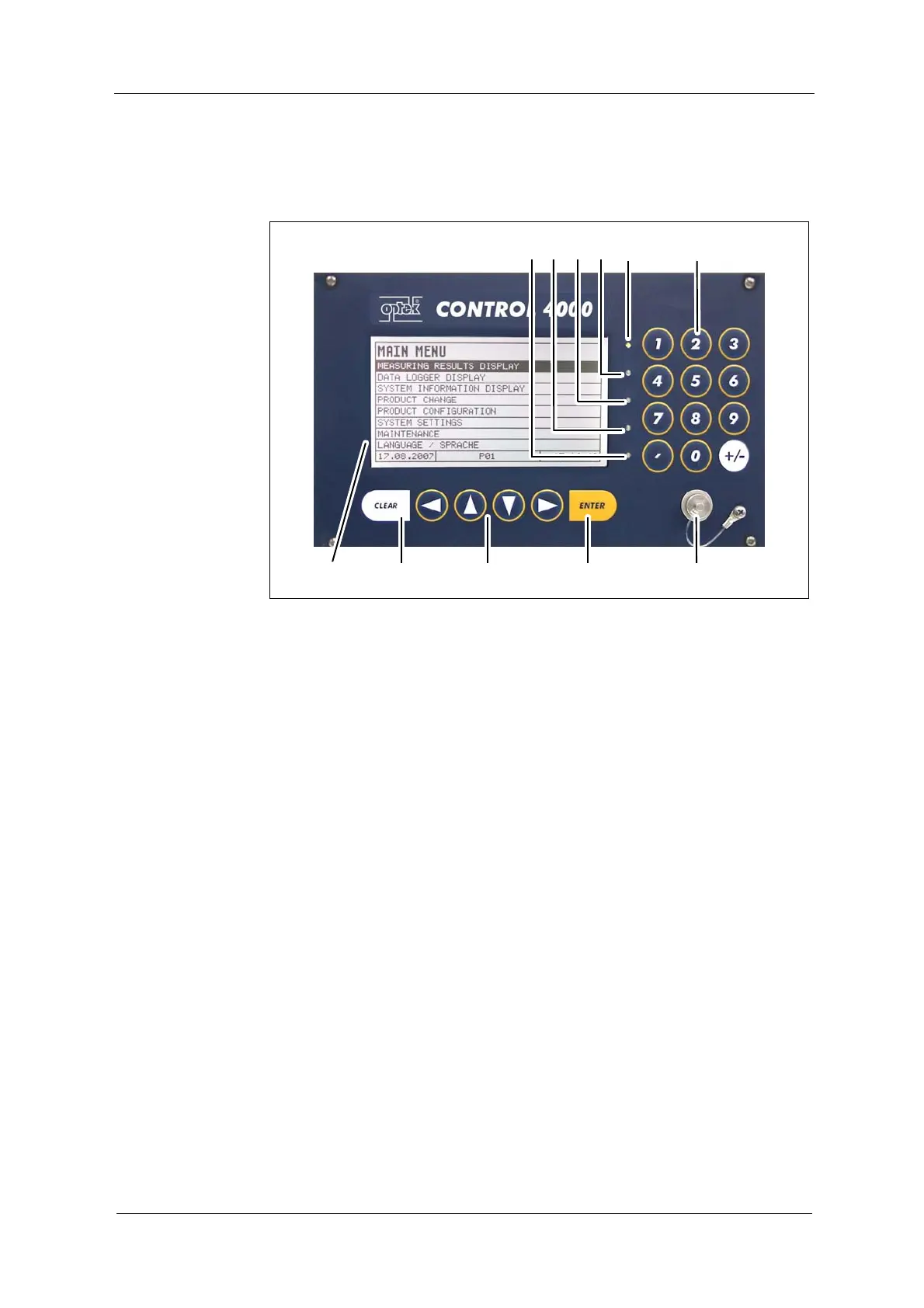
4.1 Front view converter C4000
Fig. 2 Front panel converter C4000
Numbers stand for:
1. LED (flashes red), indicates lamp failure or system failure
2. LED (yellow), switch indicator for alarm 3 when a value exceeds or falls
below a limit value
3. LED (yellow), switch indicator for alarm 2 when a value exceeds or falls
below a limit value
4. LED (yellow), switch indicator for alarm 1 when a value exceeds or falls
below a limit value
5. LED (green), indicates readiness for operation
6. Numerical keyboard (single assignment)
7. Connection for RS-232 (control-connect cable)
8. ENTER key (confirmation of entries)
9. Cursor key (moving in the menus and entries)
10. CLEAR key (rejecting entries, returning to previous menu)
11. Display



 To Next Page