Tracking Generator
R&S
®
ESR
488User Manual 1175.7068.02 ─ 12
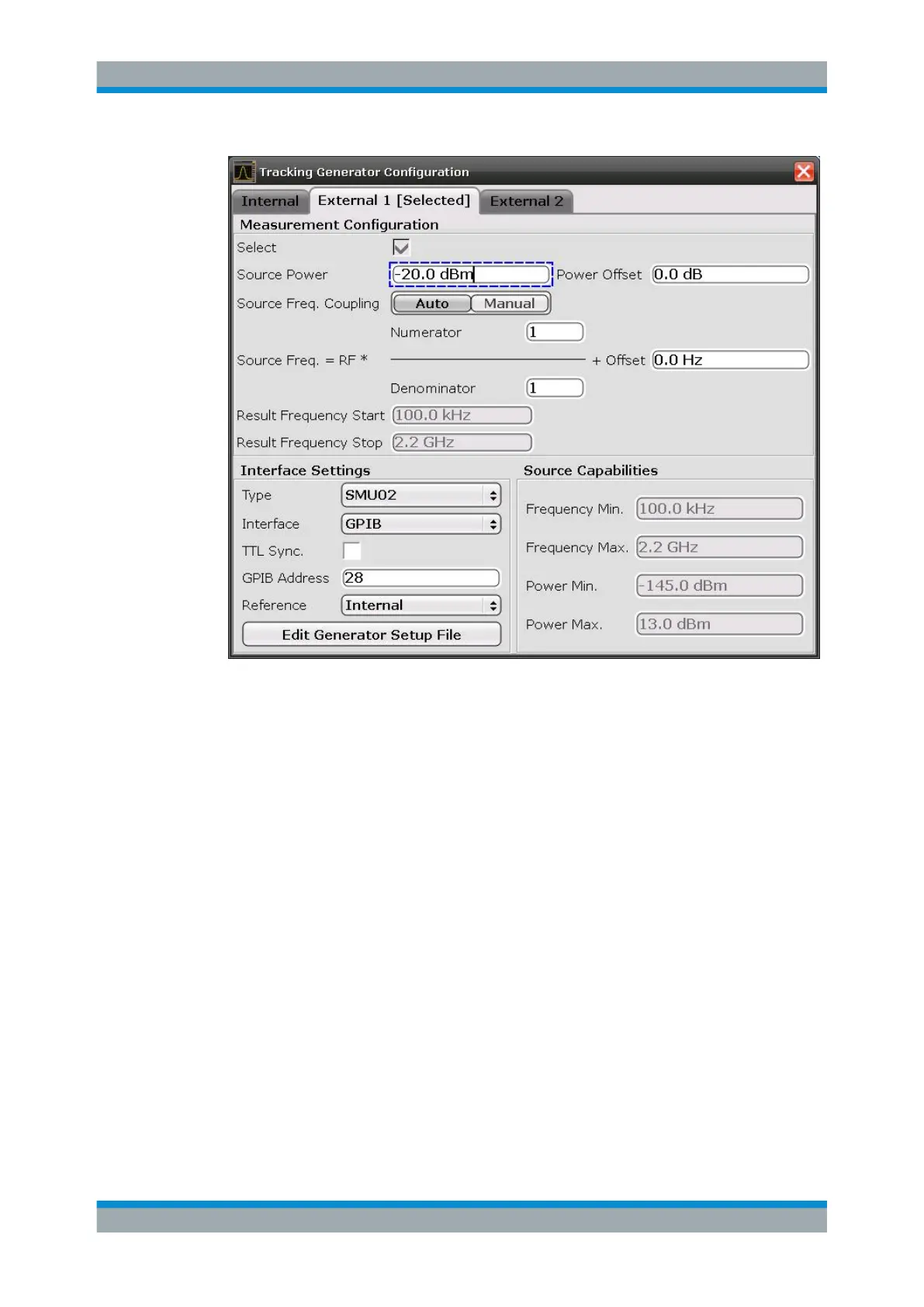
The configuration dialog box contains the following fields:
Select
Selects the specified external tracking generator as the current tracking generator
source. "External 1" or "External 2" is displayed as the source on the "Source RF" soft-
key. All tracking generator functions are performed with the currently selected source.
Note: Note that the generator is not automatically activated when it is selected. To acti-
vate the currently selected generator, click the "Source RF On" softkey.
Source Frequency Coupling
Enables or disables frequency coupling between the analyzer and the generator.
"Auto"
Default setting: the frequencies are coupled (see "Generator Fre-
quency (Numerator/Denominator/Offset)" on page 489).
"Manual"
The generator uses a fixed frequency, defined in the (Fixed) Genera-
tor Frequency field which is displayed when you select "Manual" cou-
pling.
Remote command:
SOURce<n>:EXTernal<generator>:FREQuency:COUPling[:STATe]
on page 908
(Fixed) Generator Frequency
Defines the fixed frequency to be used by the generator.
Configuring Tracking Generators


 To Next Page
 Loading...