VM15 User Manual How to operate VM15
72
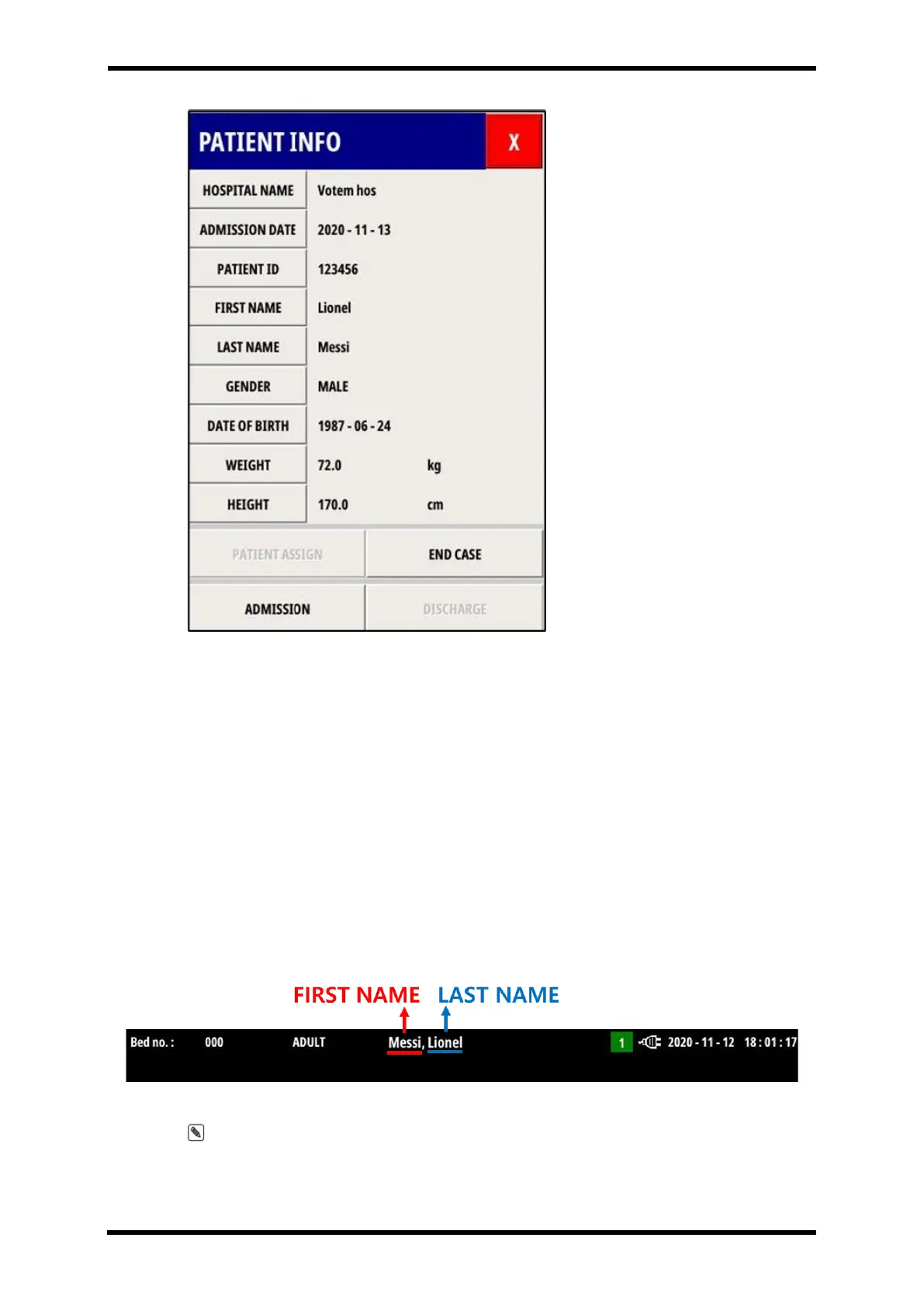
Figure 8-4. Patient info window
- Hospital Name : Enter the hospital name.
- Admission date : Enter the patient’s date of admission. Enter this in the form
yyyy/mm/dd.
- Patient ID : Enter the patient’s ID.
- First Name : Enter the patient’s first name.
- Last Name : Enter the patient’s last name (family name).
- Gender : Choose Male or Female.
- Date of Birth : Enter the patient’s date of birth. Enter this in the form yyyy/mm/dd.
- Weight : Enter the patient’s weight.
- Height : Enter the patient’s height.
- PATIENT ASSIGN : The patient information currently entered in PATIENT INFO is
registered in the VM15. The entered First Name and Last Name will be displayed at the
top of the VM15 screen as shown in Figure 8-5.
Figure 8-5 FIRST NAME / LAST NAME on the MAIN screen
Note. It is recommended to register the patient with the VM15 using PATIENT ASSIGN
before measuring the patient's vital signs.



 To Next Page