CS1D Operating Manual (Basic Operation)
40
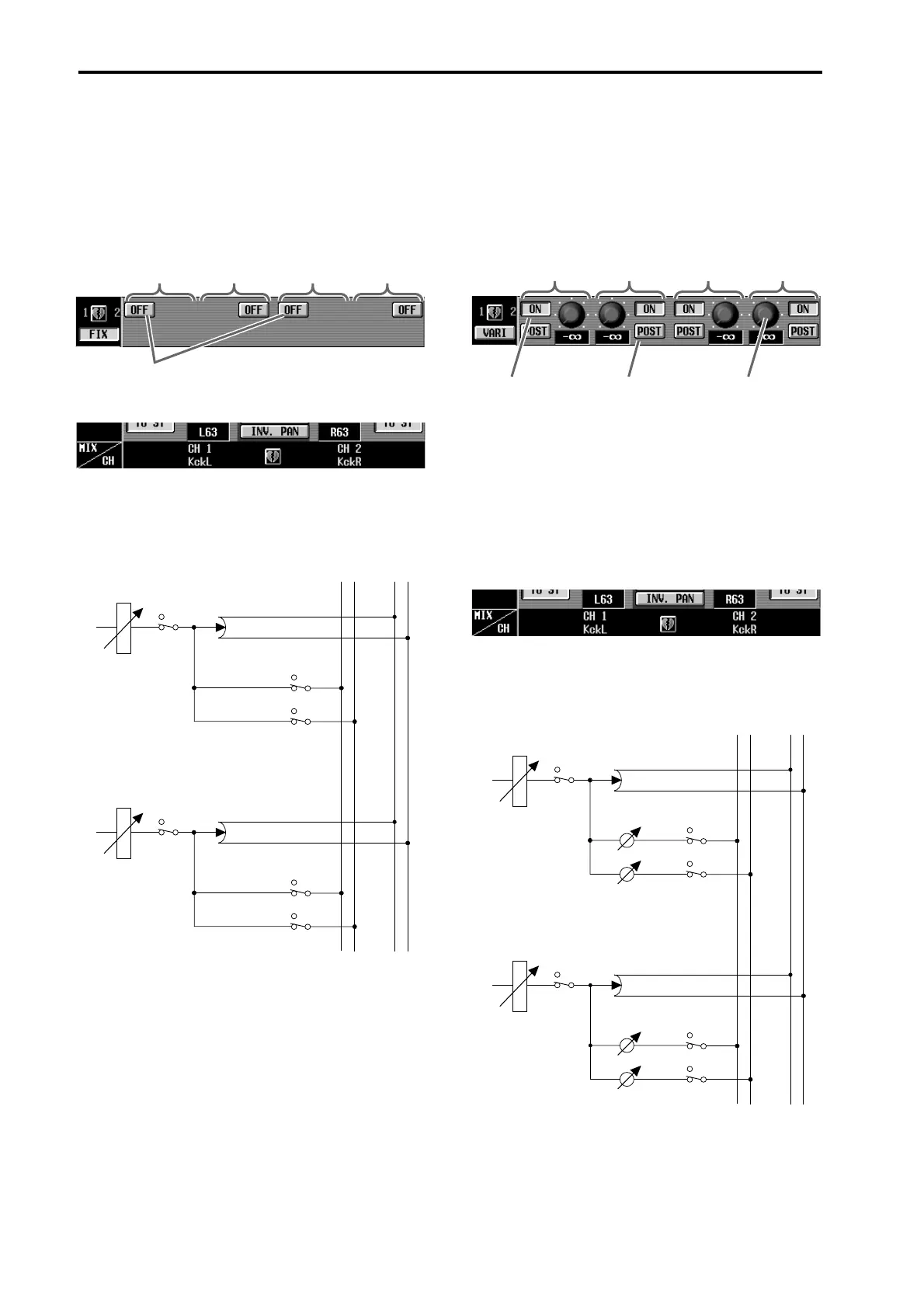
2. Use the on-screen FIX/VARI buttons to select either
FIX type or VARI type for adjacent odd-numbered
→ even-numbered MIX buses.
When you switch between FIX type and VARI type,
the screen and signal flow will change as follows.
• FIX type MIX buses
• VARI type MIX buses
ON/OFF buttons
These are on/off switches for the signal that is sent from the
input channel/ST IN channel to each MIX bus.
Input
channel 1
→MIX bus 1
Input
channel 1
→MIX bus 2
Input
channel 2
→MIX bus 1
Input
channel 2
→MIX bus 2
MIX1
MIX2
STEREO L
STEREO R
……
……
FADER
INPUT CHANNEL 1
ON
ON
ON
PAN
MIX1 (FIX)
MIX2 (FIX)
FADER
INPUT CHANNEL 2
ON
ON
ON
PAN
MIX1 (FIX)
MIX2 (FIX)
ON/OFF buttons
These are on/off
switches for the sig-
nal that is sent from
the input channel/
ST IN channel to
each MIX bus.
PRE/POST buttons
These buttons select
either PRE or POST
(post fader) as the send
point from which the
signal will be sent from
the input channel/ST IN
channel to each MIX
bus. If PRE is selected,
you can also use the
PRE FADER/PRE EQ
buttons to select either
pre-fader or pre-EQ.
LEVEL knobs
These knobs
adjust the send
level of the signal
that is sent from
the input channel/
ST IN channel to
each MIX bus.
Input
channel 1
→MIX bus 1
Input
channel 1
→MIX bus 2
Input
channel 2
→MIX bus 1
Input
channel 2
→MIX bus 2
MIX1
MIX2
STEREO L
STEREO R
……
……
FADER
INPUT CHANNEL 1
ON
ON
ON
PAN
MIX1 (VARI)
LEVEL
MIX2 (VARI)
LEVEL
FADER
INPUT CHANNEL 2
ON
ON
ON
PAN
MIX1 (VARI)
LEVEL
MIX2 (VARI)
LEVEL



 To Next Page