Global functions
74
CUE/SOLO
[Function]
Cue/solo settings and operations.
■ Console
In the LCD FUNCTION
ACCESS block, press the [MON/
CUE] switch (press repeatedly
until the screen shown at the
right appears)
■ Display
MENU button → MON/CUE
button → CUE/SOLO tab
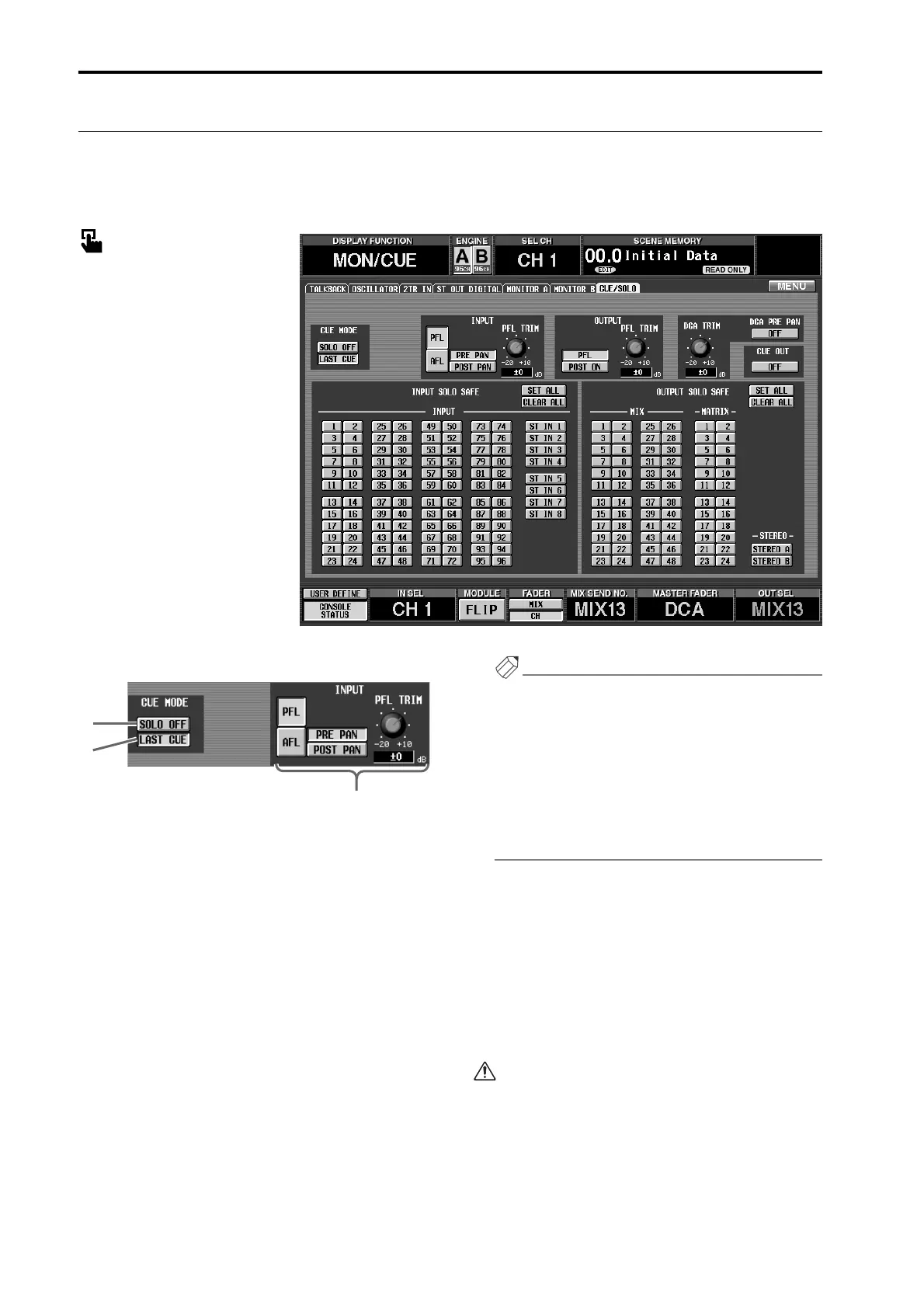
[Screen functions]
1 SOLO ON/OFF
This button selects either CUE mode or SOLO mode as
the monitoring method when a [CUE] switch is used.
• CUE mode (SOLO ON/OFF button is off)
The signal of the channel whose [CUE] switch is pressed
will be sent to the dedicated CUE bus, and can be moni-
tored via the CUE bus from the CUE OUT jacks, MON-
ITOR OUT jacks A, and PHONES MONITOR A jack.
By using this method, you can monitor the signals of an
input or output channel without affecting the other buses.
• SOLO mode (SOLO ON/OFF button is on)
This is the so-called “solo function,” in which the sig-
nal of only a specific channel will be sent to the MIX,
MATRIX, and STEREO A/B buses.
The signal of only the channel whose [CUE] switch is
pressed will be send to the MIX, MATRIX, and STE-
REO A/B buses, and other channels will be muted.
The signal of the channel whose [CUE] switch is
pressed can also be monitored from the CUE OUT
jacks, MONITOR OUT jacks A, and the PHONES
MONITOR A jack.
Hint
The SOLO ON/OFF button is linked with the
[SOLO] switch in the CUE section (MASTER block)
of the CS1D top panel. If CUE mode is selected the
[SOLO] switch LED will be dark, and if SOLO mode
is selected it will blink.
Even when the SOLO ON/OFF button is on, you can
exclude a specific input channel or output channel
from the solo operation. This setting can be made in
the SOLO SAFE section (7) of the CUE/SOLO screen.
2 LAST CUE ON/OFF
This button specifies the operation when a [CUE]
switch is pressed for more than one channel.
• When LAST CUE is on
Only the channel that was last selected by the [CUE]
switch will be monitored.
• When LAST CUE is off
All channels for which the [CUE] switch is currently
on will be mixed and monitored.
MIX CUE mode is valid only for the [CUE]
switches of the input channels, the output channels,
and the DCA section.
For example while the NOISE GATE KEY IN
[CUE] switch of the SELECTED INPUT CHAN-
NEL block is on, only the key-in signal of the built-
in noise gate of that input channel will take priority
for monitoring.
1
2
3



 To Next Page