CS1D Operating Manual (Start-up)
36
Monitor the input signal
After you have patched an input source to an input channel, press the [CUE] switch for that input channel and check
whether it is output from the MONITOR OUT jacks.
[Procedure]
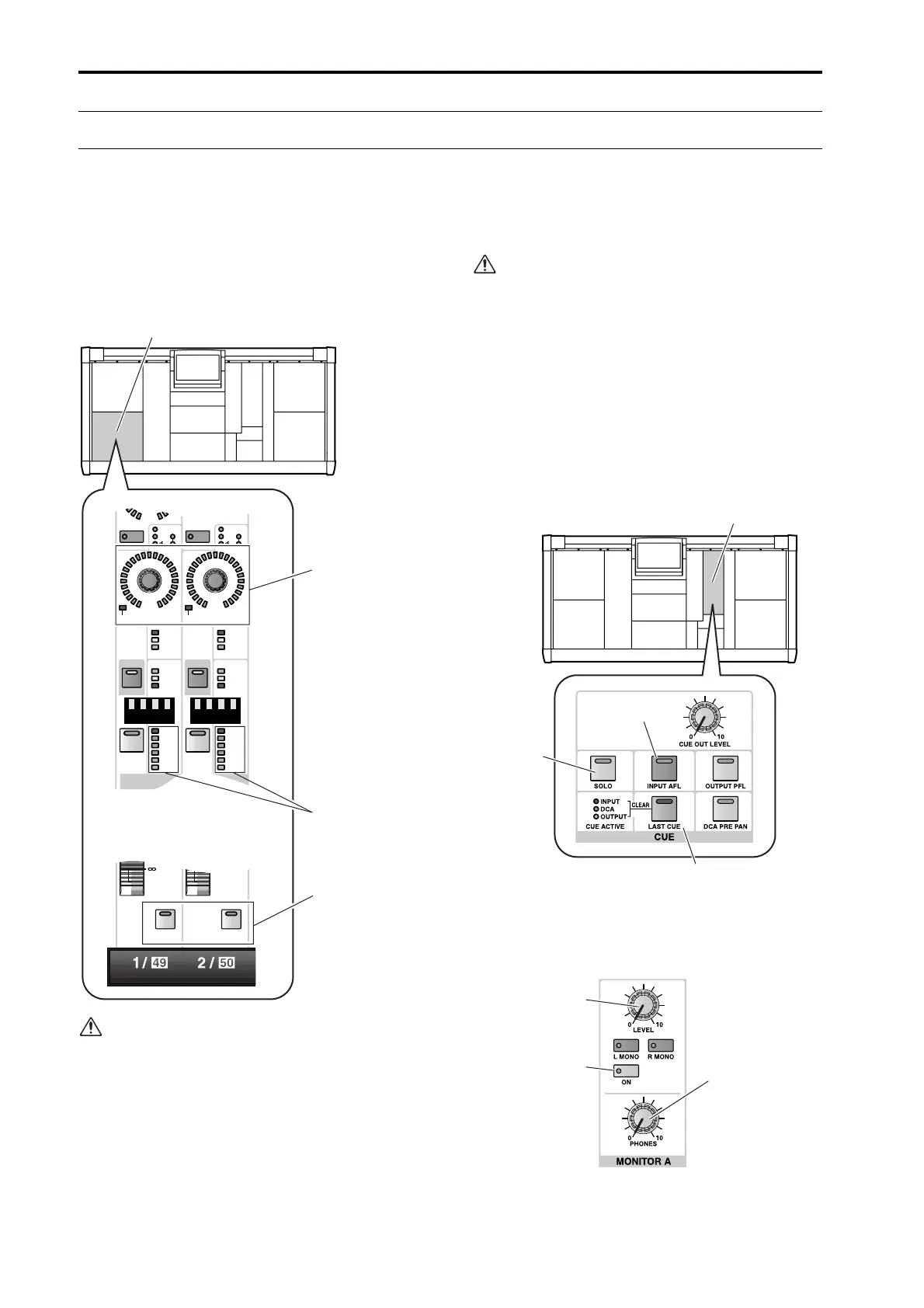
1. Play back the input source, and check that the
meter LEDs light for input channels 1/49 and 2/50
in INPUT block 1 of the console.
If the input source is connected to a mic/line input
card (LMY2-ML), adjust the [GAIN] encoder so
that the CLIP segment of the meter LED does not
light.
2. Press the [CUE] switches of input channels 1/49
and 2/50 to make the switch LEDs light.
The input signals of input channels 1/2 will be sent to
the monitoring bus (CUE bus).
In the CUE section of the MASTER block, make
sure that the [SOLO] switch, the [INPUT AFL]
switch, and the [LAST CUE] switch are off (LED
dark). If any of these switches are on, it may not be
possible to monitor the signal from the MONITOR
OUT A jacks or the MONITOR A headphone jack
even though the [CUE] switch of the input channel
is pressed.
Monitoring will also be impossible if the CUE
INTERRUPTION button has been turned off in the
MON/CUE function MONITOR A screen. Please
check whether this button has been turned off.
(“CS1D Reference Manual (Software)” →p.71.)
3. In the MONITOR A section of the MASTER block,
turn on the MONITOR A [ON] switch and raise the
MONITOR A [LEVEL] volume to an appropriate
level. Also raise the volume of your monitor system.
PAN
TO ST
CLIP
R
+48V
INPUT
INS A
B
L
GAIN
SEL
-68
+
THR
-
COMP
+
THR
-
CLIP
6
12
18
30
60
GATE
+10
PAN
TO ST
CLIP
R
+48V
INPUT
INS A
B
L
GAIN
SEL
-68
+
THR
-
COMP
+
THR
-
GATE
+10
CLIP
6
12
18
30
60
ONON
INPUT block 1
[CUE] switch
Meter LEDs for
input channels 1/49
and 2/50
[GAIN] encoder
MASTER block
[LAST CUE] switch
[INPUT AFL]
switch
[SOLO]
switch
MONITOR A
PHONES [LEVEL]
volume
MONITOR A
[ON] switch
MONITOR A
[LEVEL] volume



 To Next Page