CS1D Operating Manual (Basic Operation)
98
Controlling a mute group
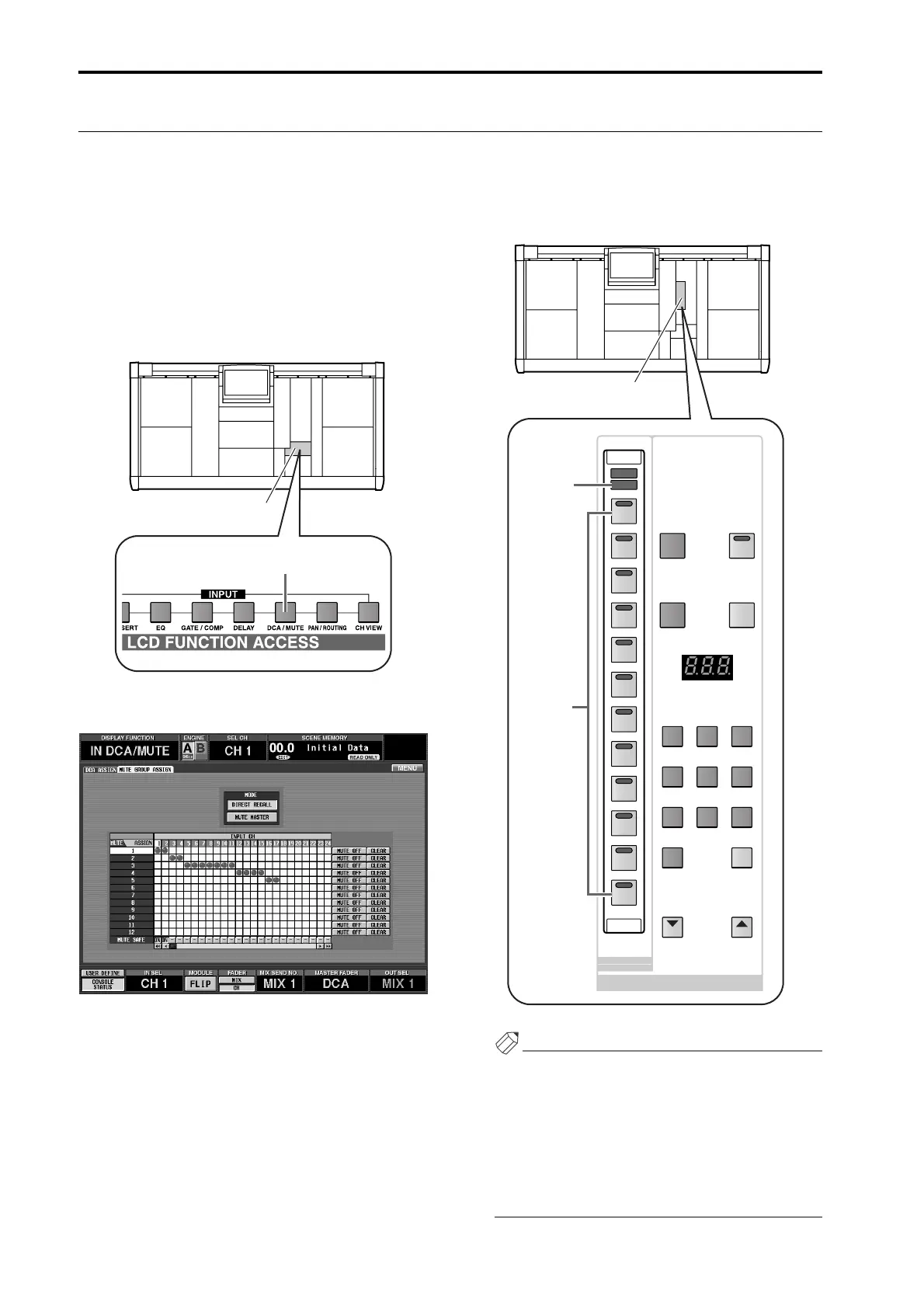
By using the SCENE MEMORY [1]–[12] switches in the SCENE MEMORY block of the console, you can switch muting
on/off for mute groups 1–12.
[Procedure]
1. Assign input channels/output channels to mute
groups 1–12.
2. In the LCD FUNCTION ACCESS block, press the
INPUT [DCA/MUTE] switch several times to
access the MUTE GROUP ASSIGN screen (IN DCA/
MUTE function).
• MUTE GROUP ASSIGN screen (IN DCA/MUTE
function)
3. In the MODE section, click the MUTE MASTER
button to turn it on.
The SCENE MEMORY [MUTE] LED in the SCENE
MEMORY block of the console will light. In this
state, the SCENE MEMORY [1]–[12] switches of the
console will function as MUTE MASTER buttons to
switch muting on/off for mute groups 1–12.
Hint
In the initial state of the PM1D system, the SCENE
MEMORY [1]–[12] will function as DIRECT
RECALL switches that recall specific scenes.
The function of the SCENE MEMORY [1]–[12]
switches can also be selected in the OUT DCA/
MUTE function MUTE GROUP ASSIGN screen, or
in the SCENE MEMORY function DIRECT RECALL
screen.
LCD FUNCTION ACCESS
block
INPUT [DCA/MUTE] switch
STORE
SCENE NUMBER
PREVIEW
RECALL
RECALL
UNDO
SCENE MEMORY
DEC INC
12
11
10
9
8
7
789
456
123
0
CLEAR
6
5
4
3
2
1
MUTE
RECALL
MUTE MASTER
DIRECT RECALL
SCENE MEMORY block
SCENE
MEMORY
[MUTE] LED
SCENE
MEMORY
[1]–[12]
switches



 To Next Page