Input functions
152
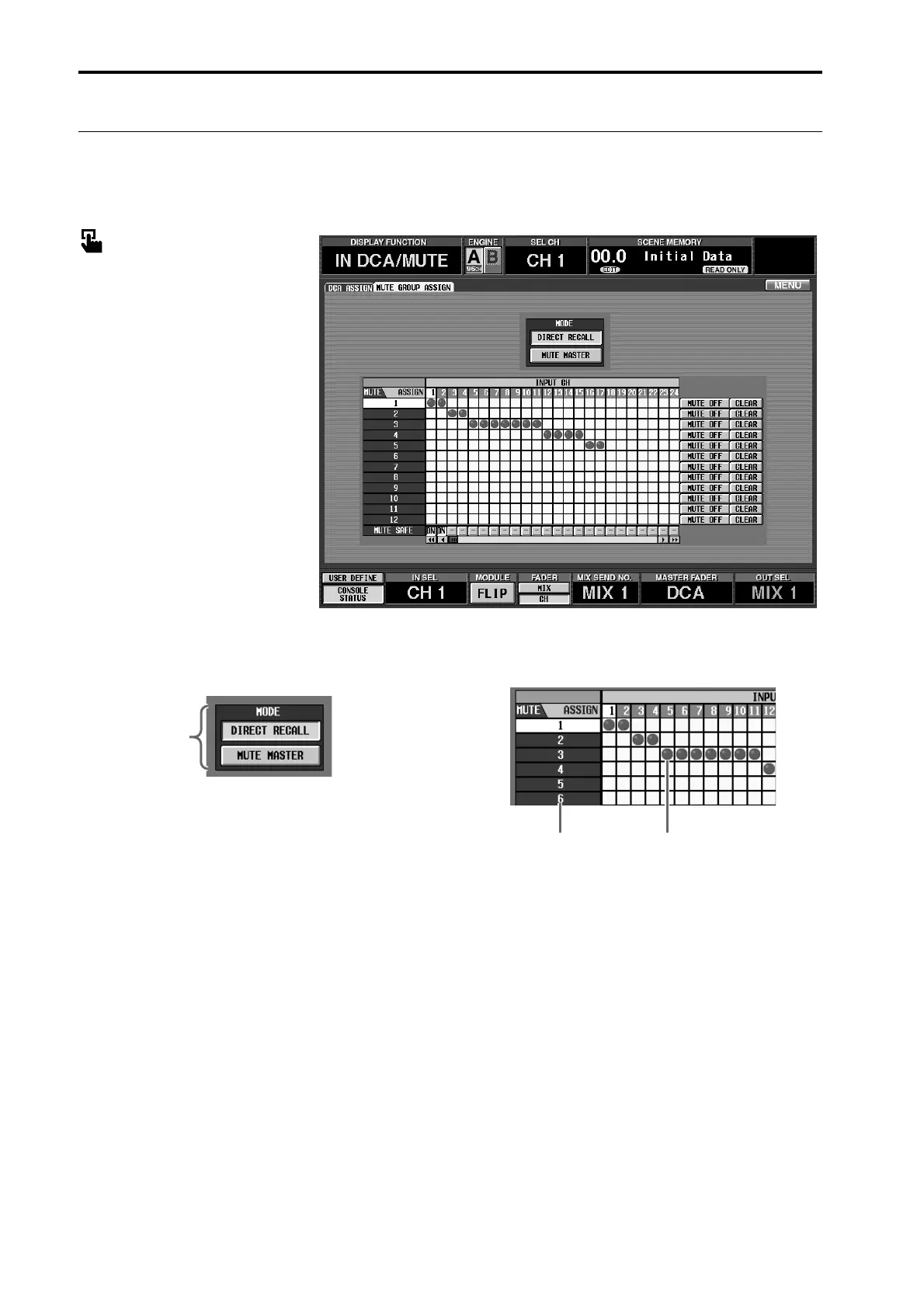
MUTE GROUP ASSIGN
[Functions]
Assign input channels to mute groups 1–12.
■ Console
In the LCD FUNCTION ACCESS
block, press the INPUT [DCA/
MUTE] switch (Press repeatedly
until the screen shown at the right
appears.)
■ Display
MENU button → INPUT DCA/
MUTE button → MUTE GROUP
ASSIGN tab
[Screen functions]
1 MODE
Select one of the following two choices as the func-
tion of the SCENE MEMORY [1]–[12] switches in
the console’s SCENE MEMORY block).
This is linked with the MODE button located in the
OUT DCA/MUTE function MUTE GROUP
ASSIGN screen, and also with the MODE button
located in the SCENE function DIRECT RECALL
screen.
• DIRECT RECALL
The SCENE MEMORY[1]–[12] switches can be used
to directly recall the scenes assigned to direct recall
numbers 1–12. (For details on assigning a scene to a
direct recall number, →p.28.)
• MUTE MASTER
The SCENE MEMORY [1]–[12] switches can be
used to switch muting on/off for mute groups 1–12.
2 MUTE
These are the mute group numbers. The mute group
corresponding to the grid location of the cursor will
be highlighted.
3 Grid
In this grid you can assign input channels (horizon-
tal rows) to mute groups (vertical columns). Move
the cursor to the desired grid location, and press the
[ENTER] switch (or click) to set/cancel the assign-
ment. It is possible to assign a single input channel to
two or more mute groups. To access channels that are
not currently displayed, use the horizontal scroll bar.
1
2 3



 To Next Page