Global functions
62
MON/CUE (monitor/cue) functions
Make settings related to monitor and cue
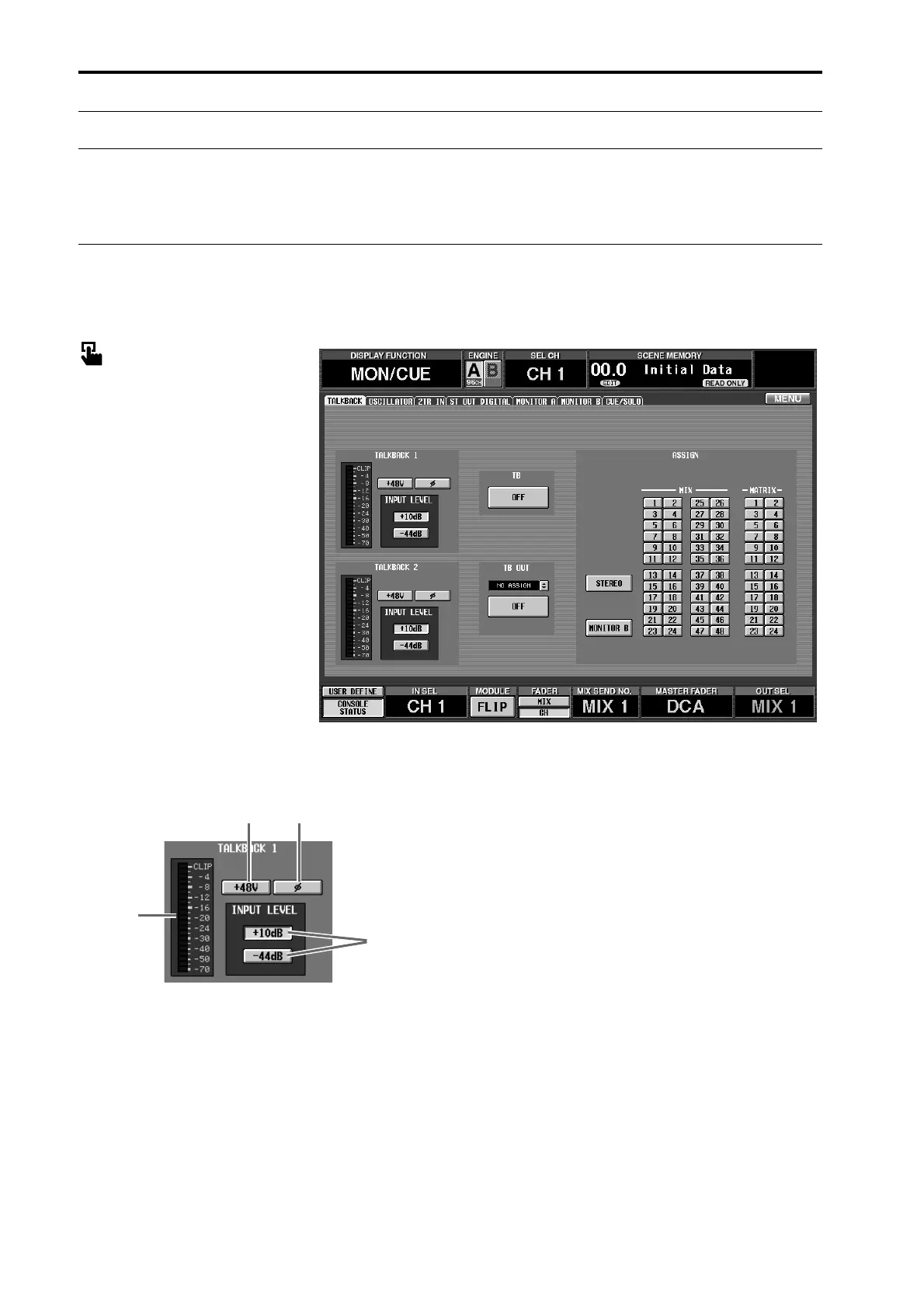
TALKBACK
[Function]
Switch talkback on/off, and select its assignment destination
■ Console
In the LCD FUNCTION ACCESS
block, press the [MON/CUE] switch
(press repeatedly until the screen
shown at the right appears)
■ Display
MENU button → MON/CUE but-
ton → TALKBACK tab
[Screen functions]
1 Level meter
This level meter indicates the peak level of the signals
that are input from the TALKBACK 1 jack located on
the CS1D top panel and from the TALKBACK 2 jack
located on the rear panel.
2 +48V (phantom power)
This button turns phantom power on/off for the
TALKBACK 1/TALKBACK 2 jacks. (When on, the
TALKBACK [+48V] LED located on CS1D top panel
will light.)
3 ø (phase)
This button switches the phase of the TALKBACK 1/
TALKBACK 2 jacks between normal/inverted.
4 INPUT LEVEL
This button selects the input level of the TALKBACK
1/TALKBACK 2 jacks.
Levels of +10 dB and –44 dB are supported.
When the +10 dB button is on, the TALKBACK [+10
dB] LED located on the CS1D top panel will light.
2 3
4
1



 To Next Page