Libraries
170
UNIT LIBRARY
[Function]
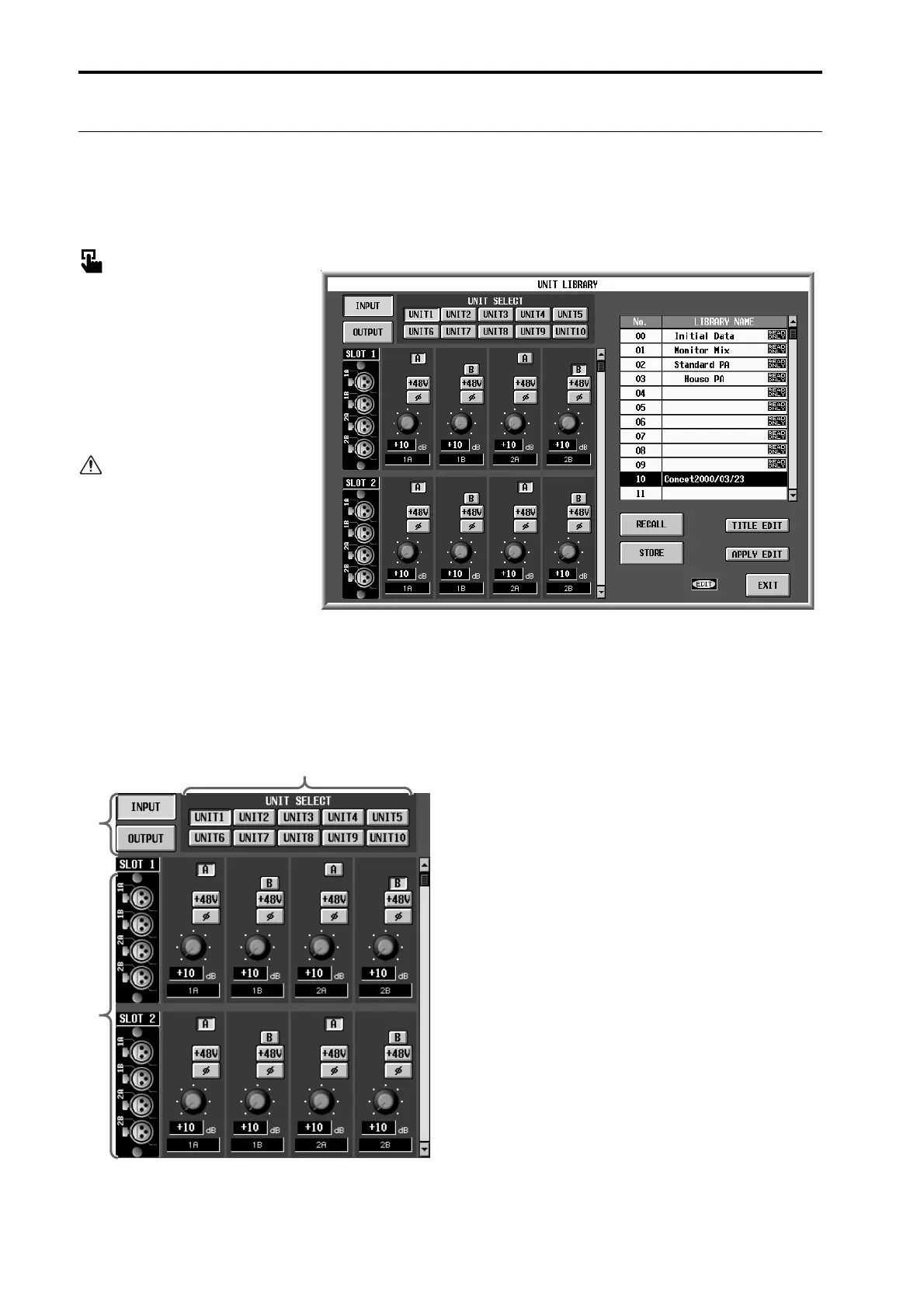
Here you can store and recall the settings (unit data) of all input/output units included in the PM1D system.
Here you can also view and edit the connection state and settings of the input/output units.
■
Display
MENU
button
→
IN HA/INSERT
button
→
ST IN INS/UNIT LIB
tab
→
UNIT LIBRARY
button
MENU
button
→
OUT INSERT
button
→
ST MAS INS/UNIT LIB
tab
→
UNIT LIBRARY
button
The unit data that is saved in
the Unit library contains set-
tings for both input units and
output units.
[Screen functions]
The screen shown above is for when the library is
accessed from the IN HA/INSERT function.
1
UNIT SELECT
For the input unit data that is currently selected in
the library list
4
, these buttons select the type of
input/output unit that is to be displayed/edited.
The settings of the units you select here will be dis-
played in the edit section
2
.
2
Edit section
This displays a list of settings for each card of the
units you selected in
1
. You can use the buttons and
knobs to edit the settings.
Use the right scroll bars to access cards that are not
currently displayed.
3
Input/output selection
Select whether the input unit (INPUT button) or the
output unit (OUTPUT button) settings will be dis-
played in
2
.
1
2
3


 To Next Page