EFFECTGEQSCENEMIDI/GPI/TCUTILITY
SYS/W.CLOCK
METERMON/CUE
MON/CUE (monitor/cue) functions
67
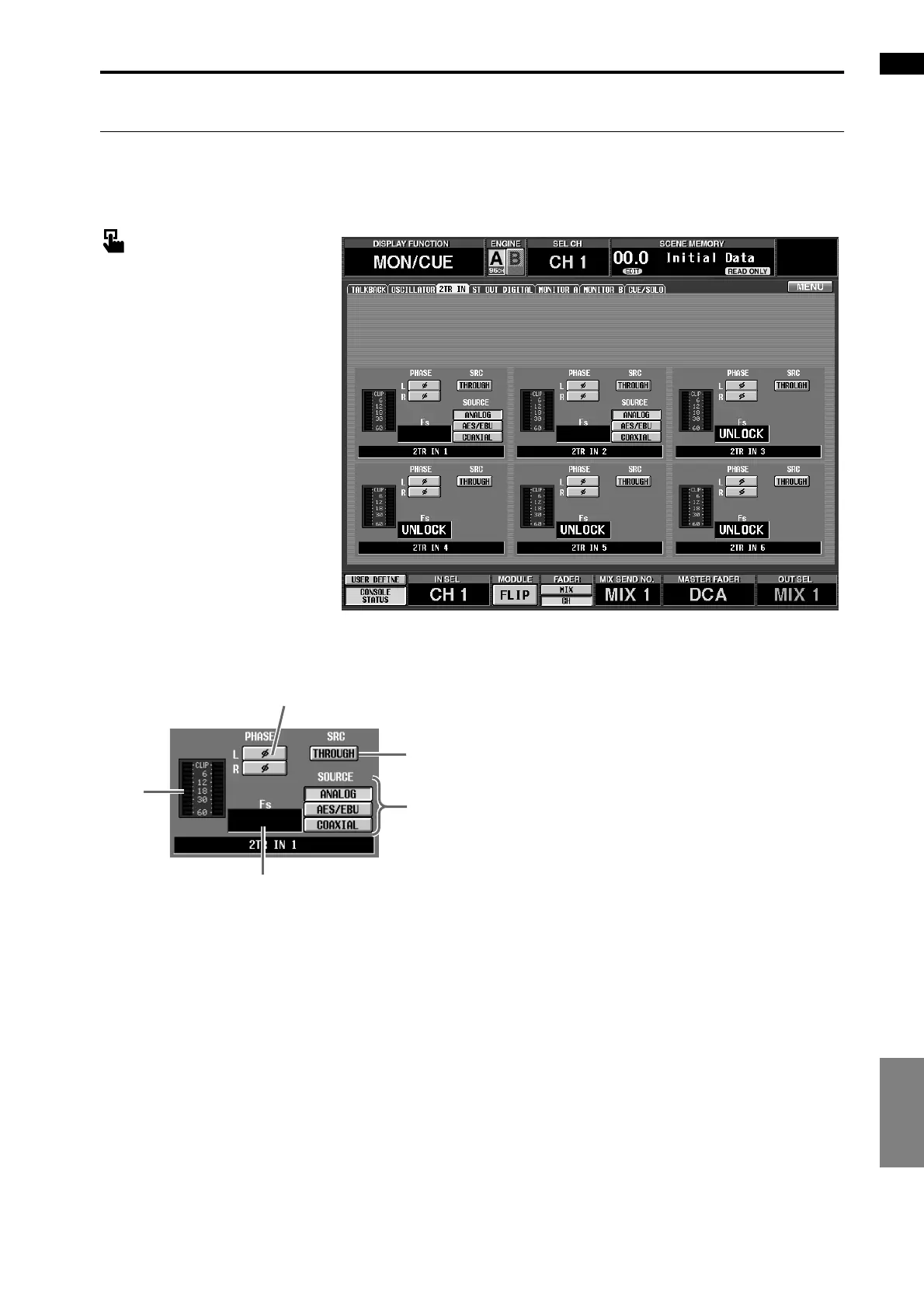
2TR IN (2 track in)
[Function]
Make settings for the 2-TRACK IN jacks of the CS1D.
■ Console
In the LCD FUNCTION ACCESS
block, press the [MON/CUE] switch
(press repeatedly until the screen
shown at the right appears)
■ Display
MENU button → MON/CUE but-
ton → 2TR IN tab
[Screen functions]
1 Level meter
This level meter shows the input level from the corre-
sponding 2-TRACK IN jack.
2 PHASE
This button switches the input signal of the corre-
sponding 2-TRACK IN jack between normal/
inverted phase. This can be set independently for L
and R.
3 SRC (sample rate converter)
This is an on/off switch for the sample rate converter
provided on each 2-TRACK IN jack.
This will be displayed as “ON” when the converter is
being used, or “THROUGH” when it is not being
used. This SRC button cannot be operated if 2-
TRACK IN connector 3 is selected as the word clock
master.
4 Fs (sampling frequency)
This indicates the sampling frequency of the signal
that is input from the corresponding 2-TRACK IN
jack.
5 SOURCE (2TR IN 1/2 only)
These buttons select the input jack that will be used
for 2TR IN 1/2.
The following input jacks correspond to each button.
• ANALOG............ 2-TRACK IN ANALOG L/R
jacks
• AES/EBU............ 2-TRACK IN DIGITAL AES/
EBU jacks
• COAXIAL........... 2-TRACK IN DIGITAL COAX-
IAL jacks
2
5
3
1
4



 To Next Page