118
Input functions
IN PATCH functions
Assign input/output units to input channels/insert I/O/direct out
INPUT PATCH
[Function]
Patch the input jacks of the input units, 2TR IN jacks, effect returns, and talkback to the desired input channel
(monaural/stereo).
■ Console
In the LCD FUNCTION ACCESS
block, press the INPUT [PATCH]
switch (press repeatedly until the
screen shown at the right appears)
■ Display
MENU button → INPUT PATCH
button → INPUT PATCH tab
[Screen functions]
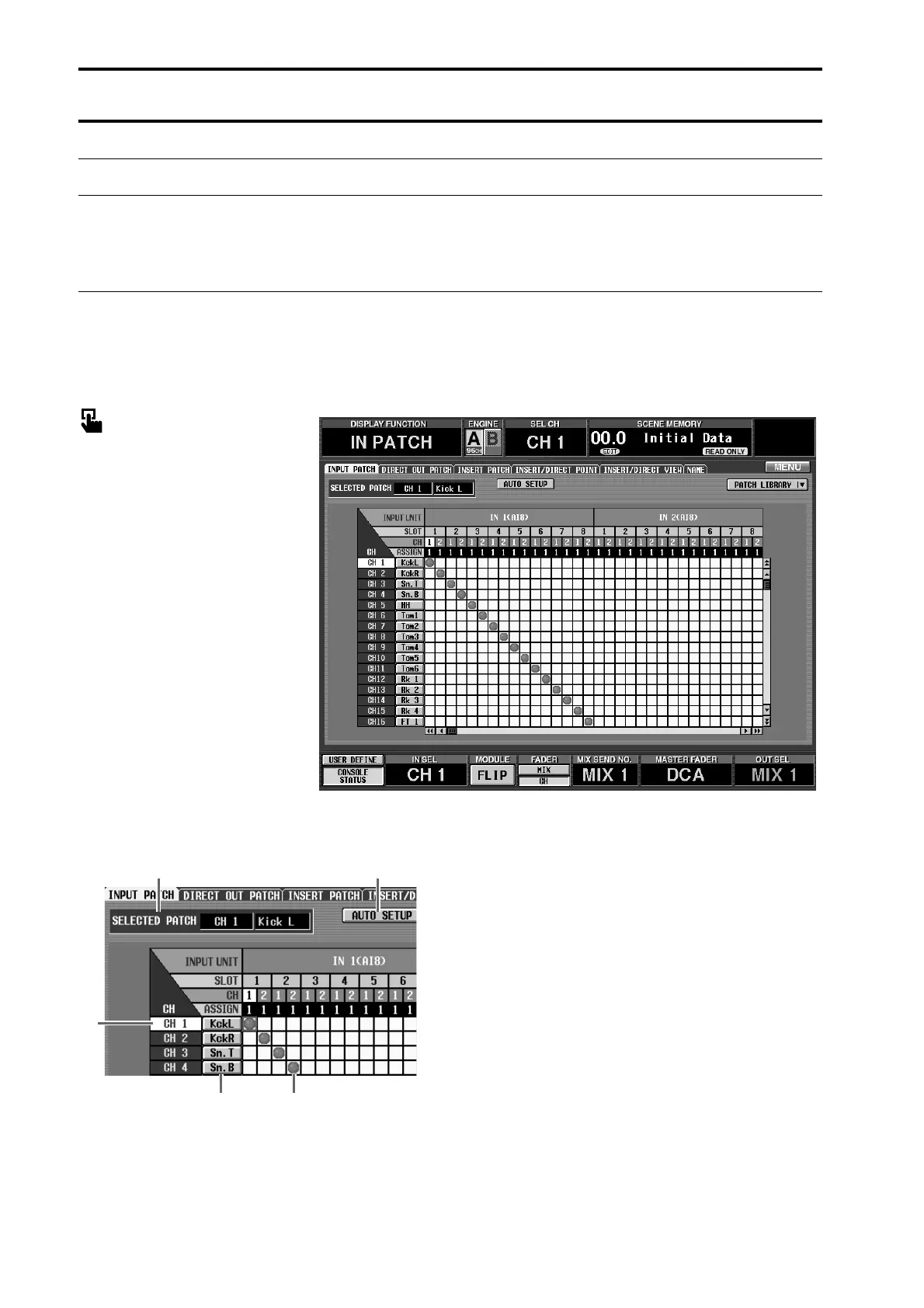
1 CH (input channel)
This is the number of the patch destination input
channel.
The channel number of the grid where the cursor is
currently located will be highlighted.
2 Short name
The short name assigned to each input channel is
displayed here. You can also click this area to assign a
short name/long name.
3 SELECTED PATCH (currently selected patch)
This shows the input channel number/long name for
the grid location of the cursor.
4 Grid
This grid allows input jacks (horizontal lines) to be
patched to input channels (vertical columns). Cur-
rently-patched grids are indicated by a ● symbol.
Move the cursor to the desired grid, and press the
[ENTER] switch (or click) to set/cancel the patch.
1
2
4
3 5



 To Next Page