Output functions
114
OUT CH VIEW (output channel view) function
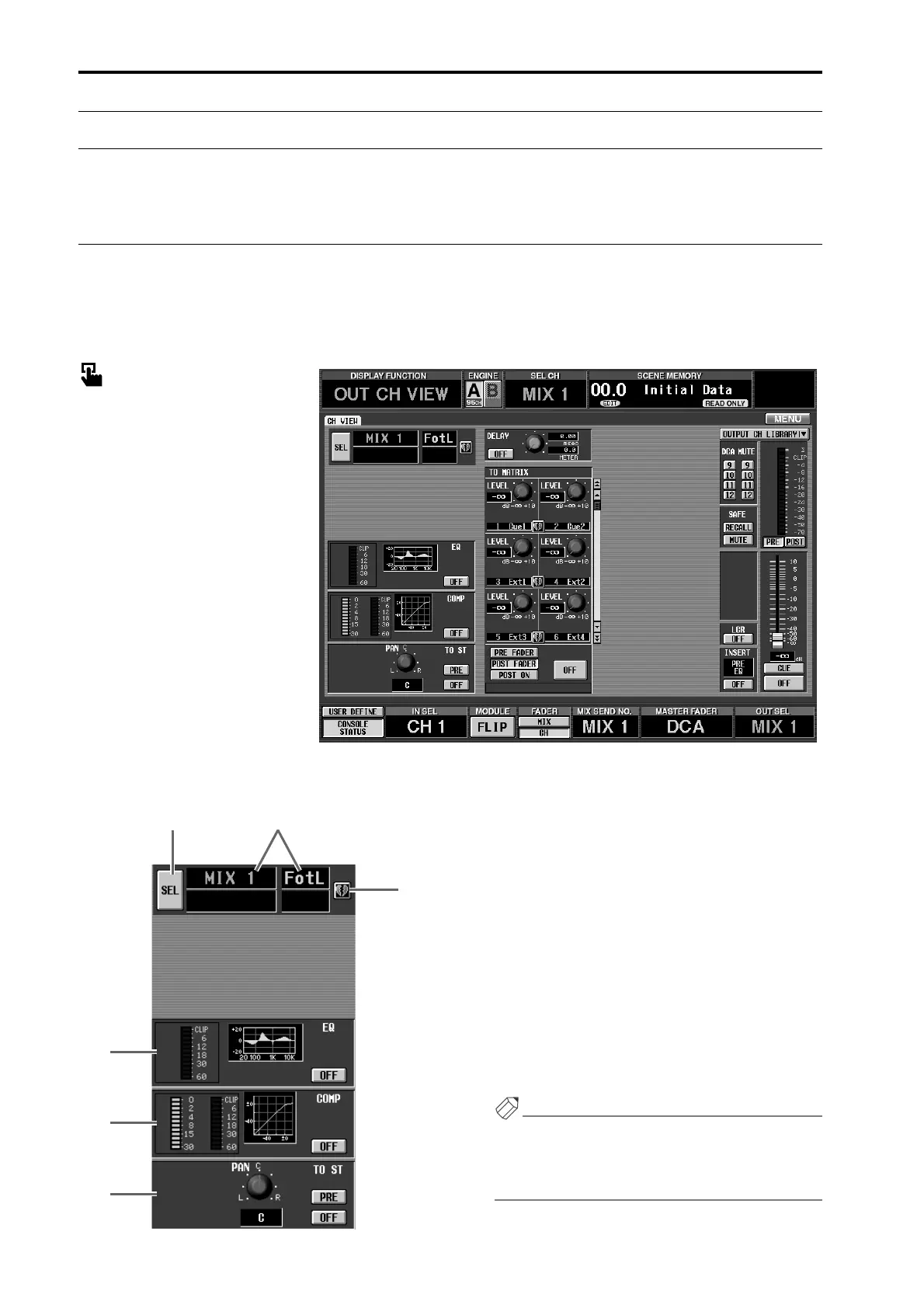
View output channel settings
CH VIEW (channel view)
[Function]
View the settings of the currently selected MIX channel, MATRIX channel, or STEREO A/B channel. In this
screen you can also modify the parameter settings, or access individual screens.
■ Console
In the LCD FUNCTION ACCESS
block, press the OUTPUT [CH
VIEW] switch
■ Display
MENU button → OUTPUT CH
VIEW button
[Screen functions]
1 SEL (channel select)
Use this button to select the channel whose settings
you wish to view.
When you click this button, the CH SELECT popup
window will appear.
2 Channel number/name
This displays the number and short name of the cur-
rently selected channel.
3 Pairing
This displays the pairing status of the currently
selected channel.
You can also click the heart symbol to set/defeat pair-
ing.
Hint
If a paired MIX/MATRIX channel or the STEREO A/
B channel is selected, parameters for both channels
will be displayed in this one screen. See the following
diagram.
1
4
5
6
3
2



 To Next Page