Chapter 10. Monitor
117
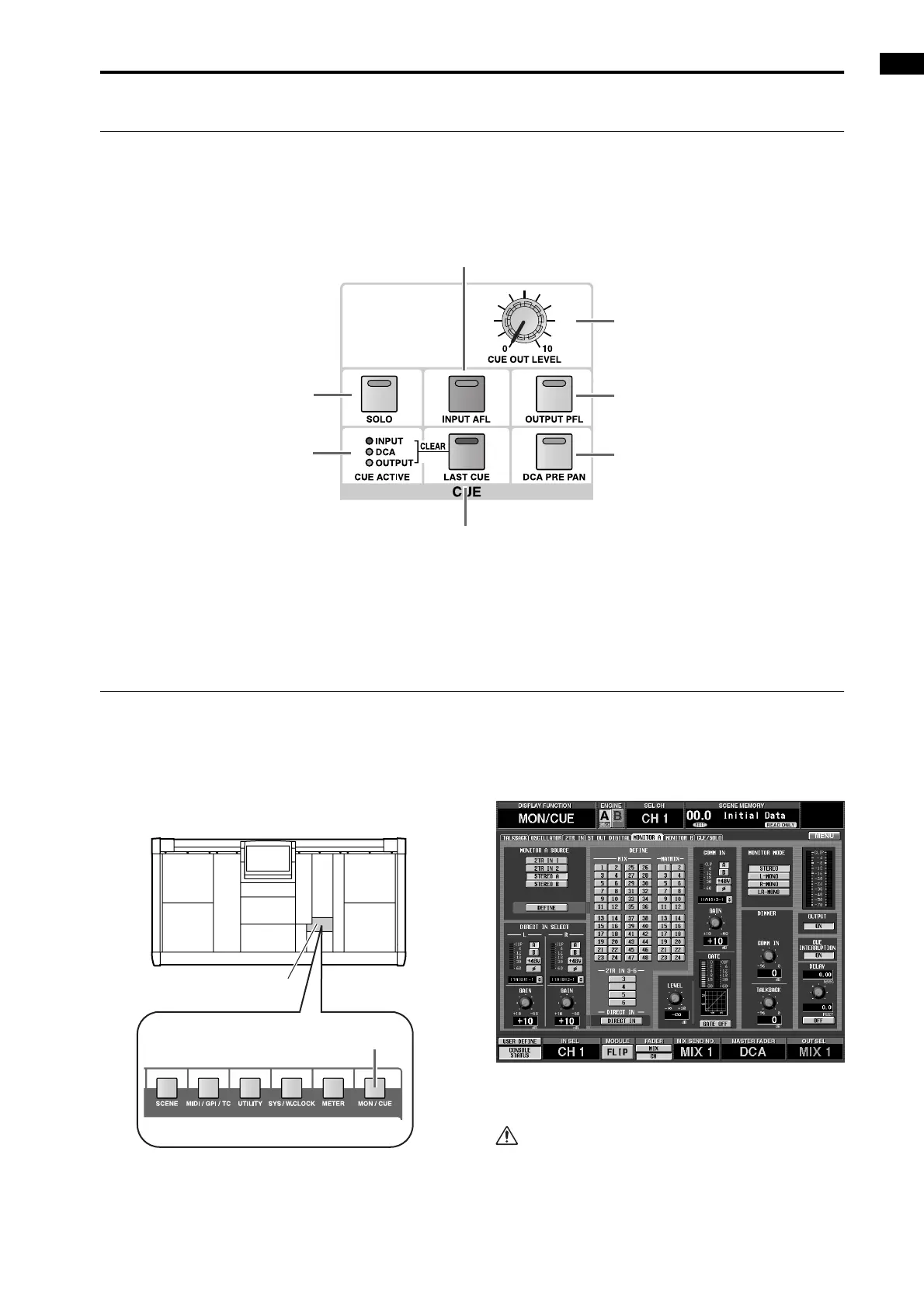
Controls and functions of the CUE section
Operations for the Cue/Solo function are performed in the CUE section of the MASTER block or in the display (MON/
CUE function CUE/SOLO screen). The controls and functions of the CUE section are explained below.
Using the Cue function
Here’s how to use the [CUE] switch of the desired channel/DCA group to monitor the cue signal.
[Procedure]
1. In the LCD FUNCTION ACCESS block, press the
[MON/CUE] switch several times to access the fol-
lowing MONITOR A screen.
• MONITOR A screen (MON/CUE function)
2. Make sure that the CUE INTERRUPTION button
located at the right edge of the screen is turned on.
The CUE INTERRUPTION button is an on/off
switch for the interrupt from the cue signal of the
[CUE] switch. Be aware that if this button is off,
pressing a [CUE] switch will not affect MONITOR
OUT jacks A.
[CUE OUT LEVEL] volume
This knob sets the output level of the
signal output from the CUE OUT jacks.
[OUTPUT PFL] switch and LED
This selects the location in the signal
route at which the signal will be moni-
tored when you press the [CUE] switch of
an output channel (MIX channel, MATRIX
channel, STEREO A/B channel).
[DCA PRE PAN] switch and LED
This switch selects the location in the
signal route at which the signal will be
monitored when a [CUE] switch in the
DCA GROUP block is used to monitor
a DCA group to which input channels
are assigned.
[LAST CUE] switch and LED
This switch selects either LAST CUE mode
(LED lit) or MIX CUE mode (LED dark) as
the operation when the [CUE] switch is
pressed for two or more channels.
CUE ACTIVE [INPUT]/[DCA]/[OUT-
PUT] LEDs
These LEDs indicate the monitoring
status. If even one [CUE] switch is
currently on, the LED for its group will
light.
[SOLO] switch and LED
This selects either CUE mode (LED
dark) or SOLO mode (LED blinks) as
the monitoring method for the [CUE]
switches. Press and hold this switch
more than 2 seconds to set the SOLO
mode
[INPUT AFL] switch and LED
This switch selects the output location of the signal that is
sent to the CUE bus when a [CUE] switch of an input
channel (input channel, ST IN channel) is pressed.
LCD FUNCTION ACCESS
block
[MON/CUE] switch



 To Next Page